QUICK REFERENCE IFD550
avidyne.com | 800.AVIDYNE
3
2
1
2
3
4
5
6
7
8
9
10
11
12
13
14
15
16
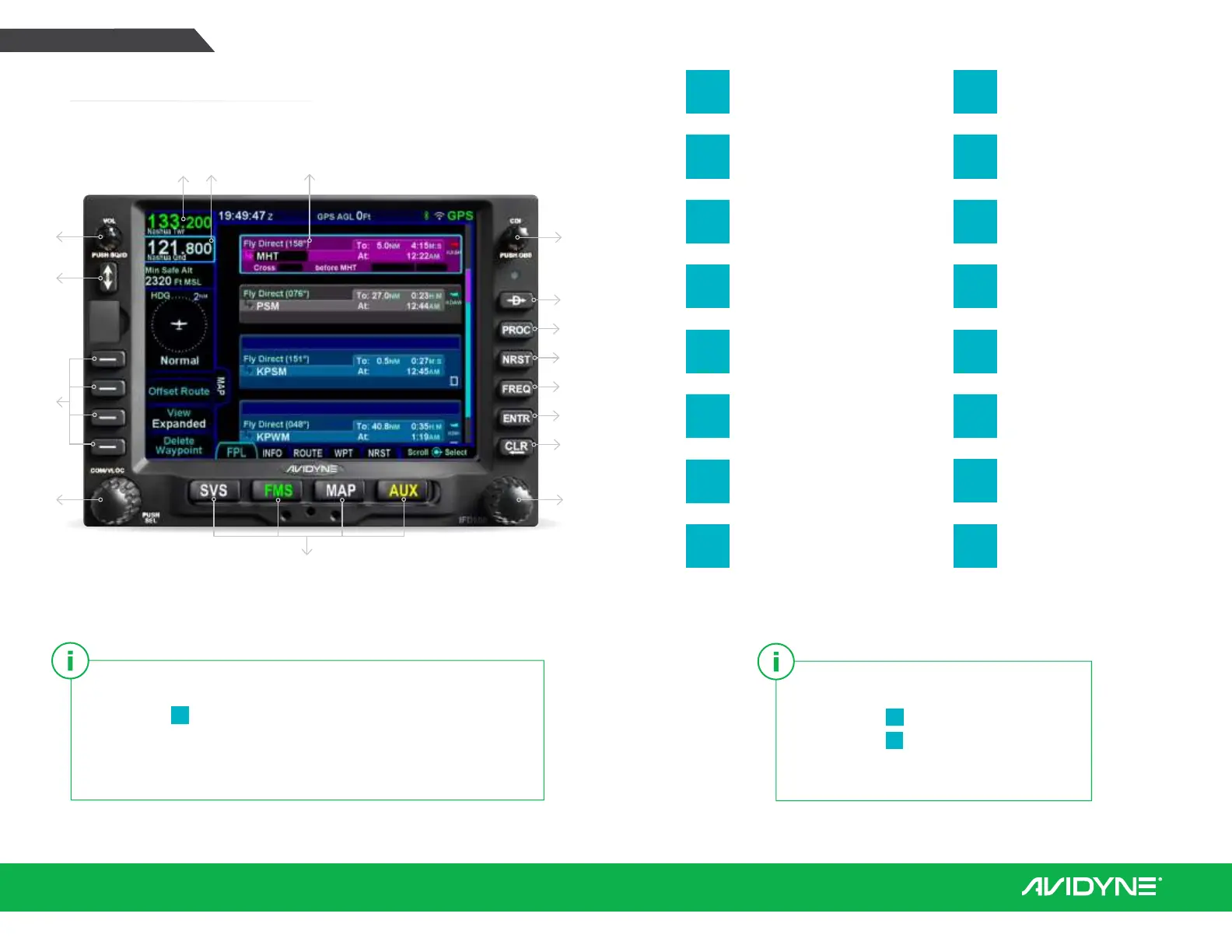
Volume/Power/
Squelch Knob
CDI Nav Source
Active Waypoint
Standby Frequency
Active Frequency
Frequency Swap
(flip-flop)
Direct To
Procedure
Nearest
Frequency
Enter (select)
Clear (delete)
FMS Knob (context-
sensitive: scroll, zoom/
push to select)
Line Select Keys
(LSK)
COM/NAV Manual
Tuning Knob (Push for
NAV & Transponder)
Page Function Keys
(two-way rocker)
SVS, FMS, MAP, AUX
To start an FMS edit, either:
1. Press the
8
ENTR function key,
2. Push the
6
bottom right knob, or
3. Tap the screen in the same field twice.
To move your cursor, either:
1. Turn the
6
FMS knob (the outer ring scrolls through each box,
whereas the inner ring scrolls through the fields of each box), or
2. Utilize hybrid touch by tapping the screen on a waypoint
or in the blank space between waypoints.
Overview Diagram
1
13
141516
6
12
11
10
9
8
7
2
4
5
3


 To Next Page
 Loading...







