Page 6
1. Once all connections have been made, plug the provided plug-in transformer into a battery backed up
110vac power supply then turn on 110vac power. Once power is applied, the power LED will turn on.
2. After approximately 3 to 5 minutes and unit has fully booted, LEDs on unit should be illuminated as follows:
+ POWER – Solid Green
+ STATUS – Flashing Green
+ INTERNET – Solid Green
+ TEL IN – Solid Red
+ CAR PHONE – Yellow to start, once unit is accepted in setup, LED should change to green
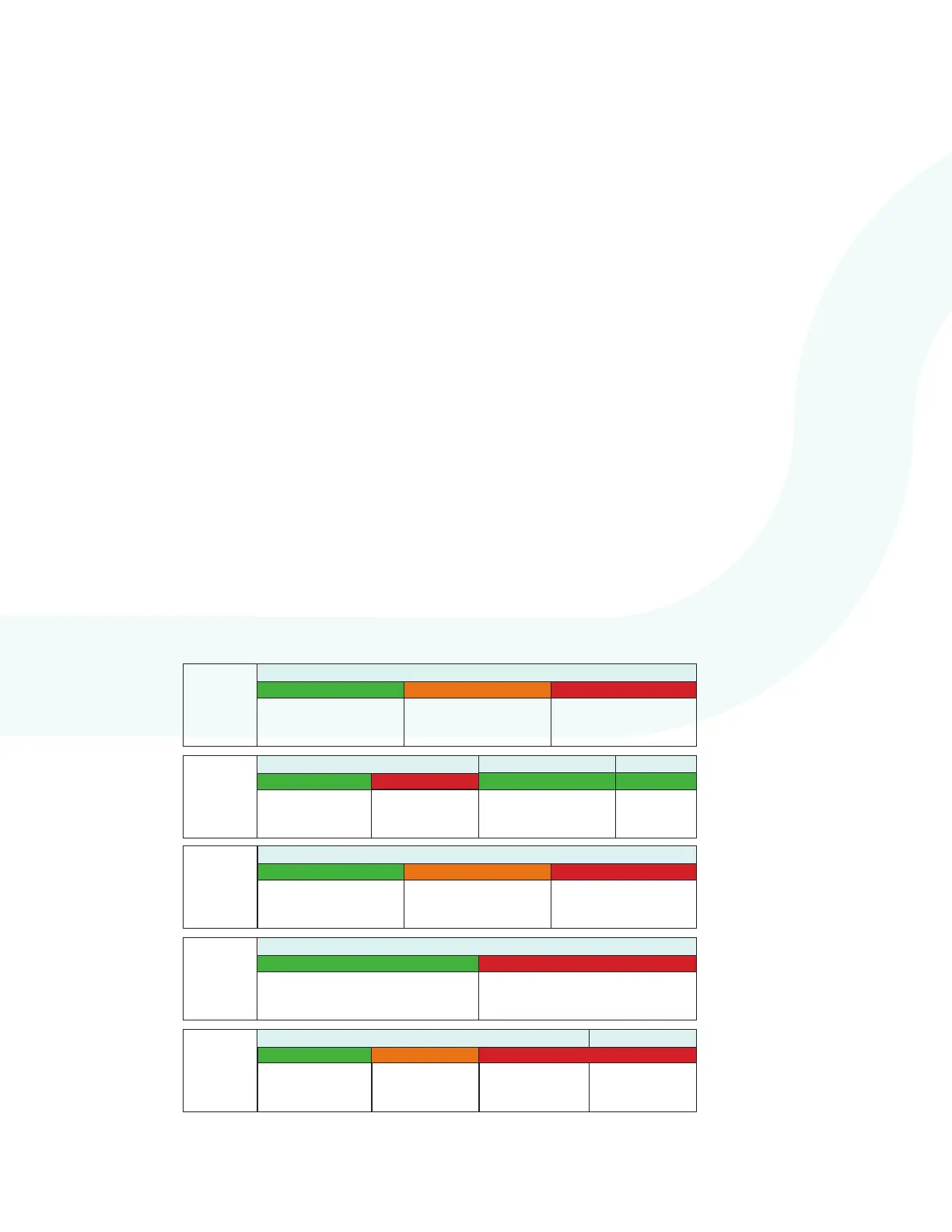
*If LEDs don’t show correct state see chart below for detailed LED overview.
3. When power is applied to the machine room unit, the screen on the elevator unit should illuminate and start
the boot process. When the boot process is complete, the screen will turn off.
NOTE: If a new rmware has been released in the time period between shipment from the manufacturer and installation,
the elevator unit will show an updating message on the screen. The status LED on the Machine Room unit
will also be cycling between, green, orange, and red. The update needs to be completed before the rest of the
installation can be performed.
4. After elevator unit boots and machine room LEDs are ready, press and hold response buttons (YES/NO
or DOOR OPEN/CLOSED) for 7 seconds. When the screen turns on, verify on the screen next to “SVHub”
the system shows “Connected”. If it does not, the device may have network issues. See page 13 for
troubleshooting.
Powering on System
DO NOT HAVE THE WIFI DONGLE PLUGGED IN WHEN POWERING ON THE SYSTEM
ON
POWER
STATUS
GREEN
ORANGE
RED
PROPER
OPERATION
SYSTEM
UNDER VOLTAGE
SYSTEM
BOOTING
GREEN
RED
CRITICAL
COMPONENT
FAILED CHECKS
TEL IN
ON
FLASHING
PROPER
OPERATION
OFF
INTERNET
ON
GREEN
ORANGE
RED
PROPER
OPERATION
DEVICE CANNOT
REACH INTERNET
ON
GREEN RED
PHONE LINE
DETECTED
NO PHONE LINE
FOUND
CAR
PHONE
GREEN
GREEN
SCRIPT
FAILED
SCRIPT
FAILED
WIFI DONGLE ACTIVE
ORANGE
ON
RED
UNIT NOT
ACCEPTED IN
APP
CAR UNIT NOT
DETECTED
CRITICAL
COMPONENT
FAILED
CAR
PHONE
ONLINE
GREEN
FLASHING
If the STATUS LED is
cycling between green,
orange, and red, it is
updating.


 To Next Page