Page 9
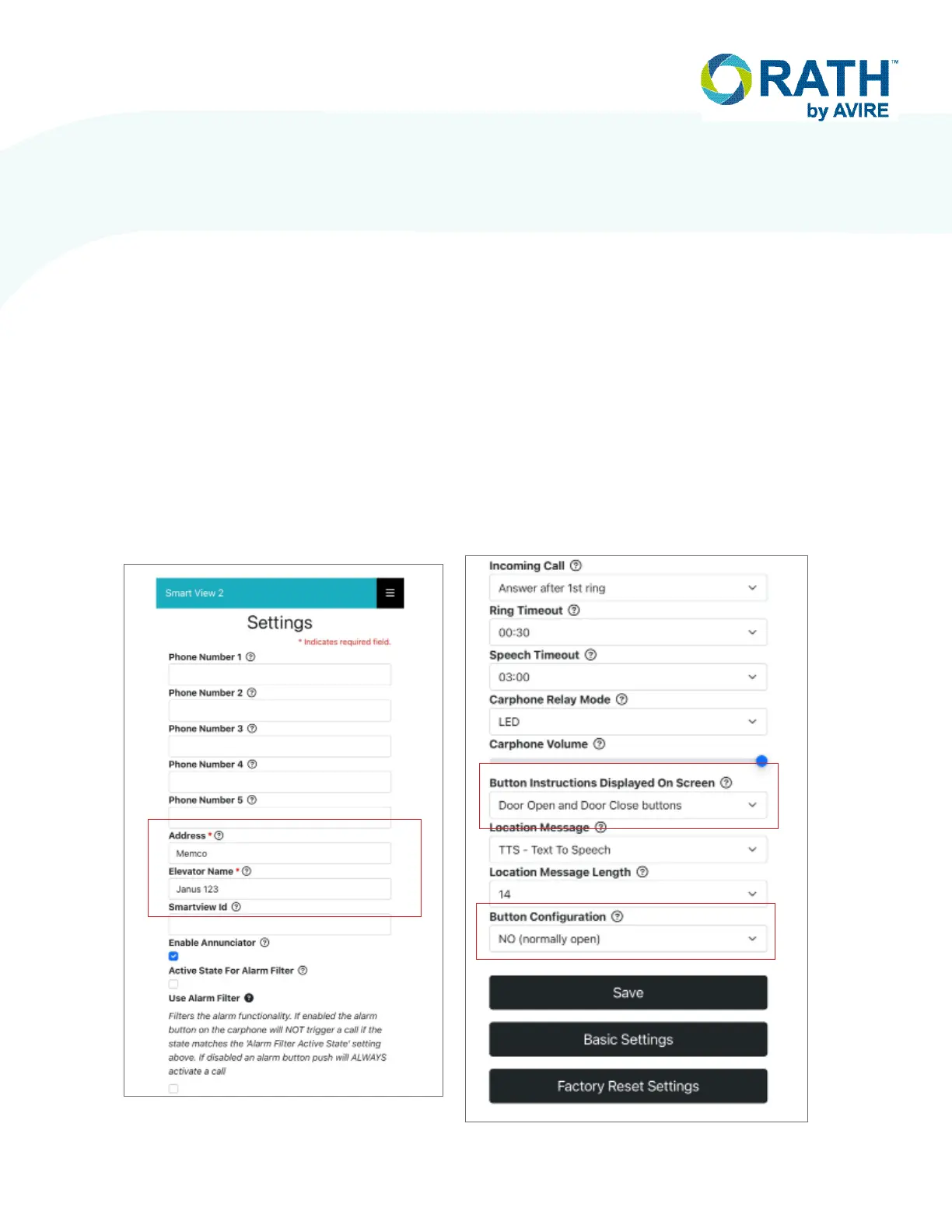
7. Click Advanced Settings at the bottom of the page
8. When the settings page opens, enter the address of the building and the elevator number in the
“Address” and “Elevator Name” eld.
9. If using dedicated Yes / No buttons, click drop down under “Button Instructions” and select correct option
in drop-down menu.
10. If buttons being used with system are normally closed instead of normally open, click drop down under “Button
Conguration” to select desired state.
NOTE: All other settings can remain unchanged as they are only for the RATH 7200 car phone unit with built-in
emergency phone and cannot be used with the 7200M.
11. Click “SAVE” when complete
12. If using the WIFI dongle for programming, disconnect it from the Machine Room unit. If using the local
hardwired connection, disconnect the programming device from the “ETH OUT” port and reconnect the routed
Internet connection. Wait for the Internet LED on the Machine Room unit to change from RED to GREEN
(approximately 30 seconds).
NOTE: Leaving the dongle in the unit may result in a security vulnerability. RATH by AVIRE is not responsible for any
damage caused by a security breach due to the dongle not being removed from the unit.


 To Next Page