13
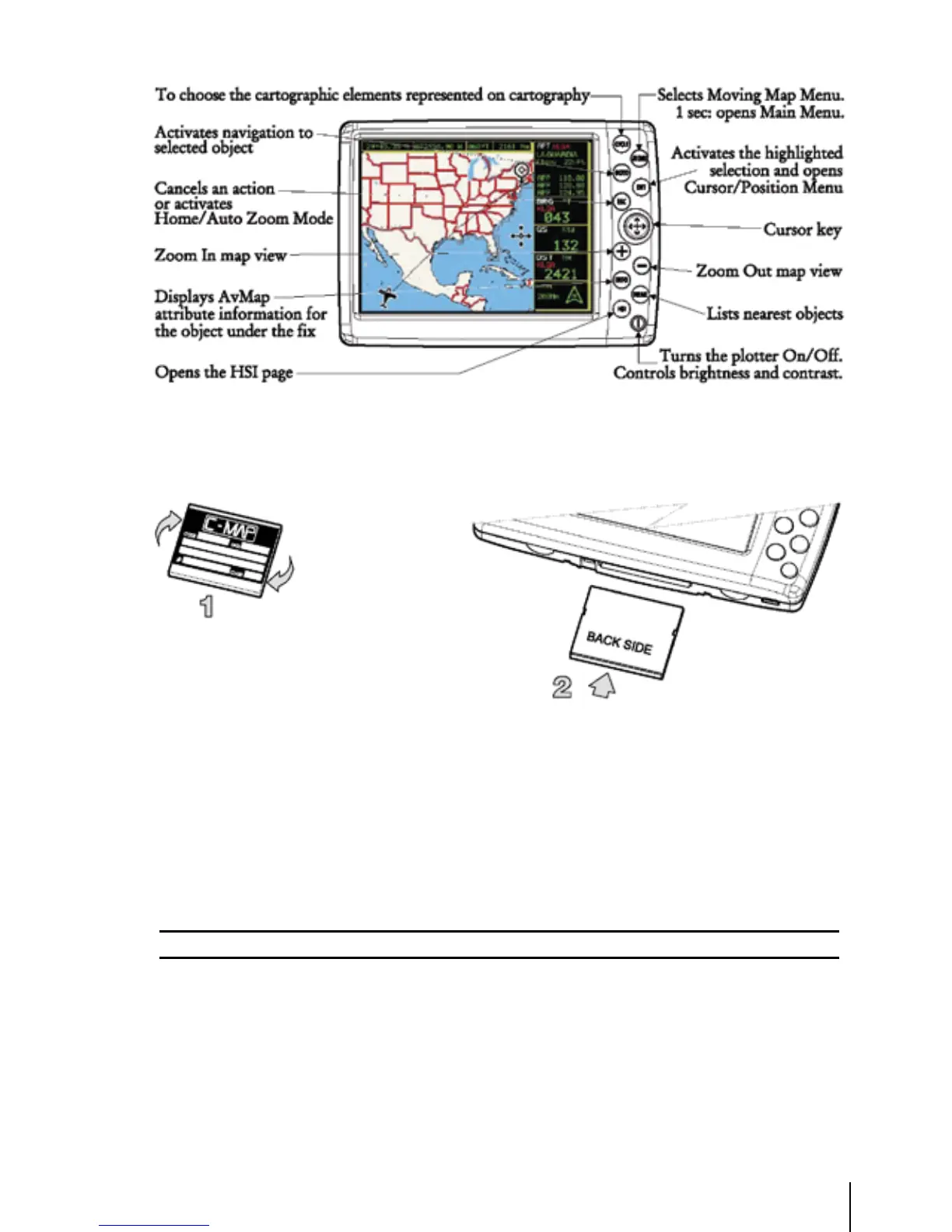
Fig. 1.2 - The GEOPILOT
Fig. 1.2a - How to insert the Compact Flash
1.3 FLYING START
These pages provide a very brief overview of several of the GEOPILOT’s important features, the Main
Menu, the Moving Map, GoTo flights and locating a Waypoint in the Database. It does not replace
the User Manual, which should be read to get the fullest possible use from your GEOPILOT.
Note
The GEOPILOT is an aid to navigation. It does not replace paper charts and good judgement.
1.3.1 The Moving Map
Before starting, connect the GEOPILOT to power and place the antenna with a clear view of the
sky. Turn On the unit pressing ‘POWER’. Press ‘ENT’ to exit from the Warning page and enter the
Moving Map mode. The Moving Map is the default state displaying the Moving Map screen and the
Data Window. The Data Window contains navigation information boxes (See Chapter 3 for details
on Moving Map mode).
Note: If no Fix is available, red dashed cross is displayed over the map for increased Pilot
Awareness.



 To Next Page