Setup
Lock
12
6
Time
Picture Audio
Channel
Picture Mode
Contrast
Brightness
Color
Tint
Sharpness
Color Temp.
Standard
Normal
Move
Select
Exit
MENU
50
50
50
0
50
Setup
Lock
12
6
Time Channel
Sound Mode
Bass
Treble
Balance
Surround
SPDIF Type
Audio Language
Standard
English
Move
Select Exit
MENU
50
50
50
Off
PCM
Picture Audio
Setup
Lock Channel
Sleep Timer
Time Zone
Daylight Saving Time
Move
MENU
Picture
Off
Pacific
Off
12
6
Time
Audio
Select
Exit
Lock
12
6
Time Channel
Menu Language
Transparency
Zoom Mode
Noise Reduction
PC Setup
Close Capation
XVS
Restore Default
English
Select ExitMove
MENU
Picture
Off
Normal
Off
Off
Setup
Audio
Setup
Lock
12
6
Time
Picture Audio
Channel
Change Password
System Lock
US
Canada
Reset RRT
RRT Setting
MENU
Off
Move
Select Exit
Setup
Lock
12
6
Time
Picture Audio
Channel
Air/Cable
Auto Scan
Favorite
Show Hide
Channel Label
Air
Nation System
Europe
Move Select Move
MENU
KOCE
TV Sound System
B/G
LB
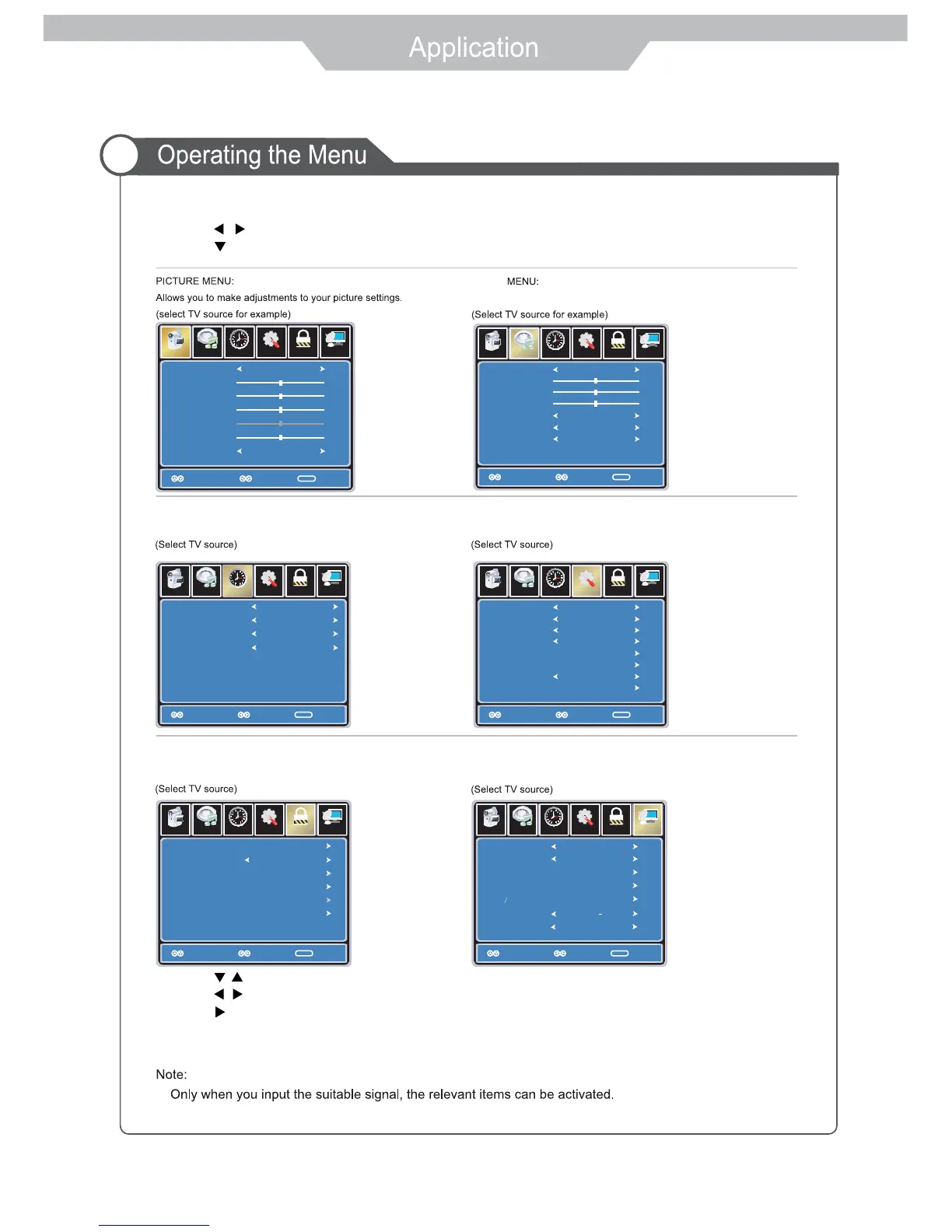
TIME MENU:
Allows you to set up a variety of timer options.
LOCK MENU:
Allows you to set up a variety of lock options.
SETUP MENU:
Allows you to set up a variety of setup options.
CHANNEL MENU:
Allows you to search channels and set up a variety of channel options.
Allows you to customize the aound options and effects.
1. After you turn on the TV and select the input source, you should setup the on-screen menu.
2. Press MENU button to display the on-screen menu.
3. Press / button to select the main menu: PICTURE, AUDIO, TIMER, SETUP, LOCK, CHANNEL.
4. Press button to enter the main menu.
5. Press / button to select the item in the main menu.
6. Press / button to adjust or select;
Press button to enter the submenu.
7. Press EXIT button to exit the menu or press MENU button to go back to the previous menu.
2. You should acrroding to the hints on the bottom of menu.
1.
AUDIO
19
Clock
2009/02/13 08:23AM



 To Next Page