Application
Customizing the LOCK Settings
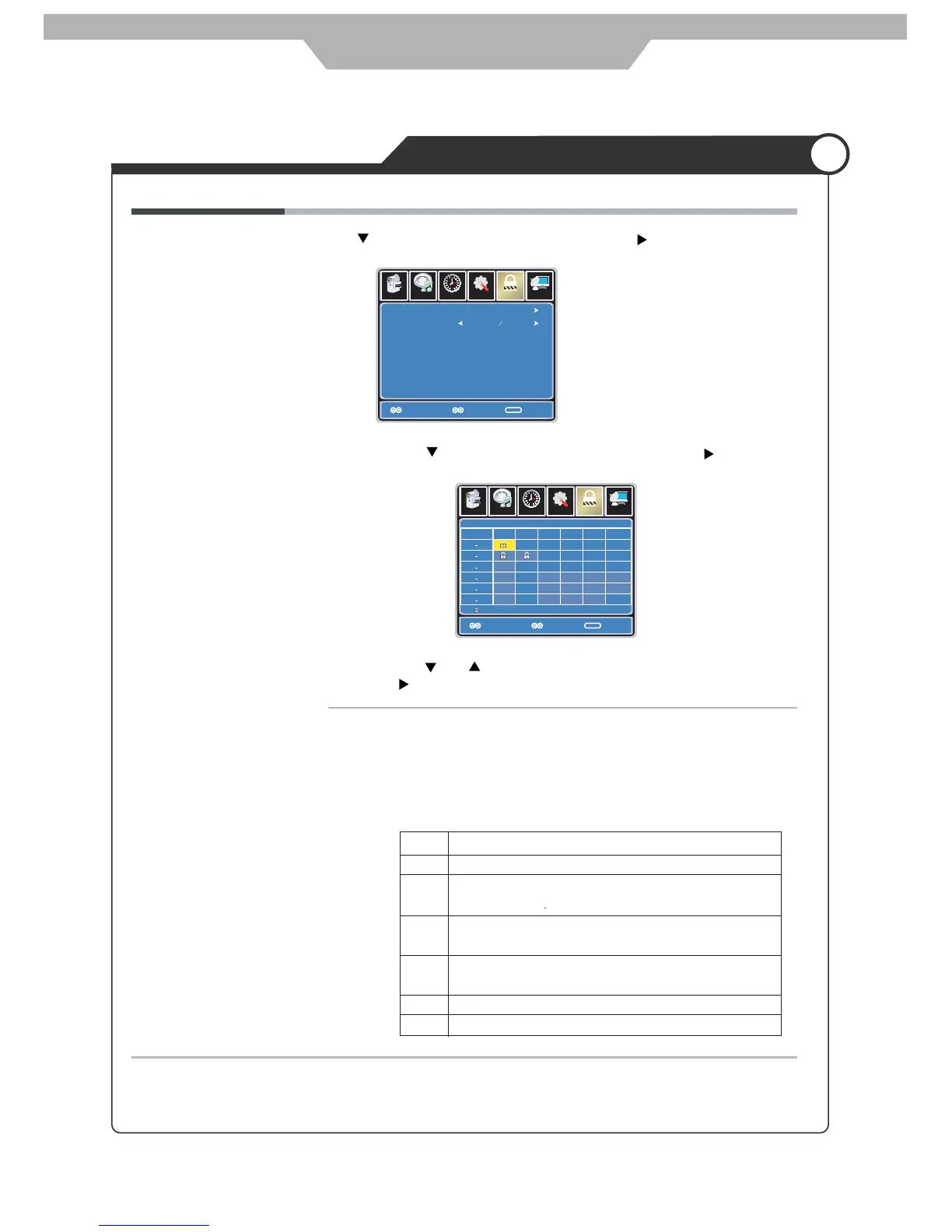
US Use button to highlight the “US” item, then press button to enter
into the following menu.
TV Use button to highlight the “TV” item, then press
button to enter into the following menu.
Use and buttons to select the desired rating and press
button to block or unblock rating.
MPAA
Setup
Lock
12
6
Time
Picture Audio
Channel
TV
MPAA
Move
Select Exit
MENU
NA
Setup
Lock
12
6
Time
Picture Audio
Channel
Move
Select Exit
MENU
Block
TV RATING
TV Y
TV Y7
TV G
TV PG
TV 14
TV MA
ALL FV V S L D
The Movie rating (MPAA) is used for original movies rated by the
Motion Picture Association of America (MPAA) as broadcasted on
cable TV and not edited for television.
Use UP or DOWN button to select N/A, G, PG, PG-13, R, NC-17
or X.
RATING DESCRIPTION
G General Audiences. Movie is appropriate for all ages.
PG Parental Guidance Suggested. May contain material not suited for
younger viewers
PG-13 Contains content that may not be appropriate for viewers under the
age of 13.
R Restricted. Contains adult content, no one under 17 admitted without
parent.
NC-17 No one 17 and under admitted.
X Adults only.
26



 To Next Page