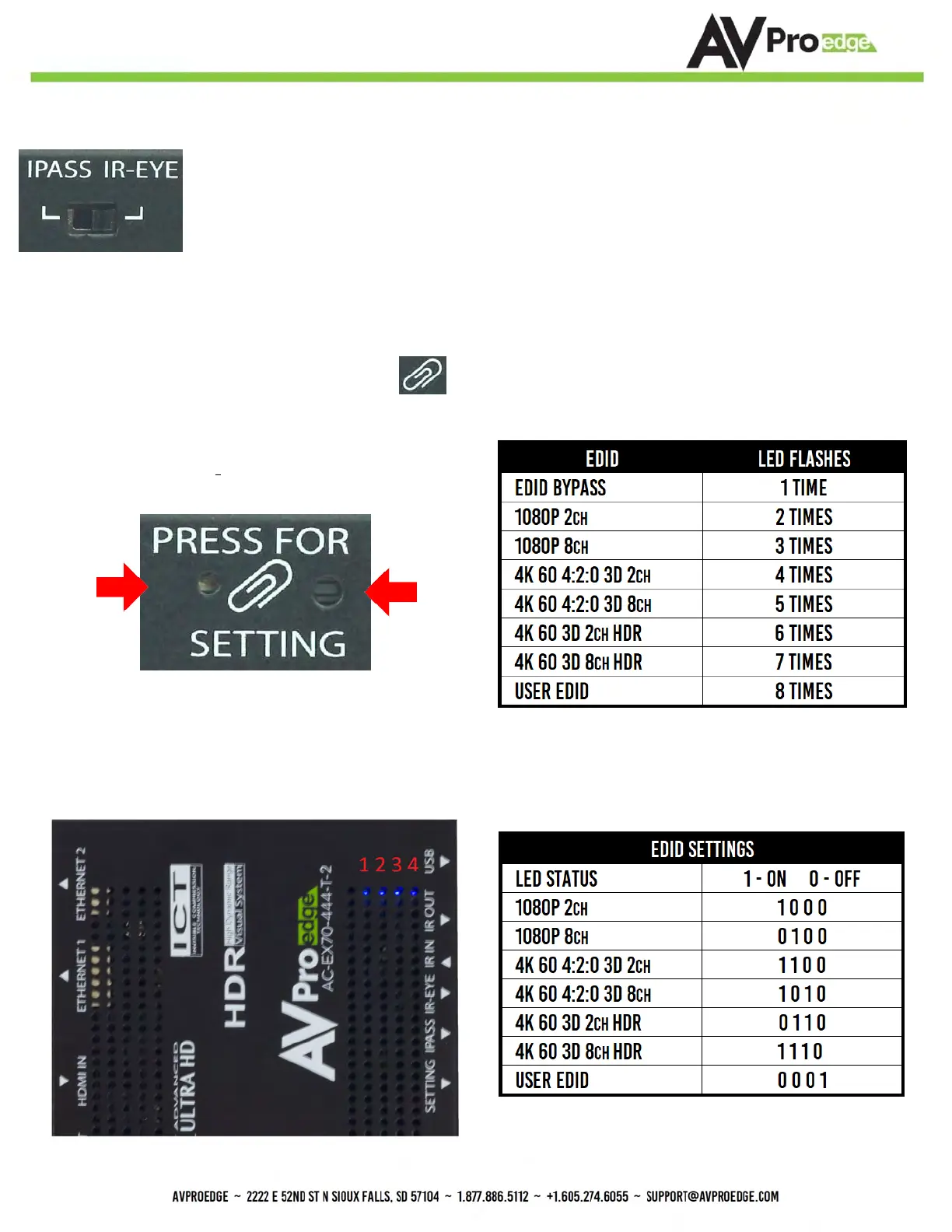
Functions & Setup of the Transmitter:
Using the Setting Button:
(On Front) The setting button can be pressed in different combinations based on what
is needed. The status light on the front will flash based on the selection. The selections are in series, meaning, for
example, if you are on selection 5 (listed below), you can come back later and press it again to move you to 6, 7, 8,
1, 2, etc... Using an ink pen is best to press the button.
symbol, and the SETTING INDICATOR LED is just
The SETTING BUTTON is located just to the right
of the to the left of the symbol.
EDID Management: GEN1
Quick press to select EDID
IR Mode Slide Switch: (On Front) This is used to select a preferred IR Mode -
There are two modes:
• IR-EYE - The IR Input will be configured to operate with an IR Receiver Eye.
• I-PASS - The IR Input will be configured to safely operate with a direct connection from a control
system using a mono or stereo 3.5mm cable. It's protected @ 3v-20v. Default mode is IR-EYE.
BUTTON
LED
EDID Management: GEN2
(Indicated by part number
AC-EX70-444-T-2)
4 LED lights on the board inside the chassis (see below) Corresponding light will be solid, the others will flash


 To Next Page