Web Interface: Switching
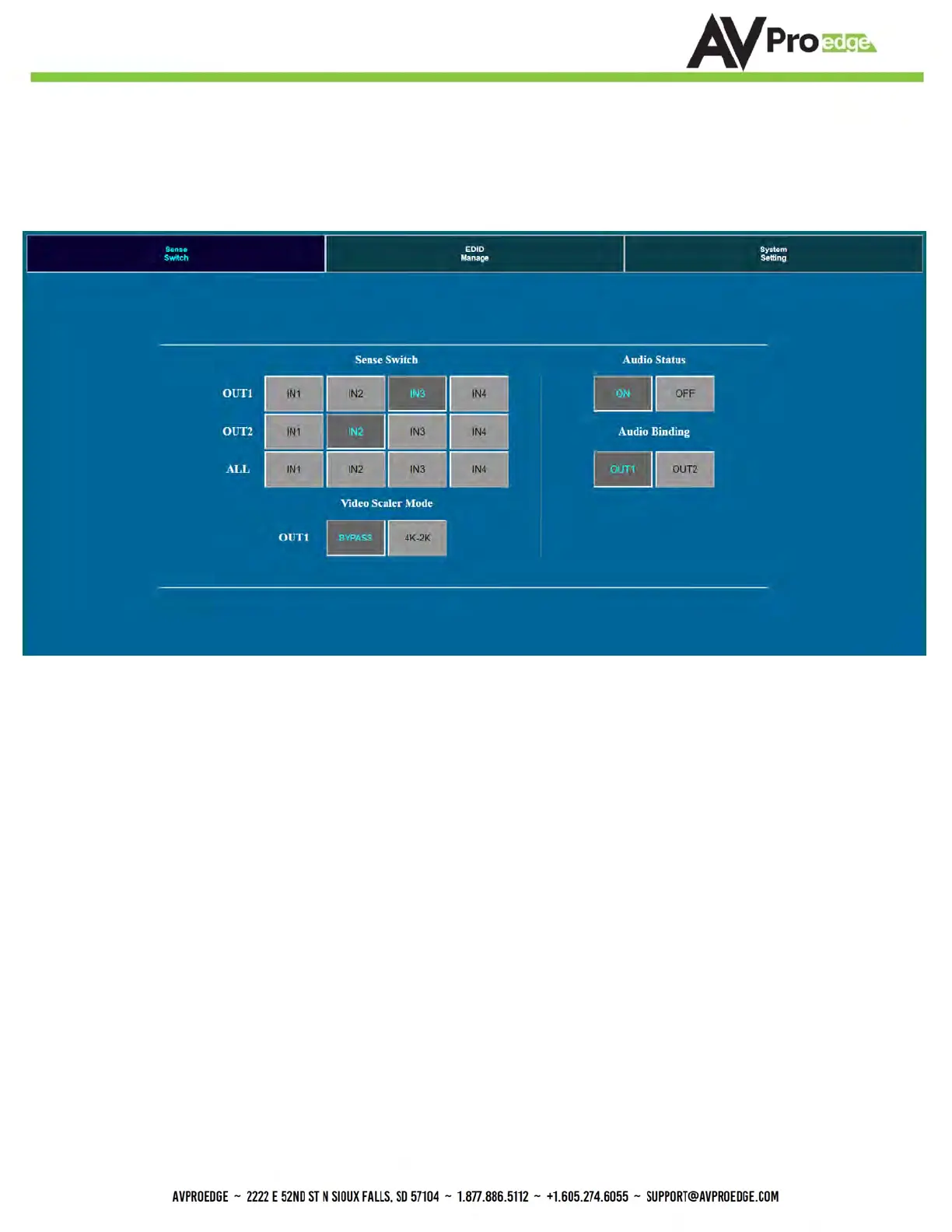
Use this page to switch between inputs and outputs, set the Output 1 Scaler and manage Audio from the web
interface. Default IP = 192.168.001.239
Sense Switch:
Use this area to route inputs to outputs
Video Scaler Mode:
This will set the scaler mode for OUTPUT 1, the options are:
• BP = Bypass - Scaler is disabled (Default)
• 4K-2K = 1080P - If incoming signal is 4K, it will be downscaled to 1080P or 1900x1200 depending
on the input format.
Audio Status:
Enable or Disable extracted Audio, the options are:
• ON = Extracted audio ports are ON (Default)
• OFF= Extracted audio ports are muted.
Audio Binding:
Bind the audio to a specific OUTPUT. The audio will always follow one output, this means
the audio switches with the video of the output you designate, the options are:
• OUT1 = Extracted audio will follow OUTPUT 1 (Default)
• OUT 2= Extracted audio will follow OUTPUT 2


 To Next Page