TV MENU SETUP
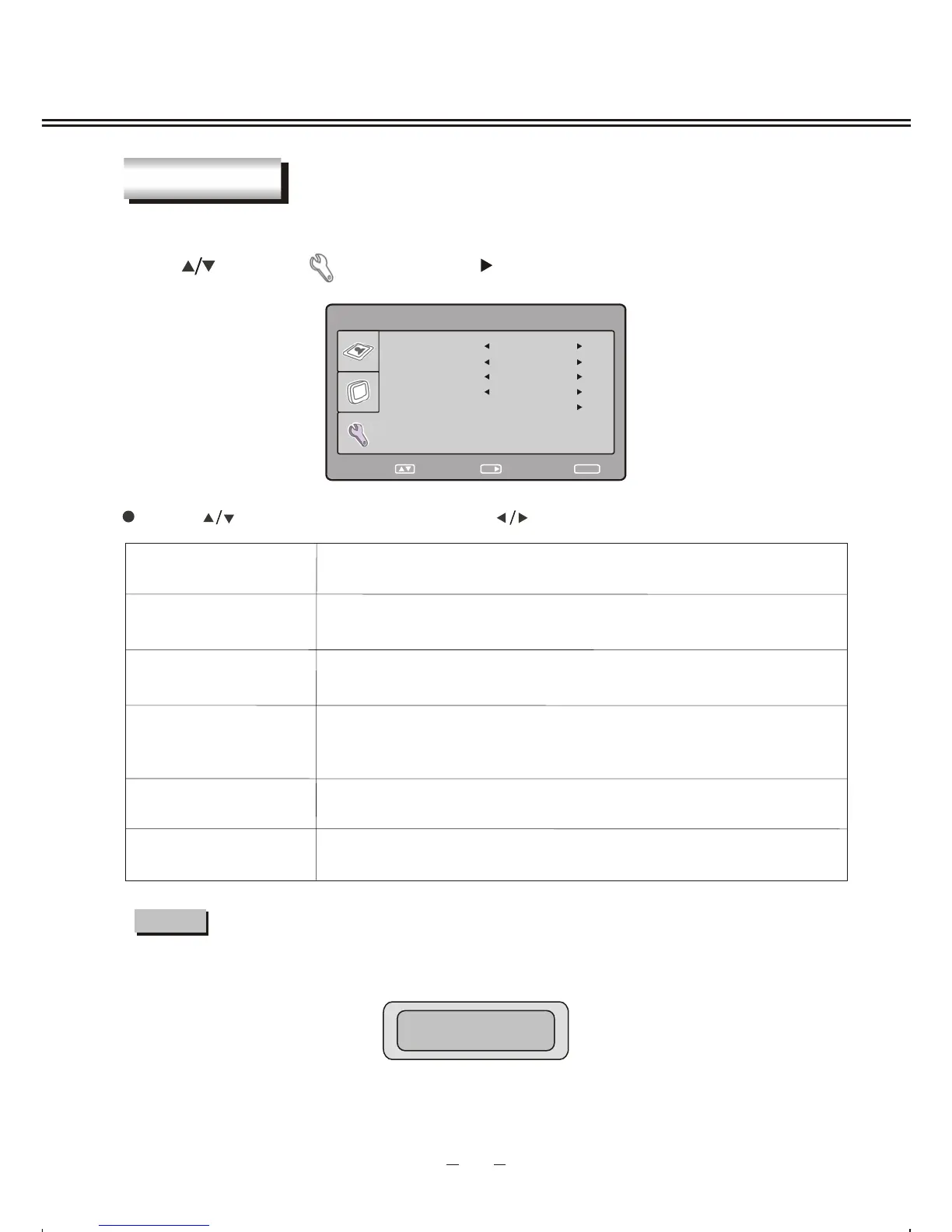
Press [ ] to select " " item and press [ ] button to enter the following section:
15
SYSTEM
You can setup some system configuration here.
Description
TRANSPARENCY
SLEEP
RATIO
RESET
To change transparency of OSD.
To reset all values to default.
Press [ ] button to select item and press [ ] button to adjust or activate.
Item
SYSTEM
SLEEP
RATIO
RESET
SELECT
RETURN
SETUP
ENTER
OK
TRANSPARENCY LEVEL 2
0
16 : 9
LANGUAGE ENGLISH
LANGUAGE
Select OSD language.
Turn off the TV after certain minutes automatically, the time you
can set is between: Off~240Min.
Set the TV image ratio 4 : 3 or 16 : 9.
STANDBY: 59S
NOTE
If you have set the sleep time , once the time is less than 1 minute there will be a remind
signal display on the screen :
At present if you want to cancel the sleep function, please press [SETUP] button on
remote control.



 To Next Page