2
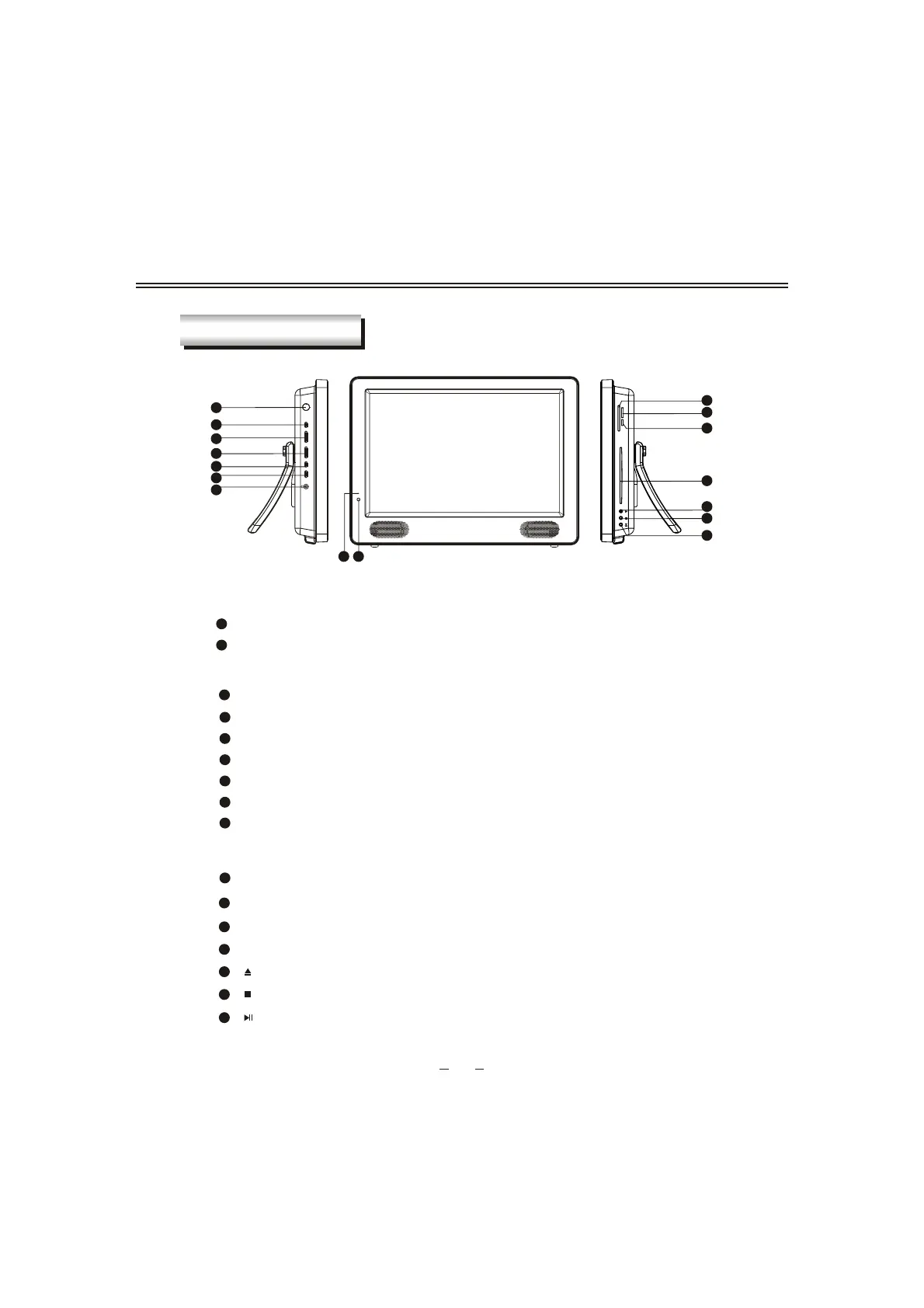
PANEL BUTTON FUNCTIONS
Indicator( )Indicator is red when in standby mode, green when working normally.
1
IR sensor window
2
Front panel
CH+/- (Increase or decrease channel number)
6
5
VOL+/-(Increase or decrease volume)
SOURCE (Enter to exit source menu)
7
4
SETUP (Enter or exit setup menu)
STANDBY (To switch between standby mode and power-on mode)
8
Left panel
11
USB jack
9
Headphone jack
Right panel
14
13
Disc in/out door
16
(Stop button)
15
(Eject button)
(Play/puase button)
PANEL CONTROL
3
POWER(Turns on or off the power supply).
10
PCMCIA CARD( Slots for external Conditional Access (CA)-modules).
12
3
4
5
6
7
8
9
SETUPVOL +
-
CH +
-
SOURCESTANDBY
POWER
16
15
14
13
10
11
12
USB
12
MEDIA CARD socket
MMC/MS/SD
CARD
PCMCIA CARD


 To Next Page