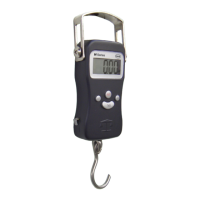
H-110
IV. Operation
1. Press the ON/OFF key to turn the scale on.
2. Once the start-up process completes and the scale
goes to zero you are ready to weigh.
3. Place the quantity to be weighed on the end of the
hook.
4. Wait a couple seconds for the display to stabilize
before taking a weight reading. For best results,
hangscalefromaxedpointratherthanholding
by hand.
V. Changing the Unit of Measure
1. Press the SET key to change the scales displayed
unit of measure.
2. If the scale is turned off then back on, it will default
to the last unit used.
• H-110 Units: kg (kilogram) lb (pound) lb:oz
(pound:ounce)
VI. Using the Tare Feature
You can use this scale’s tare feature to subtract the weight
of an empty container or vessel for net weight determination.
NOTE: The weight of the container will subtract from the
available capacity.
1. Place the empty container or vessel on the hook.
2. Press the TARE key once. The display will then
reset to zero. If the container is removed, it’s weight
will be displayed as a negative number.
3. Youmaynowllthecontainerwiththequantityto


 To Next Page