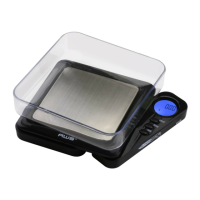
What to do if the displayed weight fluctuates randomly on AWS Blade-100?
- MMark SimmonsJul 30, 2025
If the displayed weight fluctuates randomly on your AWS Scales, ensure that your workspace is stable and free of any air currents or vibration.
What to do if the displayed weight fluctuates randomly on AWS Blade-100?
If the displayed weight fluctuates randomly on your AWS Scales, ensure that your workspace is stable and free of any air currents or vibration.
How to fix AWS Blade-100 Scales that will not turn on?
If your AWS Scales will not turn on, check the batteries.
Lists the components included with the scale, such as the scale itself, cover, and batteries.
Identifies and explains the function of each button and the display indicator on the scale.
Provides instructions on how to properly install batteries, including removing insulation and aligning contacts.
Details the steps for turning on the scale, zeroing, and obtaining a weight reading.
Explains how to cycle through available weight units and lists units for different models.
Guides users on subtracting container weight for net weight determination and returning to gross weight.
Outlines how to check calibration and lists acceptable tolerances and required weights for different models.
Details the step-by-step process for adjusting the scale using a calibration weight.
Provides solutions for common problems like the scale not turning on or inaccurate readings.
Explains specific error codes displayed by the scale, such as OUTZ, O-Ld, and L.
Lists key specifications including maximum capacity, readability, and dimensions for each model.
Presents detailed capacity and readability information in various units for each scale model.