19 USING WOLF REMOTER FOR THE FIRST TIME
As explained in the previous section, the Wolf Network Remoter application is the software that allows access to the
device and editing of the operating parameters. The following connection procedures are currently available:
1. LOCAL RS 232
2. MODEM
3. TCP/IP
4. TFTP (under development)
1. First of all, start up Wolf Network Remoter by launching the executable file from the location in which you installed it
(e.g. Desktop)
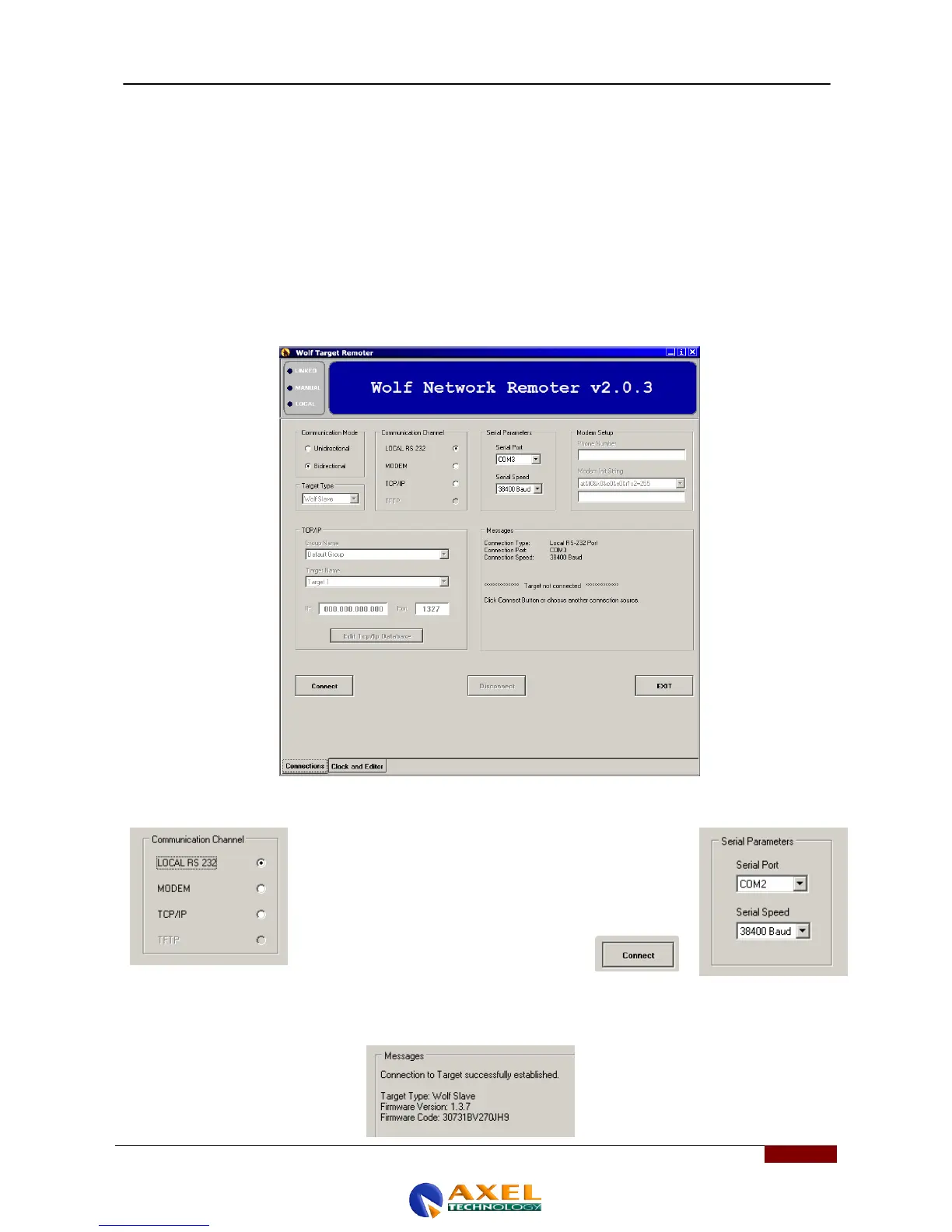
2. The following window will appear:
3. LOCAL RS 232 mode
At the moment, the RS 232 LOCAL mode is the simplest, as it
involves the use of a single pin-to-pin serial cable connected to a
single control PC. To do this, select Local RS232 in the
Communication Channel panel, as seen in the figure.
After you do this, select the Serial Port you intend to use in your
PC and its port speed. These two parameters can be found in the
Serial Parameters panel, beside the
Communication Channel. Once you have set
the correct values to access the Wolf Network,
press the Connect button.
If the connection is successful, the Messages panel will show the message “Connection to target successfully
established" and will also feature some of the data of the Wolf Network device to which you are connected, such as the
target type, the firmware version, and the firmware code. This means you are properly connected with the Wolf Network.



 To Next Page