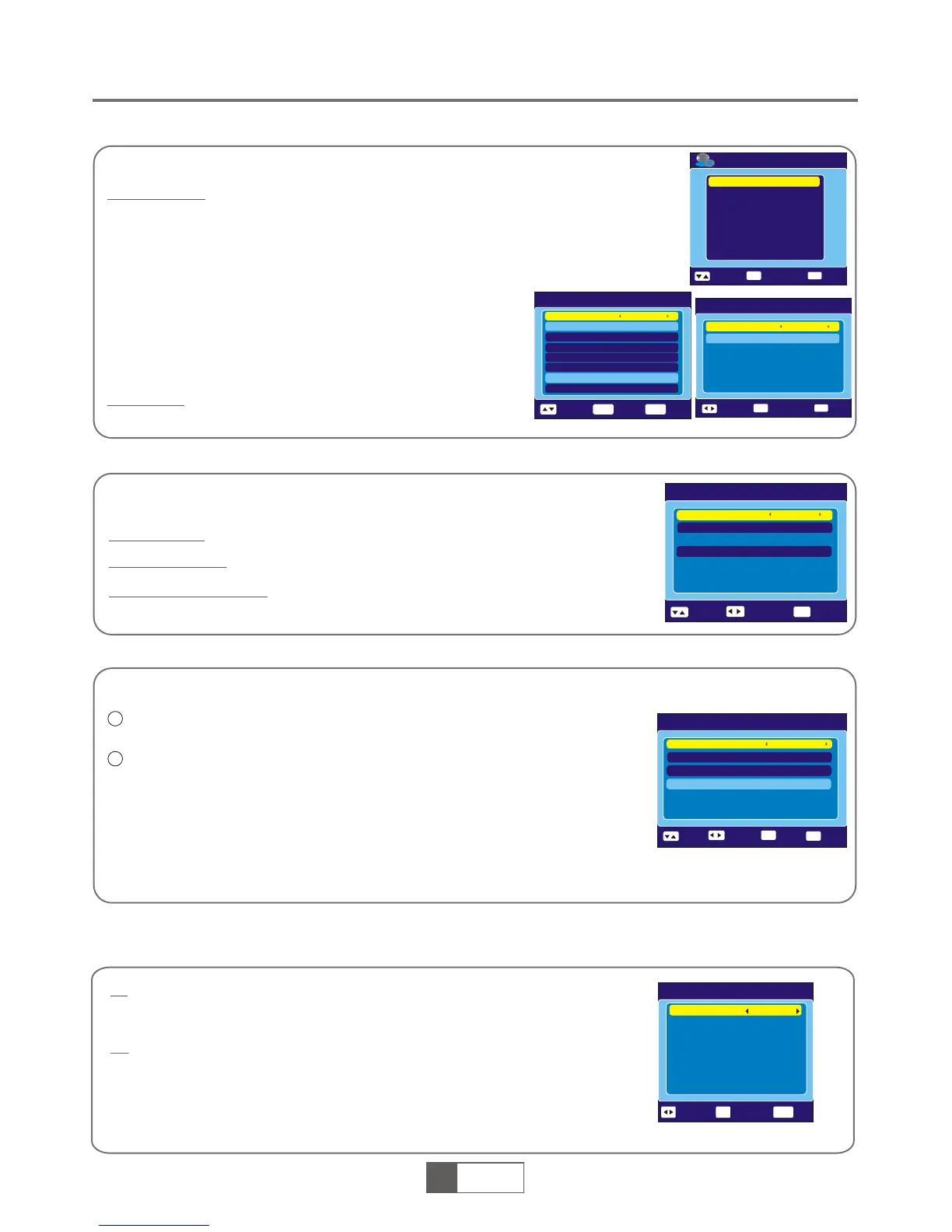
OSD Setting
This menu allows you to set Subtitle Display, OSD Transparency and load default OSD
setting.
Subtitle Display:
To set the subtitle to Standard / Off/ Teletext.
OSD Transparency:
To set the OSD transparency to Off/10%/20%/30%/40%/50%.
Load Default OSD Setting:
To clear all OSD setting and reset parameters as default value.
SYSTEM SET-UP
Parental Lock
This menu allows you to password protect the installation menu and channel, and change the Password.
In "System Setup" menu, select "Parental Lock" and press "OK" button, you are
asked to input a password(the default password is"0000").
After inputting the correct password by pressing numeric buttons, the parental lock
menu appears.
1
2
Menu Lock:
New Password: To change the password.
To lock the installation menu. When you want to enter Auto Scan/ Channel
Scan menu, you must input the password. You can set menu lock to on/off.
Confirm Password:
To confirm the new password.
Timer Setting
Sleep Timer:
You can set the STB to power off in 10 min,30min,
60min,90min and 120min automatically.
This menu allows us to set the program timer and sleep timer.
Program Timer:
This menu is used for setting the program timer you want to change to.
When you want to quit program timer, a saving window appears
Timer Number:
Timer Mode:
Timer Service:
Wakeup Channel:
Month/Date/Day:
Time:
You can set 8 program timer
Off/Once/Daily/Weekly/Monthly
TV Service/Radio Service
You can select a desired channel as the wakeup channel.
Press "LEFT" or "RIGHT" cursor button to select
your desired month, date and day.
Press "OK" then numeric button to input the time.
Sleep Timer
Sleep Timer
Off
EXI T
OK
Start Timer
Exit
Change
Remains
00:00
Timer Setting
Program Timer
Sleep Timer
EXI T
OK
Enter
Exit
Select
OSD Setting
Subtitle Display
Off
EXIT
Select
Exit
Change
OSD Transparency
Load Default OSD Setting
10%
Parental Lock
Menu Lock
Off
EXI T
0-9
Select
Exit
Input
Change
Channel Lock
New Password
Confirm Password
Age:4
----
----
Standby Mode
No command to STB on front panel or Remoter in 3 hours and
no timer event, the STB will enter standby mode automatically.
The STB can’t enter standby mode automatically.
On
Off
Auto Standby
Auto Standby
Select
On
Enter
OK
EXIT
Exit
1
1
English
1
9
English
Program Timer
Tuesday 200 4/03/2 3 10 :57
Timer Number
1
Timer Mode
Timer Service
Wakeup Channel
Month
Day
Time
10:57
3
Once
TV Service
BBC NEWS 24
Tuesday
Date
23
OK
EXIT
Select
Enter
Exit
Duration: Press "OK" then numeric button to input the
duration time.
NOTE: To unlock the receiver in case you lose the password, enter the master code "3101"


 To Next Page