7
Configuring the Printer
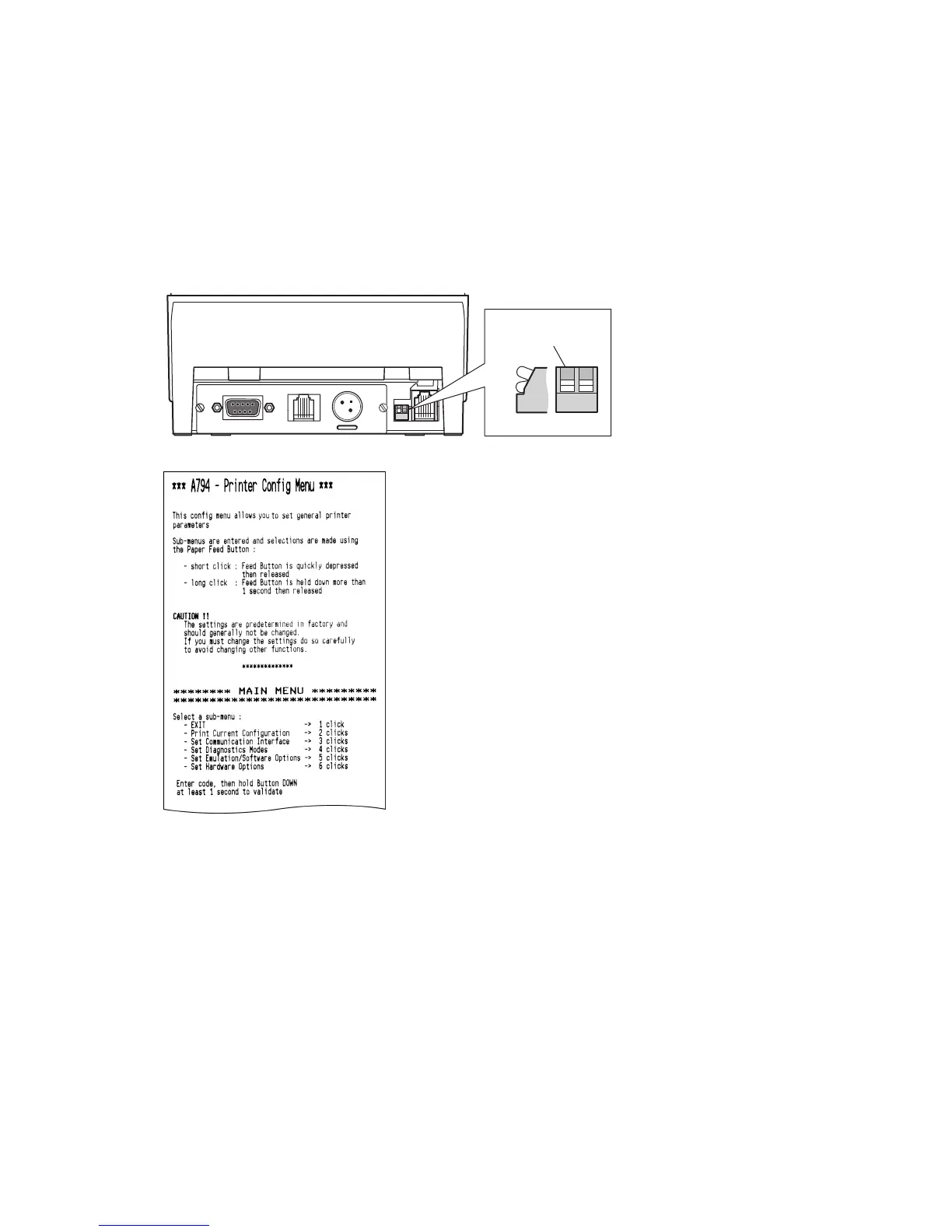
If you need to select certain functions, or change settings, use the scrolling
menu feature. This feature prints instructions on the receipt for selecting
and changing any of the functions and parameters, including A793 and
APOS emulations.
Caution: Be extremely careful changing any of the printer settings
to avoid changing other settings that might affect the
performance of the printer.
To Configure the Printer:
1. Set DIP Switch 1 to On.
2. Press the Reset Button while holding the Paper Feed Button.
The printer beeps, prints the current configuration, then prints the first
question on the scrolling menu.
3. Follow all the instructions on the scrolling menu.
4. Press the Paper Feed Button as instructed on the menu.
5. When you have finished, set DIP Switch 1 to Off.
6. Press the Reset Button.
The printer resets with the new selections.
Setup Complete
The printer is now ready to communicate with the host system.
8
Off
Switch 1 is shown
in the ON position
On
DIP Switches
1212121212
Back of Printer


 To Next Page