Chapter 5: Communication Interface A794 Owner’s Guide
December 199948
Parallel Interface
The printer is also available with an IEEE-1284 parallel interface. The printer
configuration must be set to the parallel interface using the printer’s Configuration
Menu described in the “Diagnostics and Configuration” section of the A794 Service
Guide.
IEEE Bi-directional Parallel Connector
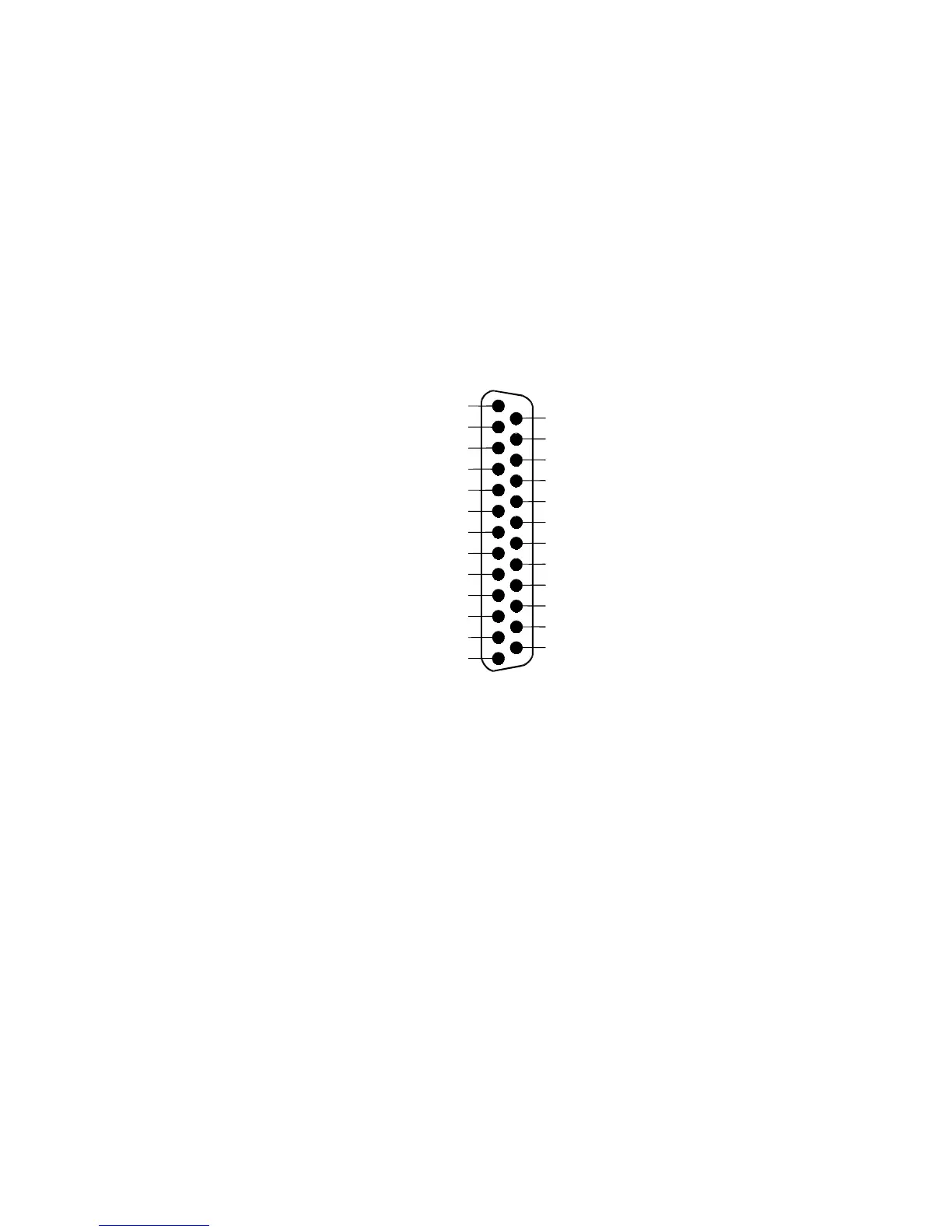
The following illustration shows the parallel communication connector and pin
assignments. The connector is located at the rear of the printer, and is designated as an
IEEE 1284-A receptacle, commonly known as a D-Subminiature 25 pin.
AUTOFD/ (Auto Paper Feed)
FAULT/ (Printer Error)
INIT/ (Initialize the Printer)
SELECTIN/ (Select Printer)
Ground
9
10
11
12
13
14
15
1
2
3
4
5
6
7
8
STROBE/
D0 (Data)
16
17
18
19
20
21
22
23
24
25
D1 (Data)
D2 (Data)
D3 (Data)
D4 (Data)
D5 (Data)
D6 (Data)
D7 (Data)
ACK/ (Printer Accepted Data)
BUSY (Printer Busy)
SELECT (Printer Selected)
PAP_EX (Paper Exhaust)
Ground
Ground
Ground
Ground
Ground
Ground
Ground
Function
Function
Pin Numbers


 To Next Page