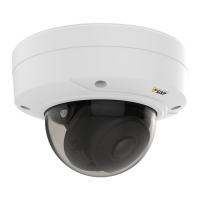
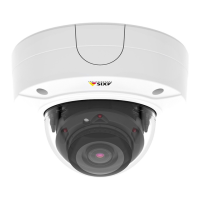
The AXIS P32 Network Camera Series encompasses a range of network cameras, including the AXIS P3227-LV, AXIS P3227-LVE, AXIS P3228-LV, and AXIS P3228-LVE models. These devices are designed for surveillance applications, providing video streaming and recording capabilities for various environments.
Function Description
At its core, the AXIS P32 Network Camera Series functions as a digital video camera that connects to a network. It captures video footage and makes it accessible for live viewing, recording, and analysis. The cameras are equipped with features to optimize image quality in diverse lighting conditions, including strong backlight scenarios. They support different video compression formats, such as Motion JPEG and H.264, allowing users to balance image quality with bandwidth and storage efficiency. The cameras are also designed to integrate with the AXIS Camera Application Platform (ACAP), an open platform that enables the development and deployment of third-party analytics and other applications, extending the camera's functionality beyond basic surveillance.
Usage Features
The AXIS P32 cameras offer a comprehensive set of features to enhance their usability in a surveillance system:
- Network Connectivity: The cameras are designed to be easily found and accessed on a network using tools like AXIS IP Utility or AXIS Device Manager. They can be accessed via a web browser, supporting popular options like Chrome, Firefox, Edge, and Safari.
- Webpage Overview: Once accessed, a user-friendly webpage provides a live view of the camera feed, along with controls for various settings. This interface includes a live view control bar, video control bar, and settings toggle for easy navigation.
- Image Quality Adjustment: Users can fine-tune image quality by selecting different exposure modes, including automatic, flicker-free, and flicker-reduced options, to suit specific lighting conditions. The cameras also feature Wide Dynamic Range (WDR) to handle scenes with strong backlighting, ensuring both dark and bright areas are visible.
- Video Streaming and Recording: The cameras allow for efficient video streaming and recording. Users can reduce bandwidth and storage needs by utilizing features like Zipstream, dynamic GOP (Group of Pictures), increased compression, and dynamic FPS (Frames Per Second). Recordings can be stored on network storage, which needs to be set up, or on an installed SD card. The live view interface provides controls to start and stop recordings, and recorded video can be easily watched from the storage section.
- View Area Management: To optimize bandwidth and storage, users can define a "view area," which is a cropped part of the full camera view. This allows streaming and storing only the relevant portions of the scene. If PTZ (Pan, Tilt, Zoom) is enabled for a view area, users can digitally pan, tilt, and zoom within that specific region.
- Overlays: Overlays can be added to the video stream to display additional information, such as timestamps or custom text. This is particularly useful for adding context to recordings or for displaying alerts, such as "Motion detected," when specific events occur.
- Bitrate Control: The cameras offer various bitrate control options, including Variable Bitrate (VBR), Maximum Bitrate (MBR), and Average Bitrate (ABR). These controls allow users to manage the bandwidth consumption of their video streams, balancing image quality with network and storage limitations.
- Rules and Alerts: A powerful feature is the ability to create rules that trigger specific actions based on certain events. For example, a rule can be set up to start a recording, send an email, or display an overlay text when motion is detected by the AXIS Video Motion Detection application. This enables automated responses to surveillance events.
- Application Platform (ACAP): The AXIS Camera Application Platform allows for the installation of third-party applications, expanding the camera's capabilities for advanced analytics and specialized functions. Users can download, install, and activate licenses for these applications to tailor the camera's performance to their specific needs.
Maintenance Features
The AXIS P32 Network Camera Series includes several features to facilitate maintenance and troubleshooting:
- Firmware Management: Users can check the current firmware version of their device and upgrade it to the latest version. Firmware upgrades are crucial for accessing new functionalities, bug fixes, and security updates. The process involves downloading the firmware file, logging in as an administrator, and following instructions in the system maintenance section.
- Factory Default Reset: In cases of lost passwords or configuration issues, the device can be reset to factory default settings. This can be done by physically pressing and holding the control button during power-up or through the web interface. This feature helps restore the device to a known working state.
- Troubleshooting Guides: The manual provides extensive troubleshooting information for common issues, such as problems finding the device on the network, accessing it from a browser, or issues with streaming. It offers clues and solutions for problems like firmware upgrade failures, IP address conflicts, and poor video rendering.
- LED Indicators: The cameras are equipped with LED indicators that provide visual feedback on the device's status. These indicators can show connection status, normal operation, startup progress, firmware upgrade status, and network connection availability, aiding in quick diagnosis of operational issues.
- SD Card Slot: The presence of an SD card slot allows for local storage of recordings, providing a backup or primary storage solution. The manual provides important notices regarding the safe insertion and removal of SD cards to prevent damage or data loss.
- Control Button: A physical control button on the device serves multiple maintenance functions, primarily for resetting the product to factory default settings.
- Support Resources: Users are directed to axis.com/support for additional troubleshooting information, firmware downloads, release notes, and to contact support for more complex issues. This ensures that users have access to comprehensive assistance when needed.
Overall, the AXIS P32 Network Camera Series is designed to be a versatile and robust surveillance solution, offering advanced video capabilities, flexible configuration options, and user-friendly maintenance features to ensure reliable operation.

 Need help?
 General

 To Next Page