AXIS Q1951-E and AXIS Q1952-E Thermal Cameras can run the application in calibration mode,
AI mode, or both modes in combination. If you choose to run it in AI mode only, camera
mounting is more flexible and you don’t need to calibrate the cameras.
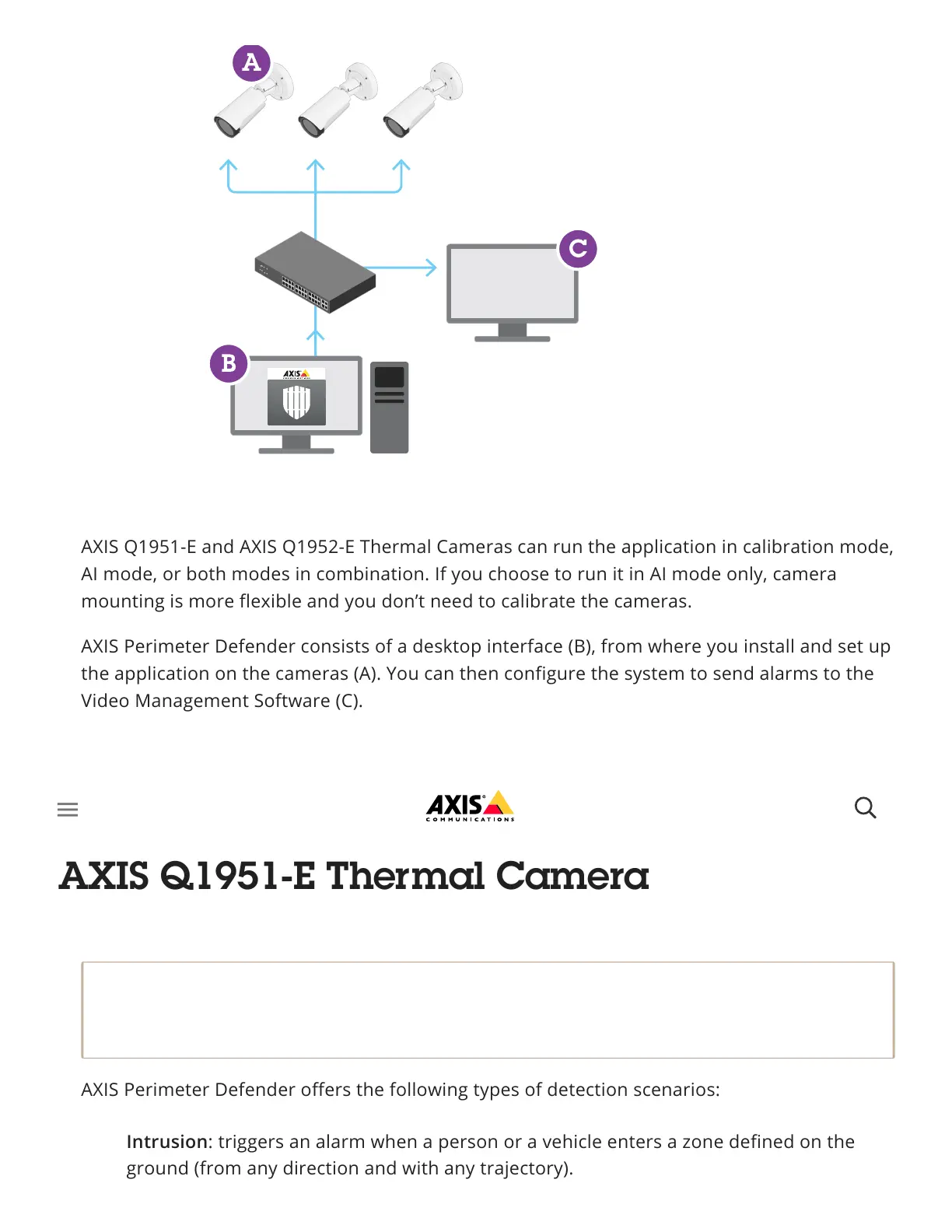
AXIS Perimeter Defender consists of a desktop interface (B), from where you install and set up
the application on the cameras (A). You can then configure the system to send alarms to the
Video Management Software (C).
AXIS Perimeter Defender PTZ Autotracking is a plugin to the AXIS Perimeter Defender
application, using the same desktop interface. With the plugin, you pair a fixed visual or
thermal camera with an Axis Q-line PTZ camera. You can then maintain continuous detection
coverage of a scene with the fixed camera while the PTZ camera automatically tracks and
gives you closer views of detected objects.
Important
AXIS Perimeter Defender PTZ Autotracking requires calibration of both fixed and PTZ
cameras.
AXIS Perimeter Defender offers the following types of detection scenarios:
Intrusion: triggers an alarm when a person or a vehicle enters a zone defined on the
ground (from any direction and with any trajectory).



 To Next Page