a
b
c
a
b
c
Operating Instructions
11
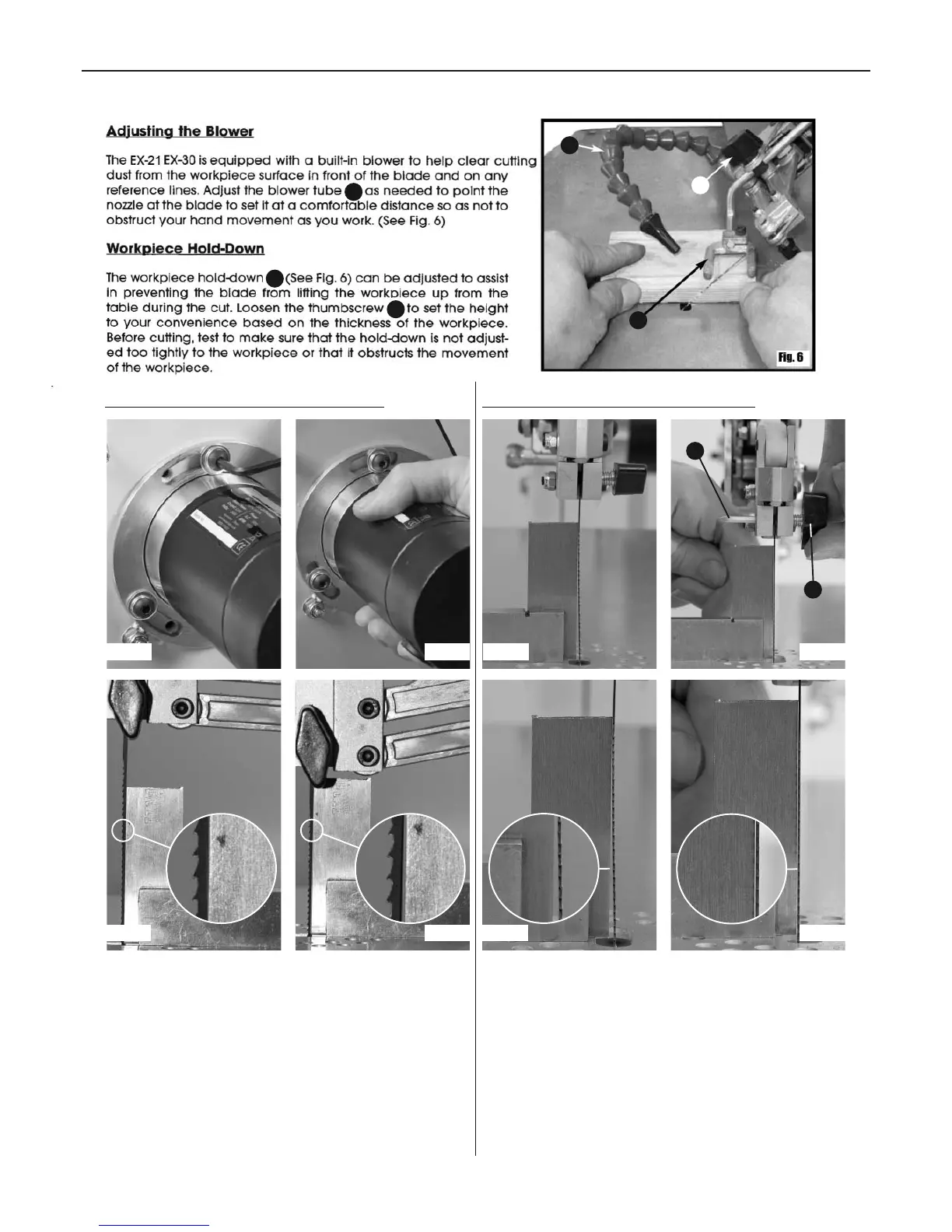
Adjusting the Osolation (Front to Back) Top & Bottom Blade holder Alignment
Place a 90˚ square upagainst the blade, the blade movement
can be set between course and fine for different cutting tasks,
this can be adjusted by rotating the motor within its' mounts.
Loosen the motor mounting cap head bolts, see figs A enough
to be able to rotate the motor (this can be quite stiff to turn),
start the machine and run at approximately 1/4 speed. By
rotating the motor, see fig B and carefully observing the blade
you will be able to see the blade changing its setting. The
finest setting is where the blade moves vertically with the least
amount of movement, see fig C backward and forwards
horizontally. This should also be where the machine vibrates
the least. When you have the setting where you wish it to be,
tighten the motor mounting bolts.
If the blade is out of alignment please follow the
procedures below for adjusting the top and bottom
blade holders:
Place a 90˚ square upagainst the blade, see fig A. U sing a 4mm
Hex key (a) adjust the grub screw and butterfly nut (b), see fig
B, until the blade is parallel with the square. (See figs C and D).
a
b
Fig A Fig B
Fig C Fig D
Fig A Fig B
Fig C Fig D



 To Next Page