– 8 – – 9 –
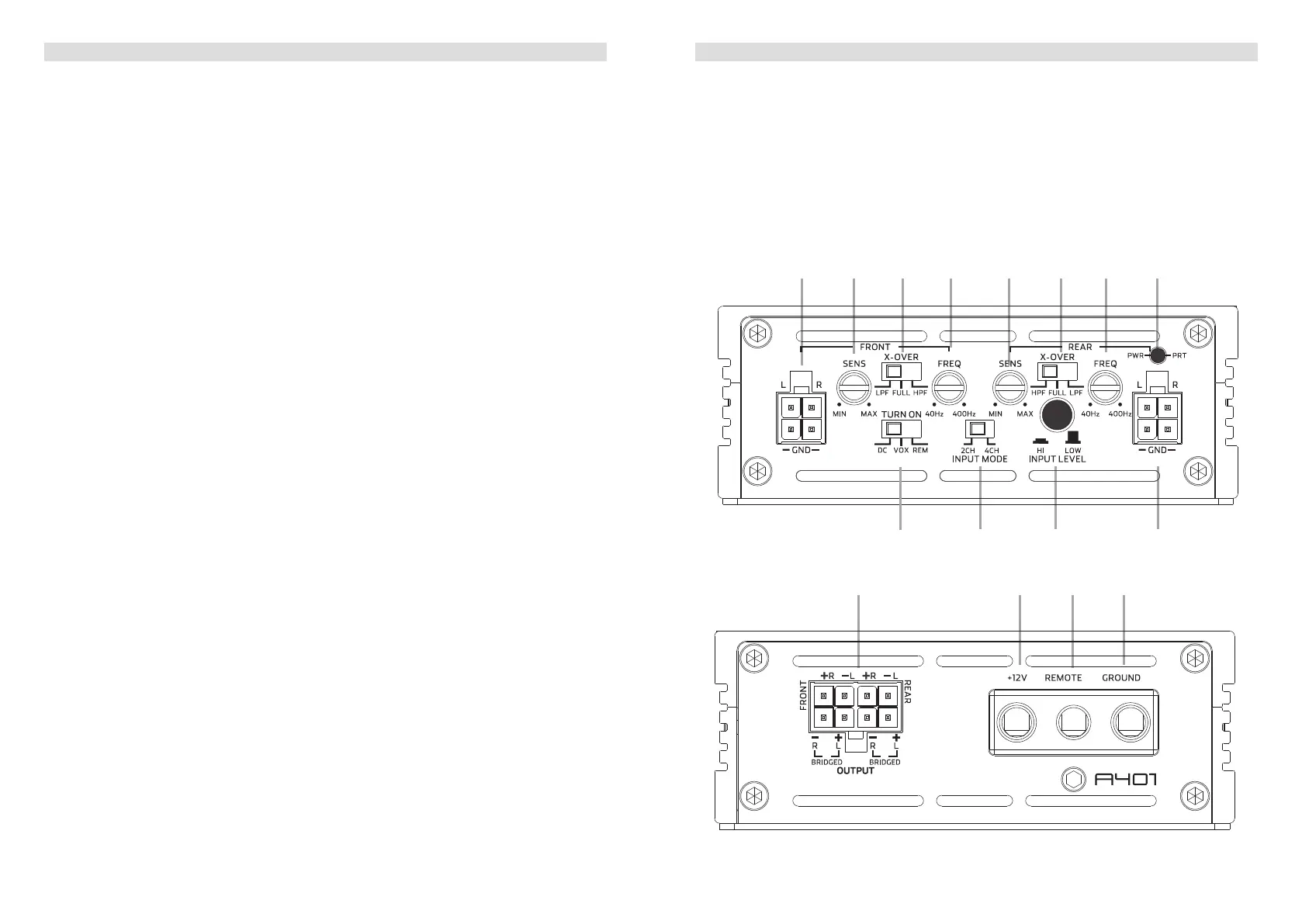
A401 CONNECTIONS + CONTROLS
1 SIGNAL INPUTS FRONT CH1 / CH2
Front channel Low-level stereo RCA signal or high-level speaker signal input
terminals for connection to head-unit.
2 INPUT SENSITIVITY CONTROL FRONT CHANNELS
Input gain potentiometer for channel CH1 / CH2, to match the output voltage of the head
unit to the amplier’s input.
3 OPERATION MODE SWITCH FRONT CHANNELS
Slide switch to select the operation mode of the X-over for section CH1 / CH2 of the
amplier: Highpass [HPF], Lowpass [LPF] or full signal [FULL].
4 X-OVER FREQUENCY CONTROL FRONT CHANNELS
Control potentiometer to adjust the highpass or lowpass ltering frequency for section
CH1 / CH2 of the amplier.
5 INPUT SENSITIVITY CONTROL REAR CHANNELS
Input gain potentiometer for channel CH3 / CH4, to match the output voltage of the head
unit to the amplier’s input.
6 OPERATION MODE SWITCH REAR CHANNELS
Slide switch to select the operation mode of the X-over for section CH3 / CH4 of the
amplier: Highpass [HPF], Lowpass [LPF] or full signal [FULL].
7 X-OVER FREQUENCY CONTROL REAR CHANNELS
Control potentiometer to adjust the highpass or lowpass ltering frequency for section
CH3 / CH4 of the amplier.
8 POWER LED
LED to show the operating status of the amplier by blue/red illumination. Blue is
normal working state, red is protect mode of amplier.
9 AUTO-TURN-ON MODE
Slide switch to select the auto-turn-on function: REM by remote wire, VOX to switch on
by music signal or DC by DC offset signal of the head units integrated amplier.
10 INPUT SIGNAL SELECTION
Slide switch to select the input signal for all channels. “2-CH” to use only front input
terminal for all output channels. “4-CH” to give each output channel its corresponding
input channel.
11 INPUT MODE SELECTION
Switch to select the proper input sensitivity range: RCA signal input = Low. Speaker
signal input = Hi.
12 SIGNAL INPUTS REAR CH3 / CH4
Rear channel Low-level stereo RCA signal or high-level speaker signal input
terminals for connection to head-unit.
13 SPEAKER OUTPUT TERMINAL
Output terminal to connect the speakers to the amplier in either stereo or bridged
mode.
A401 CONNECTIONS + CONTROLS
14 “+12 V” POWER INPUT TERMINAL
Terminal to connect the amplier to the positive +12V pole of the car battery.
15 “REM” INPUT TERMINAL
Terminal to connect the amplier to the automatic (remote) turn-on / turn-off lead of the
head unit. You must switch
9
to “REM” when using the remote wire input terminal.
16 “GND” POWER INPUT TERMINAL
Terminal to connect the amplier to the chassis ground or negative pole of the car
battery.
bo bp bq br
bmbl bn
2 3 4 5 6 7 81
9


 To Next Page
 Loading...