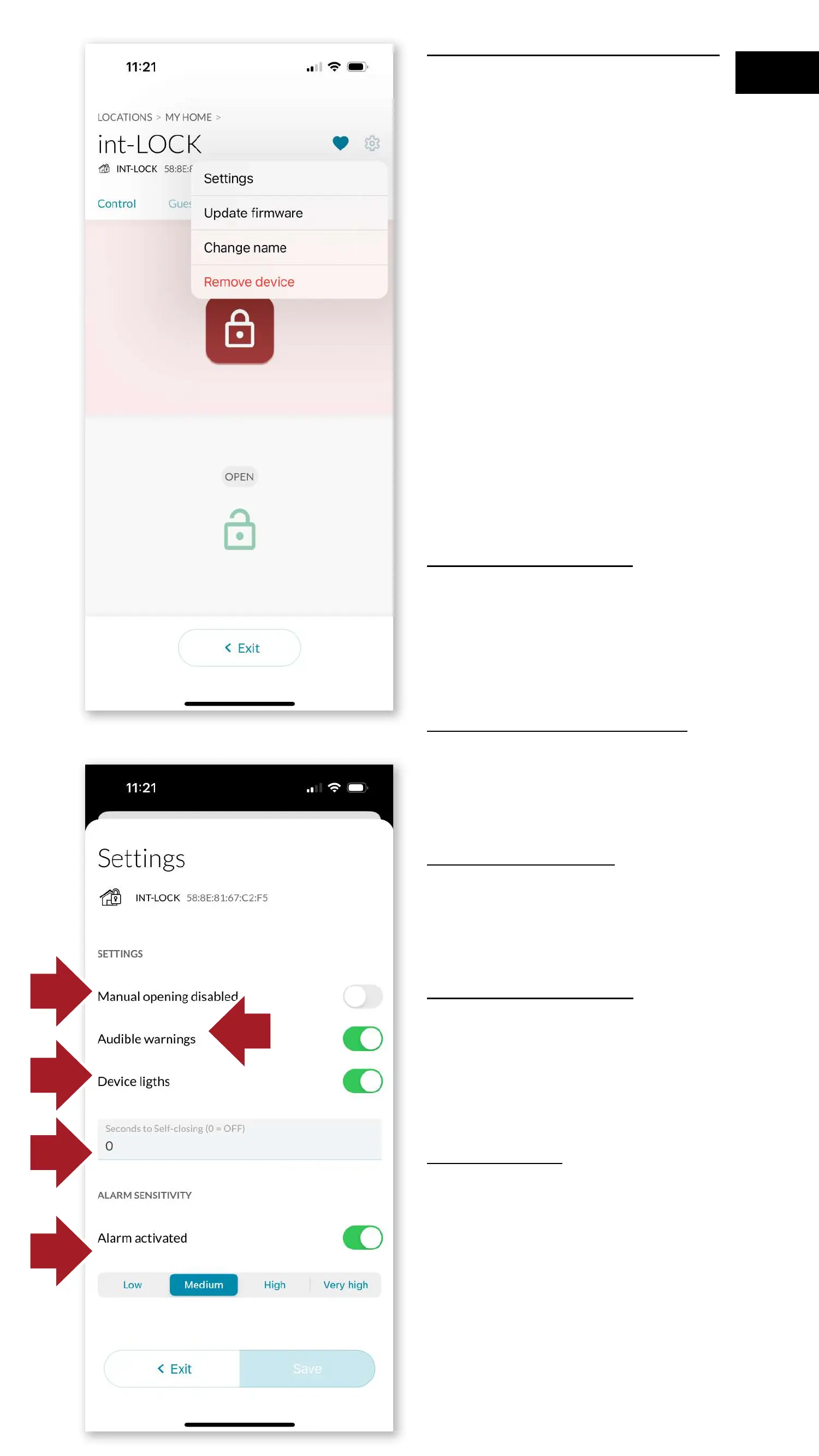
4.9 Settings and options
By clicking on the Settings
icon, you can perform the
following actions on the device:
-update rmware
-change name
-remove device
- or access the different
conguration options.
To do this, first press the hidden
button for 10 seconds until a
beep sounds and the orange
LED lights up. Then click on
configuration and the options
screen will open:
4.9.1 Lock button
-lock manual unlock button
to disable the use of the main
int_LOCK button for unlocking.
4.9.2 Sound warnings
To activate/deactivate the
opening and closing sounds.
4.9.3 LED lights
To activate/deactivate the LED
lights on the device.
4.9.4 Self-locking
To activate self-closing, set
the number of seconds for self-
closing to occur.
4.9.5 Alarm
Selecting the sensitivity level for
alarm triggering
4.9.1
4.9.3
4.9.4
4.9.5
4.9.2
63
EN



 To Next Page