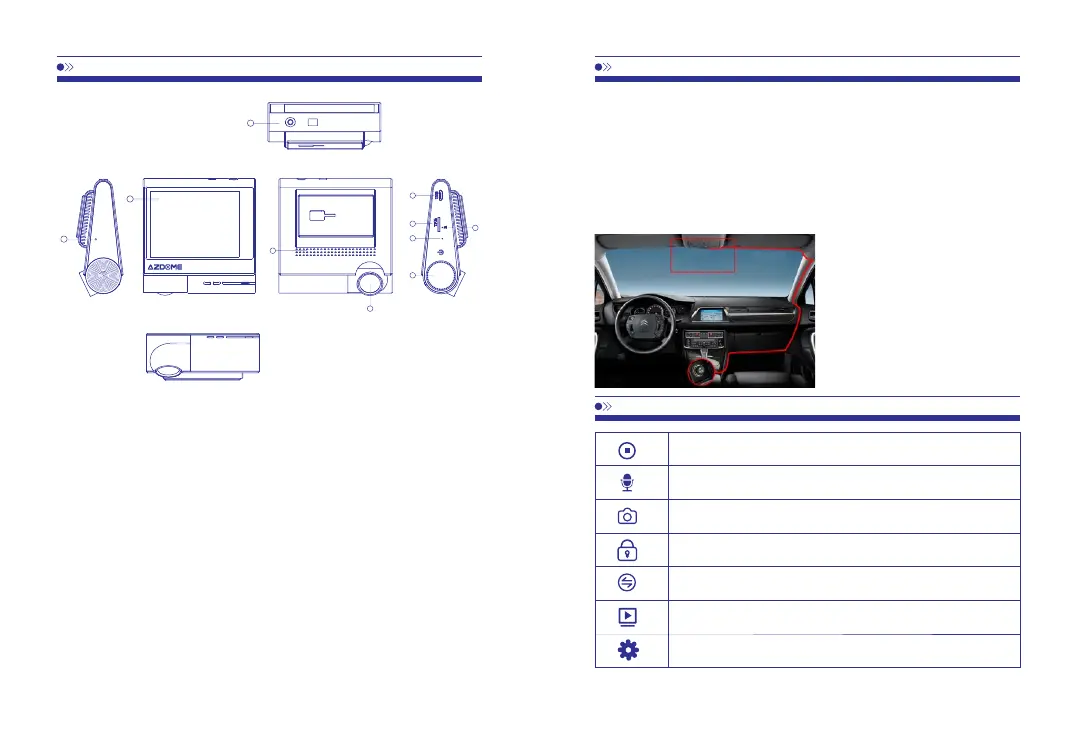
①MIC
EN-02
EN-03
④Speaker
②OLEDTouchScreen
⑤Frontcam
③AVin(SupportRearcam,notincluded)
⑥USB
3
1
2
5
4
6
7
9
10
8
⑦TFcardslot ⑧Resethole ⑨Auxiliarykey
⑩Power
Poweron/off
Inthepoweroffstate,pressandholdthepowerbuttontoturnonthemachine.
Inthepoweronstate,pressandholdthepowerbuttontoautomaticallysavetherecording
filesandturnoffthemachine.
Resethole
Theresetholeisontherightsideofthemachinemarkwith“ R”,ifcrashhappens,pleasepress
theresetholeandreconnectthepowertorestorethemachine.
1.Turnoffthecarengine
2.InserttheTFcardintothecardslotofdashcam
【Attention】Pleaseusehigh-speedSDcard(Class10orabove,andRemembertoformattheSD
cardwiththemachineafterpoweron)
3.Fixthedashcamonthefrontwindshieldofthecar
4.ConnectthedashcamUSBinterfacewiththecarchargerwithachargingcable.
【Attention】Hidethecablealongsidetheedgeofwindshield.
5.Insertthecarchargerintothecarcigarettelighter
7.Adjustthelenspositiontoensurethatthelensarelevelwiththeground.
8.Starttheengineandcheckwhetherthemachineisinstalledcorrectly.
Video,shorttouchtostarttorecord,shorttouchagaintostoprecording
AudioRecordingon-off
Photo,shorttouchtosnapapicture
Lock,whenthecameraisrecording,shorttouchtolockthefile
Shiftthemaindisplay,frontcameraorrearcamera
(ifinstalledtherearcam)
Files,insideyoucanplaybackallofyourrecordingvideosandphotos
Settings



 To Next Page