1ª 10155 ES 9 - 2009
35
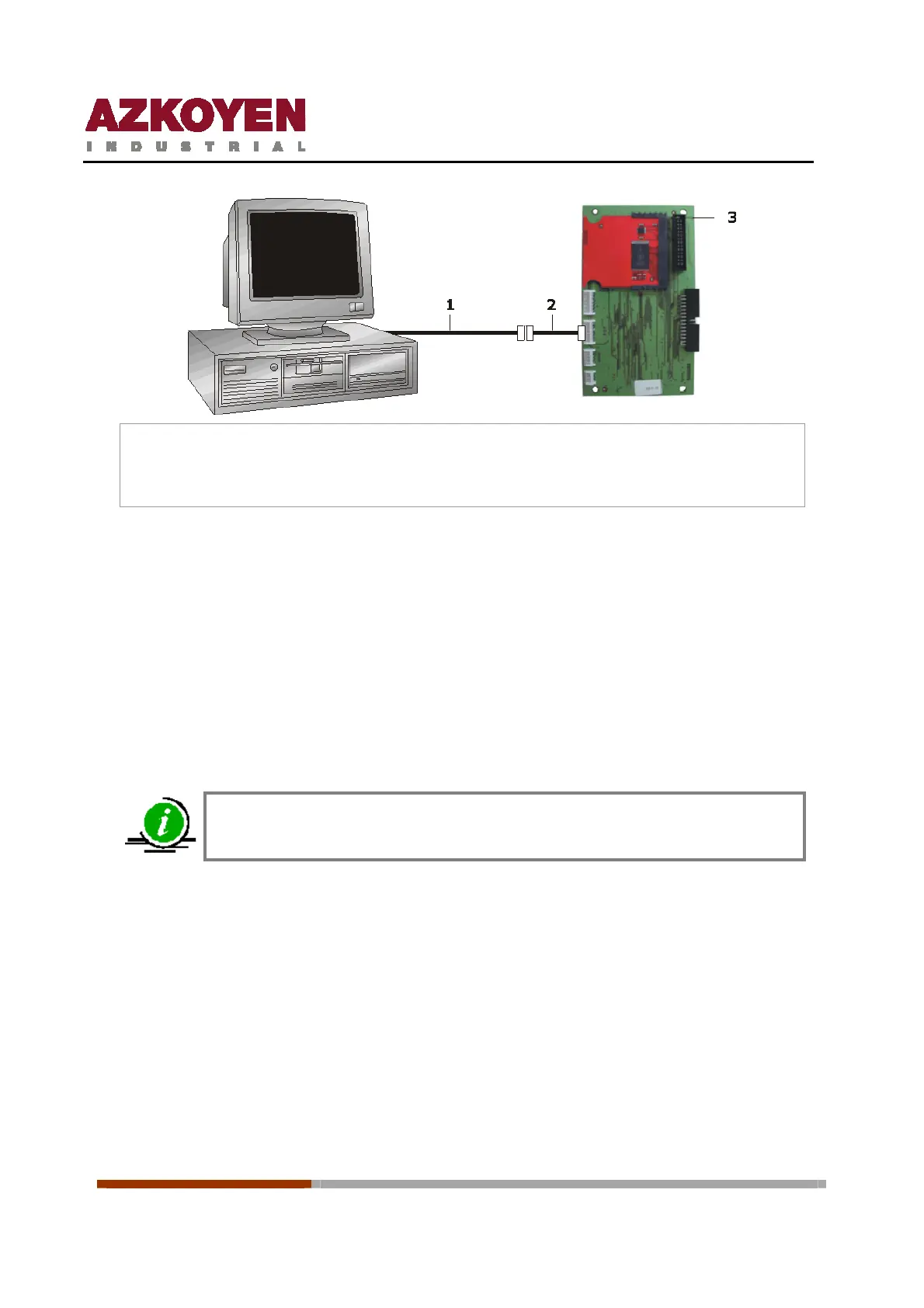
1. Cable serial port PC to serial port of the CPU
2. Loom RS232PC
3. Control board with the flash board connected
Procedure for updating:
1
st
Ensure that the machine is switched off.
2
nd
Connect the PC with the communication cable ref. 43210820-2. Loom RS232 to the
control board in the connector UART1.
3
rd
Start the programme LOADER installed in the PC.
4
th
Select the file with extension .S19 that is to be used.
5
th
Switch on the machine.
The updating of the programme will start automatically.
The time for the update is approx. of 1 minute
15.5.2 Updating of the flash board from a PC
The following is needed:
¾ PC with Windows 95 or above. The connection is made with the serial port, so the PC
must have one.
¾ A machine or the Rack of PCBs with the power supply.
¾ Programme: LOADER version 2.5 installed on the PC.
¾ Files with the programmes, extension .S19 installed in the PC.
¾ Connection cable between the serial port of the PC and the control board of the
machine to the connector UAR1.



 To Next Page