5
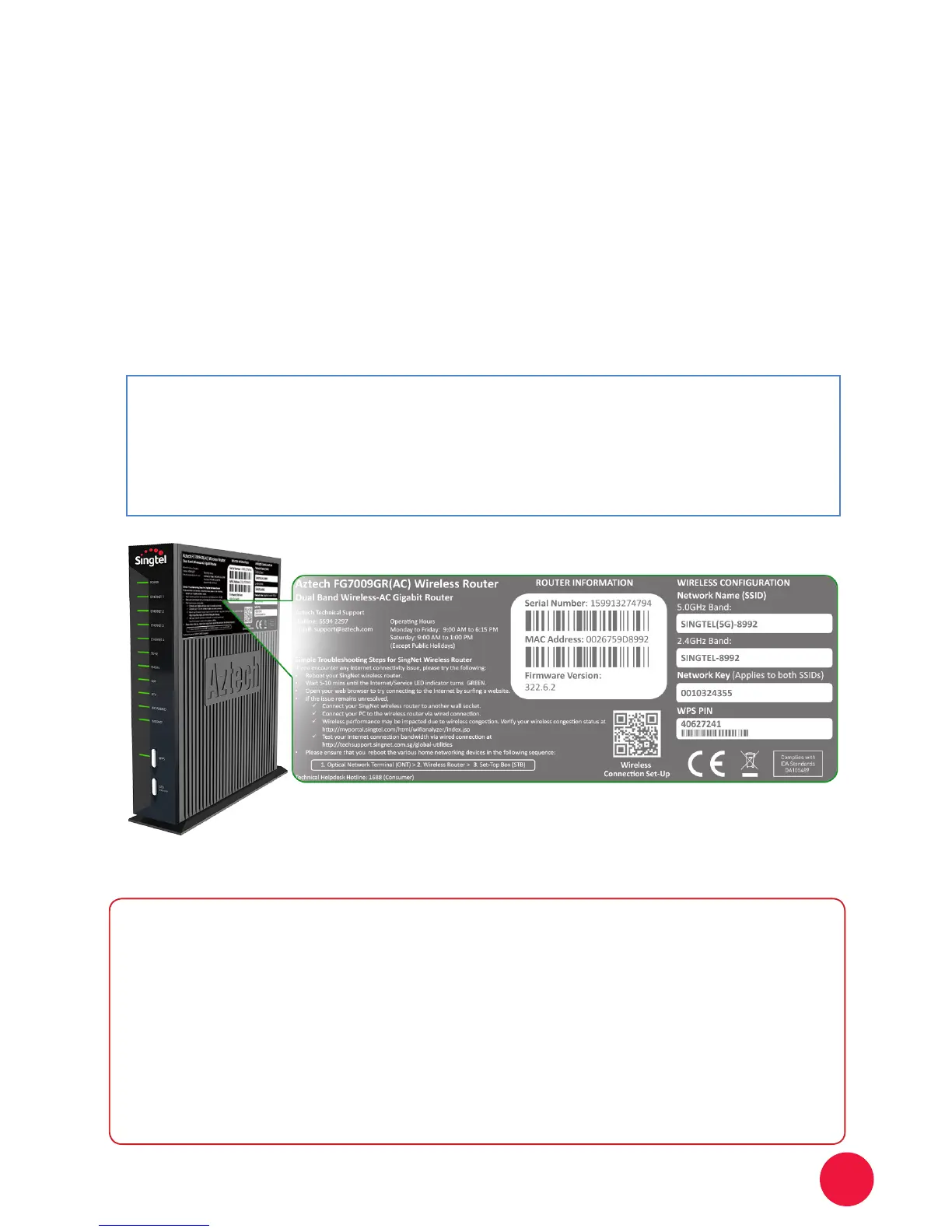
Please take note of two numerical codes which are your Network names
(for 2.4GHz and 5.0GHz) and Key with this diagram as a guide.
You may ll in these details on the box below for future reference.
Section A: Your 2.4GHz and 5.0GHz Wireless Bands
Network Name (SSID):
SINGTEL (5G) : _____________
SINGTEL : _____________
Network Key:
____________________
STEP 3:
Note: The default wireless encryption option is Mixed WPA2/WPA-PSK.
Write the last 4 numbers of your Network Name here
Write the 10 digit of your Wireless
Key here.
Dual Band Wireless Connectivity via
PC/Laptops
√ For any changes in your wireless router, you will have to connect to
a new default SSID and Network Key (ie. Password) on your end
device.
√ Do take note that your Dual Band Wireless Router will broadcast two
Wireless SSIDs (ie. for both 2.4GHz and 5.0GHz as seen above).
√ Both the 2.4GHz and 5.0GHz will appear on the network list of your
device if it supports dual band.
Useful Tips


 To Next Page