IMPORTANT!
You will need a wireless adapter (wireless PC card or wireless USB adapter)
or a wireless-enabled Notebook before you can proceed to the next section.
Please refer to your operating system’s respective instructions:
Section B. if you are using Window’s XP
Section C. if you are using Windows Vista
Section D. if you are using Windows 7
Section E. if you are using Windows 8
Section F. if you are using another wireless manager other than Windows
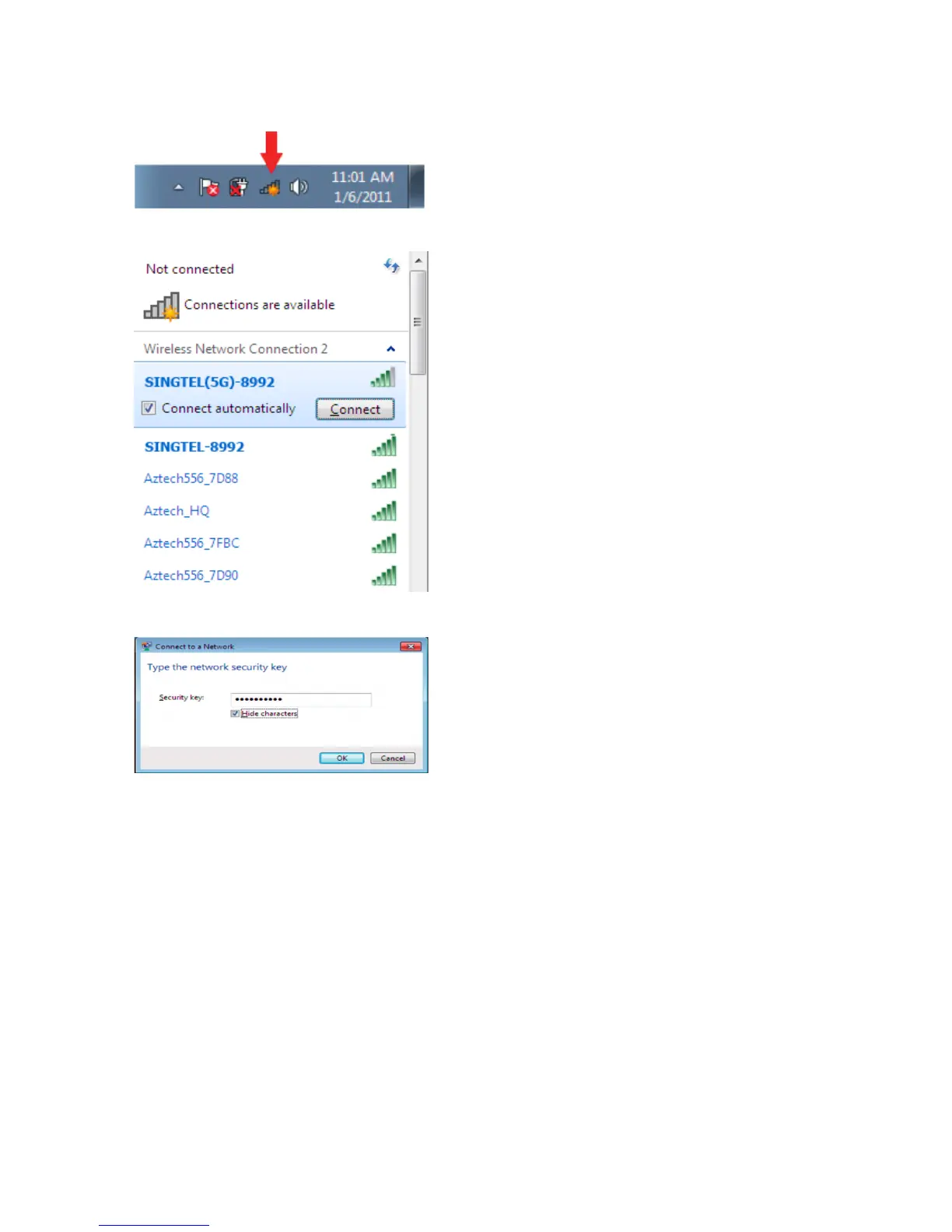
On the right hand corner of the task
bar, click on the wireless network
icon like the one on the left
You will see a window of the
available networks. Locate and
select your own wireless network
e.g. SINGTEL(5G)-8992
& SINGTEL-8992.
Note: Please refer to the sticker
pasted on your Wireless Router
if you are unsure of your Network
Name, or try refreshing your
network list if you do not see it.
Input your wireless network key
into the “Security Key” eld.
1
2
3
To connect to the 2.4GHz/5.0GHz Wireless Bands:


 To Next Page