6 7
PRODUCT DESCRIPTION
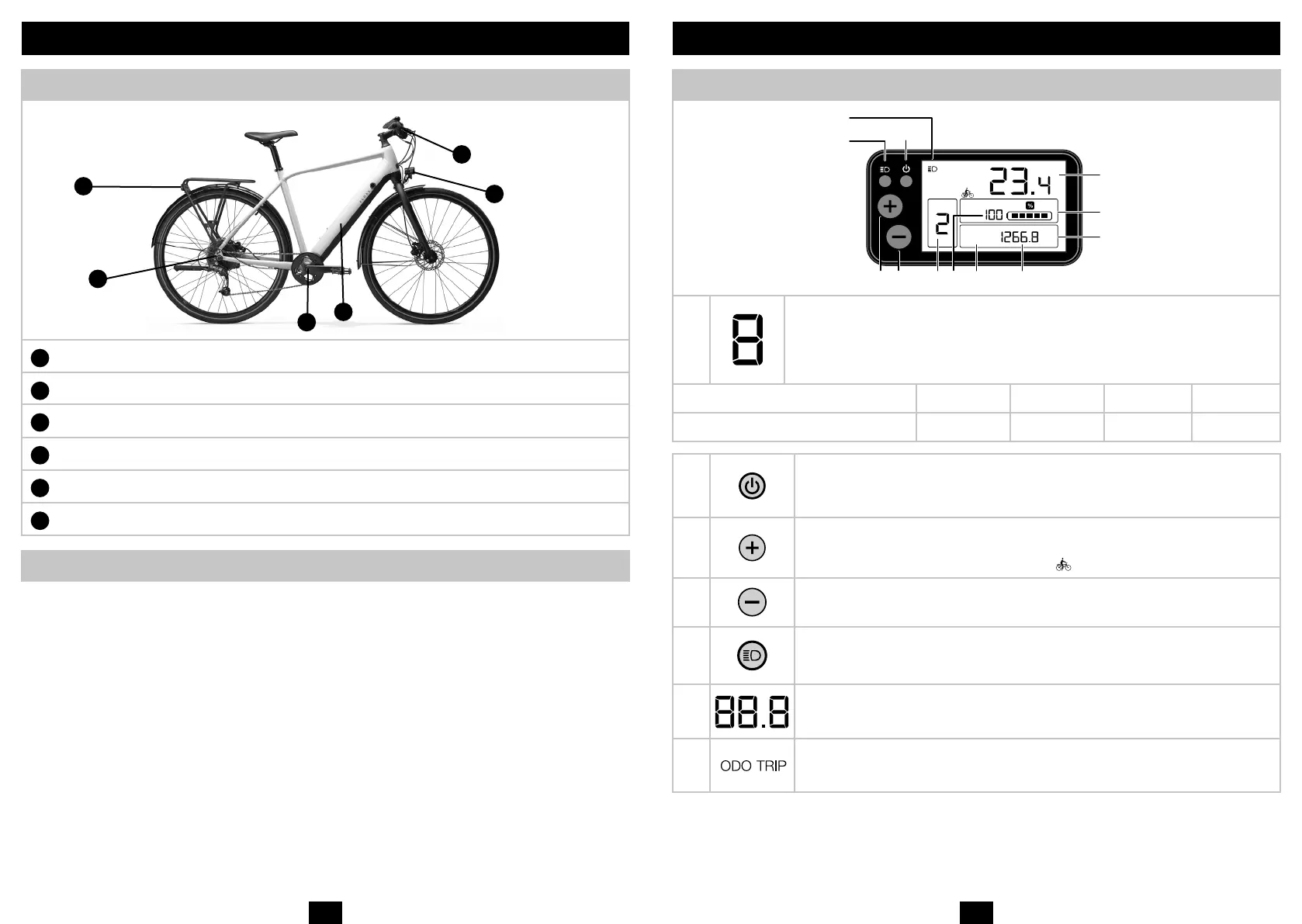
Technical features of e-bike
A
LED rear lighting
B
Battery and controller
C
Harness + connectors: Brakes/Control screen
D
LED front lighting
E
Motor
F
Pedalling sensor
Pedal-assi mode overview
The electrically assied bike can be used with or without assiance by pressing the ON/OFF button. Always make sure the battery
is properly inserted and locked. The electrical assiance will only work if you pedal. The assiance is cut o as soon as one of
the two brake levers is operated or the speed exceeds 25 km/h. It will automatically art again below 23 km/h. In order to preserve
battery life, the bike is equipped with a «power» limiter which limits assiance when the motor is under heavy ress. During inten-
sive use and in exceptional weather conditions, the pedal-assi mode may cut out to safeguard the syem.
SPEED AND CONTROL ELEMENTS
Display screen and function
10
5
2
KM / HPOWER
TRIP
to GO
ODO
NORMAL
KM
ECO
12 7 8143
6
11
9
1
Power assiance mode (0-1-2-3):
«0» no power assiance.
«1» is the default power assiance mode.
Each mode corresponds to the maximum assiance speeds set out below:
Mode 0 1 2 3
Average battery life* / 115 km 80 km 60 km
2
ON/OFF button:
Switch the electrically-assied bicycle on and o by holding the button down for a few seconds.
3
«+» button:
Step up to the higher power assiance mode by briey pressing the button
Switch to «walk assi» mode by holding the button down for a few seconds.
4
«-» button:
Step down to the lower assiance mode
5
Lighting button
The lighting on the bicycle can be switched on and o by briey pressing the button
Go to the settings by holding the button down for a few seconds
6 Speed indicator**
7
ODO: Records the total diance travelled. It cannot be reset to zero.
TRIP: Records the partial diance travelled. It can be reset to zero by pressing the «-» button for 10 seconds.
TRIPtoGO: Remaining diance that may be covered with the power assiance mode.
A
B
C
D
E
F


 To Next Page
 Loading...