10
SLD5k
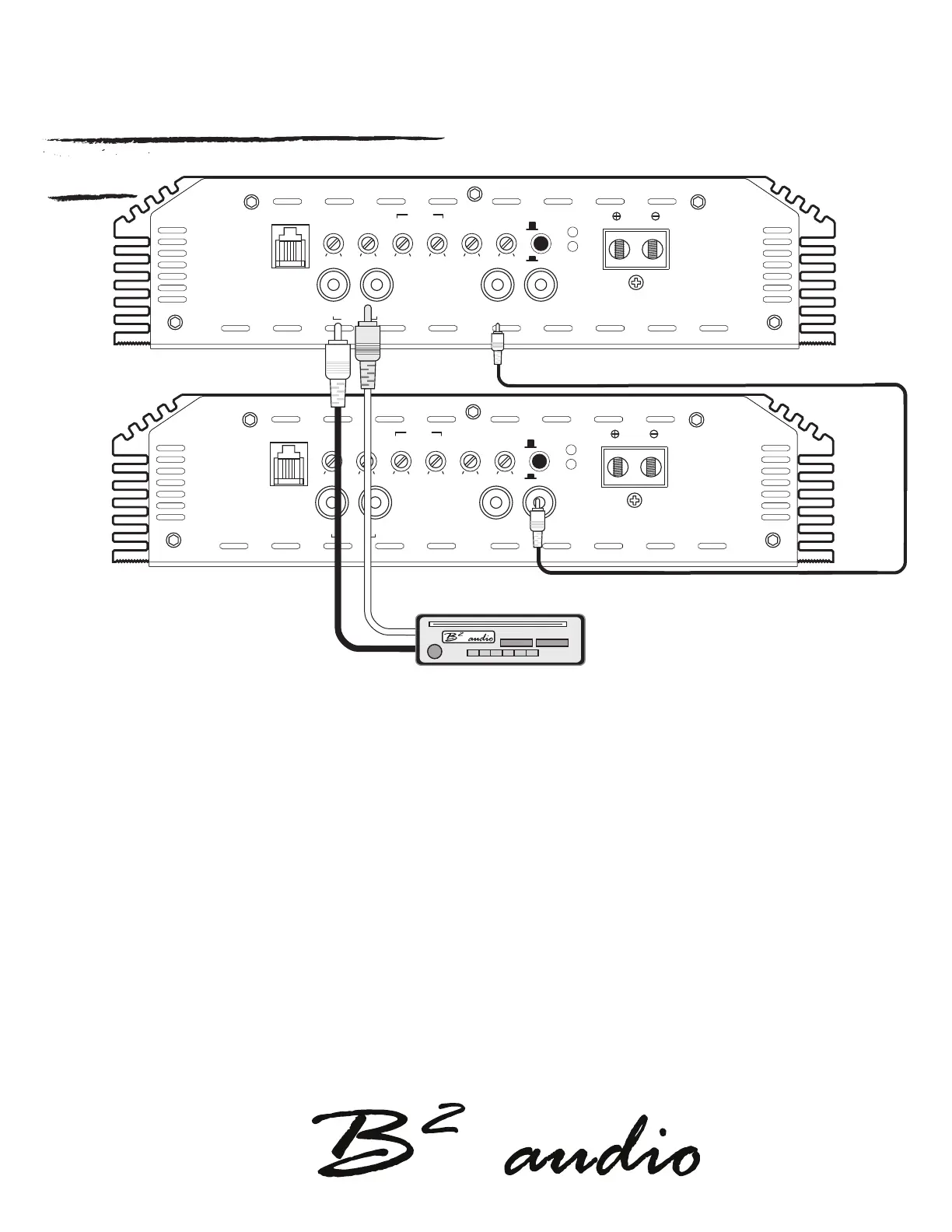
Strapped control panel setting steps
PROTECT
POWER
REMOTE
BOOST
FREQ.
LPF PHASESUBSONICGAIN
BASS
SLAVE
OUTPUT
MASTER
INPUT
SLAVE
INPUT
R
L
0.2V
6V
10Hz 50Hz 0dB
9dB
30Hz 90Hz 35Hz 250Hz 0 180
MASTER
SPEAKER
PROTECT
POWER
REMOTE
BOOST
FREQ.
LPF PHASESUBSONICGAIN
BASS
SLAVE
OUTPUT
MASTER
INPUT
SLAVE
INPUT
R
L
0.2V
6V
10Hz 50Hz 0dB
9dB
30Hz 90Hz 35Hz 250Hz 0 180
MASTER
SPEAKER
*Set slave as slave, button pushed in.
*Leave Master unpressed
HEAD UNIT
To link the master and slave amplier RCA connection follow the steps below.
Keep in mind ampliers needs to be switched o, linking the ampliers when switched on may cause harm and can void your warranty!
Step 1. Connect RCA from Head Unit / output source into master amplier RCA input.
If only one output is available, then use a Y-split to connect both L & R.
Step 2. Locate the Master / Slave switch on the right side of the control panel on the Master amplier.
Set the switch to Master position (unpressed).
step 3. Connect a single RCA from the RCA OUT on the master amplier.
Step 4. Locate the Master / Slave switch on the right side of the control panel on the Slave amplier.
Set the switch to Slave position (pressed).
Step 5. Connect the single RCA cable from the Master amplier’s Rca out to the slave amplier’s single RCA IN.


 To Next Page