13
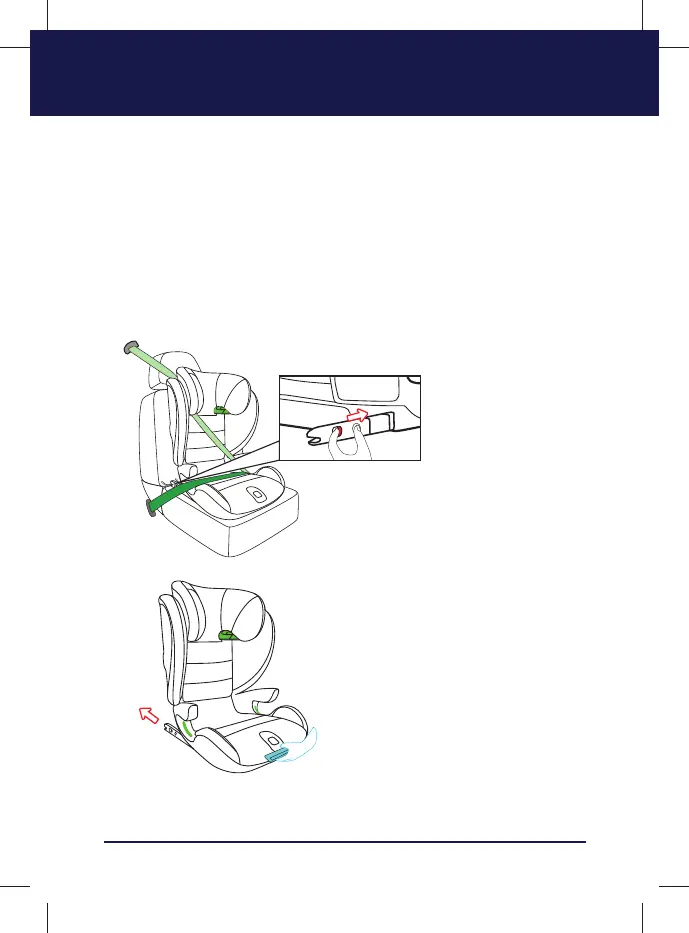
REMOVING THE SEAT
1. Push the buckle of the car, you will be able to slide the belt out of the shoul-
der belt guider;
2. Press the ISOFIX Dual Locking Button and pull the ISOFIX Unlocking Device
to separate the ISOFIX from the ISOFIX Connector. Before removing the
child seat out of the car,please make sure ISOFIX is slide into the child car
seat.
3. Remove the child car seat from the vehicle.
The color “Grenn” on the ISOFIX indicates it is
on locking status and “Red” color shows it is
on unlocking status. Press Dual Locking But-
ton and pull it back ward, you will be able to
unlock it.


 To Next Page