StartUp
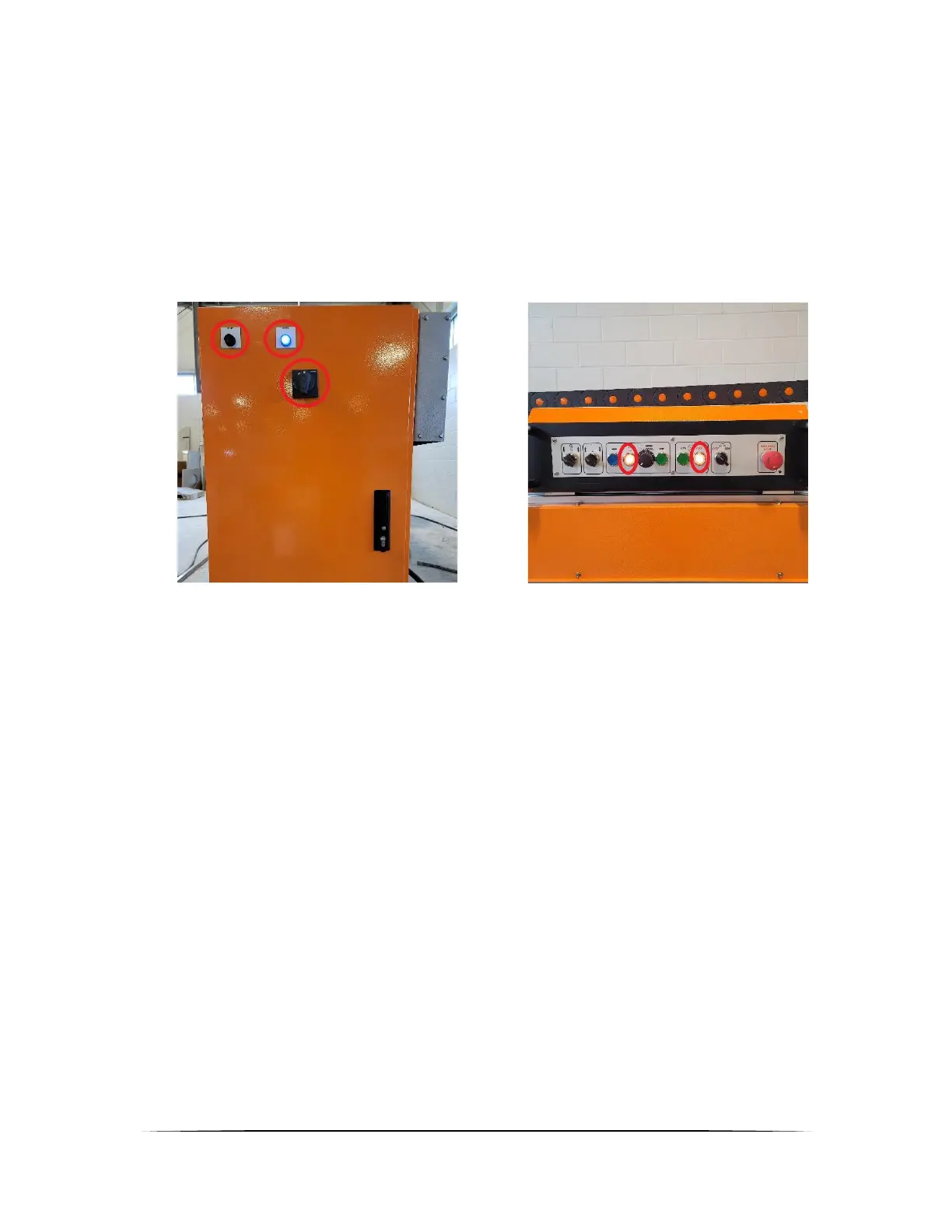
- Turn on the power disconnect and wait until the blue light illuminate. (Figure 1.2.1)
- Once the blue light illuminate, it means the power is turned on. (Figure 1.2.1)
- Wait for red blinking on saw stop and carriage stop button. This red blinking means that the
PLC is ready to be operated. (Figure 1.2.2)
- Press reset button to reset the safety on the machine and the machine is ready to be
operated. (Figure 1.2.1)
Standard Operation
- Figure 1.3.1 is the operator station to operate the machine. From left to right listed
o Raise roller
▪ Raise table roller to reduce friction between stone and table. Operator can
easily move the stone once it raised.
o Lower Clamp
▪ Lower the clamp to make sure the stone is not moving when it’s being
mittered
o Move left carriage
▪ Move the cutting unit to the left
o Stop carriage
▪ Stop the movement of the cutting unit
o Carriage speed
▪ Adjust the movement speed of the cutting unit
o Move right carriage
▪ Move the cutting unit to the right
o Start Saw
▪ Start the saw
o Stop Saw
▪ Stop the saw


 To Next Page