8
BF-UM-C-DP C260-EN November 2019
7.7 SETTINGS
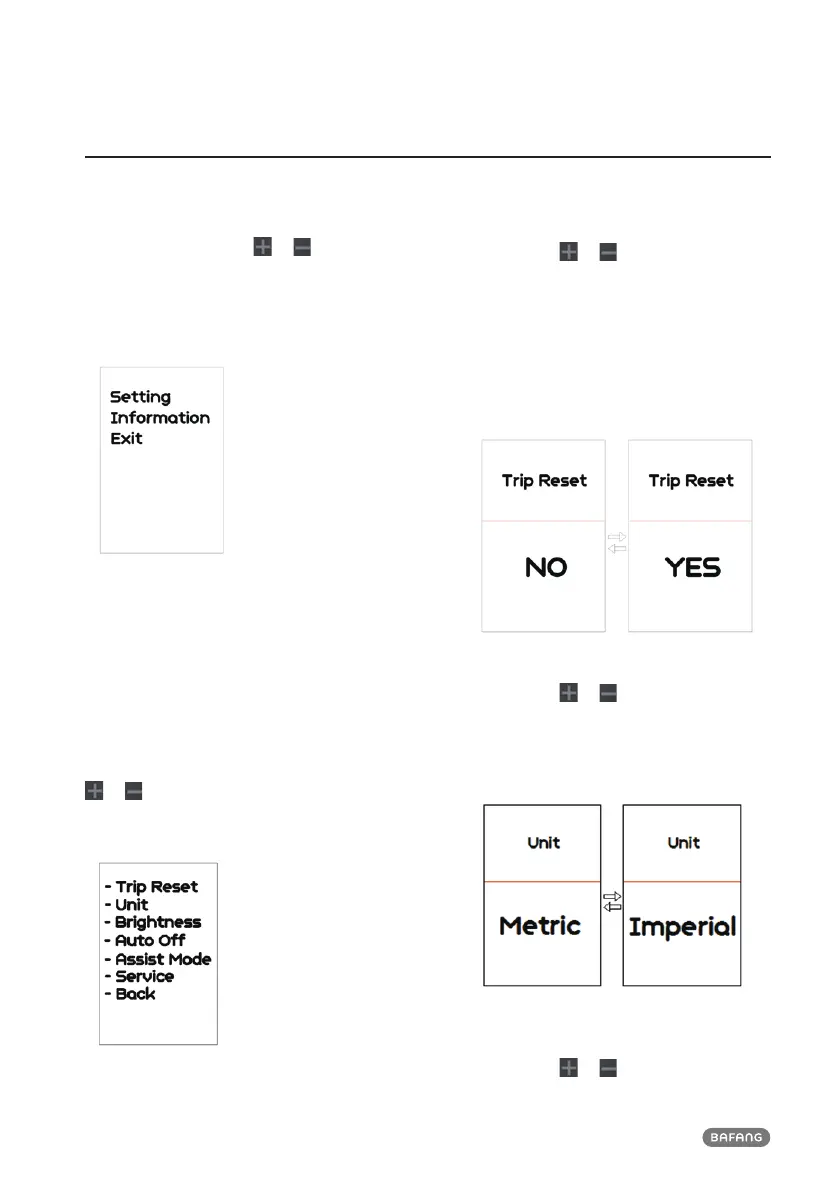
After the HMI powered on, briefly press
“Mode” button two times to enter into the
“SETTING”. Briefly press or (<0.5s) to
select and then briefly press (<0.5S) “Mode”
button to confirm and enter into the option.
Note: the speed must be "0" then can enter
the setting interface.
Into the Setting function
You can quickly press the “Mode” (<0.5S)
button twice at any time, or select “BACK” →
“EXIT”to exit back to the main interface.
7.7.1 “Setting” interface
In “SETTING” interface, briefly press (<0.5S)
or to select “Setting” and then briefly
press (<0.5S) “Mode” to confirm and enter into
“Setting”.
The operations in “Setting” item
7.7.1.1 “TRIP Reset”---set reset function
for single-trip
Briefly press
or to select “TRIP Reset”,
and then briefly press “Mode” to enter
into the item. Select “NO”/“YES” (“YES”-
to clear, “NO”-no operation), then briefly
press “Mode” to save and exit back to the
"Setting" interface.
NOTE: the cycling time, average speed and
maximum speed are reset at the same time.
7.7.1.2 “Unit”--- set unit for km/mile
Briefly press
or to select “Unit”, and
then briefly press “Mode” to enter into the
item. Select “Metric”/ “Imperial”, then briefly
press “Mode” to save and exit back to the
"Setting" interface.
7.7.1.3 “Brightness”--- set backlight
brightness
Briefly press
or to select “Brightness”,


 To Next Page