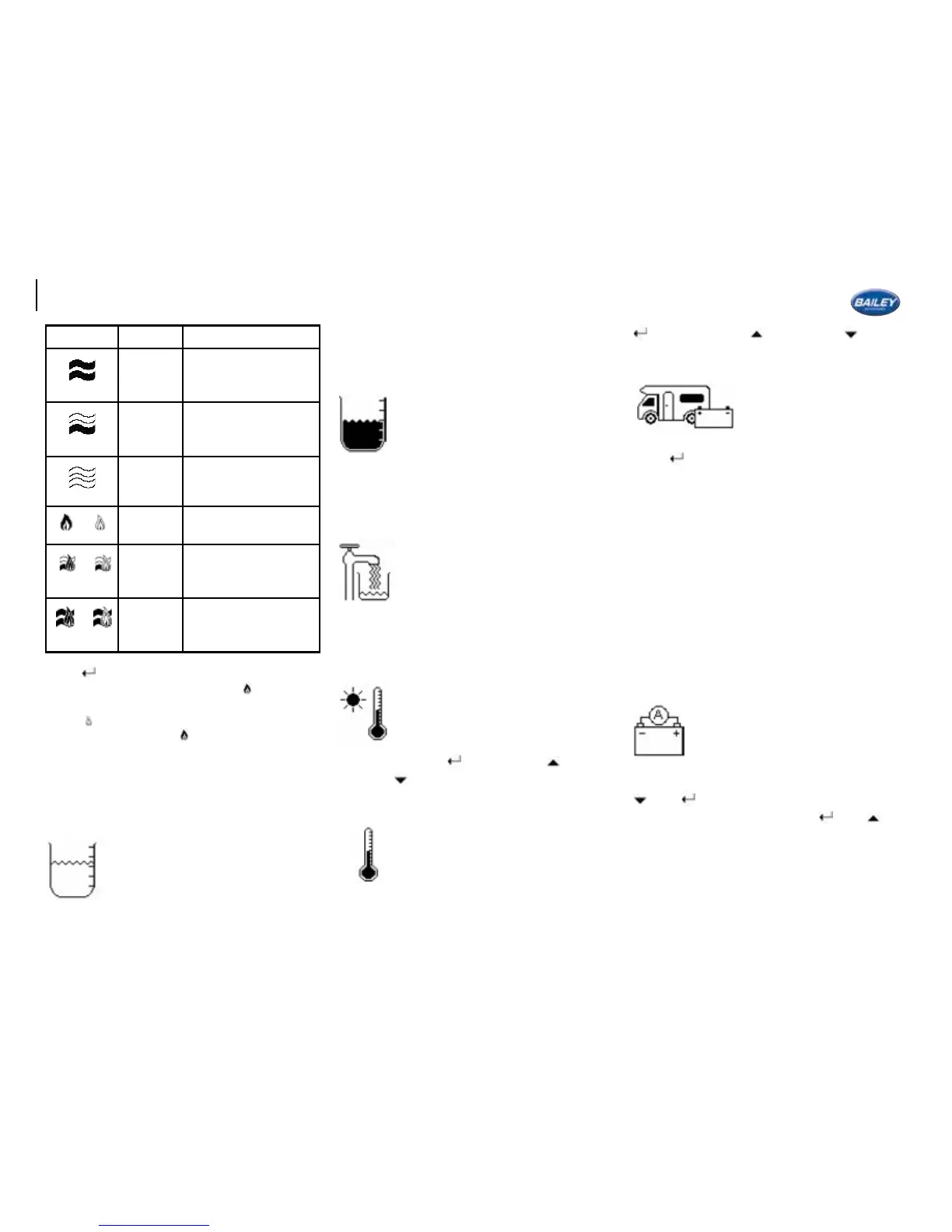
Icon Mode Description
Electric
high
only
To operate the
heater on electric
high setting only
Electric
low only
To operate the
heater on electric
low setting only
Heater
off
To turn the heater
off completely
or
Gas
function
To operate the
heater on gas only
or
Gas and
electric
low
To operate on gas
and electric low
or
Gas and
electric
high
To operate on gas
and electric high
Press
to set the heater mode.
On all gas settings a lled ame
represents
that the gas is currently burning. An empty
ame shows that gas is selected but not
burning. A ame icon
on the homepage will
also indicate that a gas appliance is currently
in use.
Note: Please consult the Whale user manual
for more detailed information on each mode.
Water Level
The level in the fresh water tank is
displayed as a % on this screen.
Note: See “Notications and
Warnings” section for water low
warning and “User Settings” section for water
low alarm enable.
Waste Level
The level in the waste water tank is
displayed as a % on this screen.
Note: See “Notications and Warnings” section
for waste high warning and “User Settings”
section for waste high alarm enable.
Fill Internal Tank?
With the external pump connected to
the inlet and to an external water
source, press to ll the internal
tank.
Note: When the internal tank is full the pump
will stop automatically.
External Temperature
The outside temperature, as detected
by a sensor underneath the van, is
displayed on this screen.
You can change between degrees
Celsius and degrees Fahrenheit by
pressing
and selecting for °C or
for °F.
Internal Temperature
The inside temperature, is detected
by a sensor inside the control panel,
is displayed on this screen.
You can change between °C
and degrees °F by pressing
and selecting for °C or for °F.
Select Battery
With 230V mains
disconnected, the user can
choose to draw power from
the leisure battery OR the
vehicle battery.
Press to swap between batteries.
If the “Auto-Battery” feature is enabled (see
“User Settings” section) the system will
automatically switch to “Vehicle Battery” if
the “Leisure Battery Voltage” is low (less than
11V).
When 230V mains is connected “Leisure
Battery” is automatically selected and cannot
be changed.
Note: See “Notications and Warnings” section
for vehicle battery notication.
Leisure Battery Amps
The current being drawn from your
leisure battery, in Amps, is displayed
on this screen. A higher current will
drain your battery faster.
To display current draw as a percentage press
then . 12A reads 100%. You can return to
displaying in Amps by pressing
then .
Note: See “Notications and Warnings” section
for High current warning and “User Settings”
section for amps high alarm enable.
48





 To Next Page