18
19
20
21
22
23
24
25
26
27
28
29
30
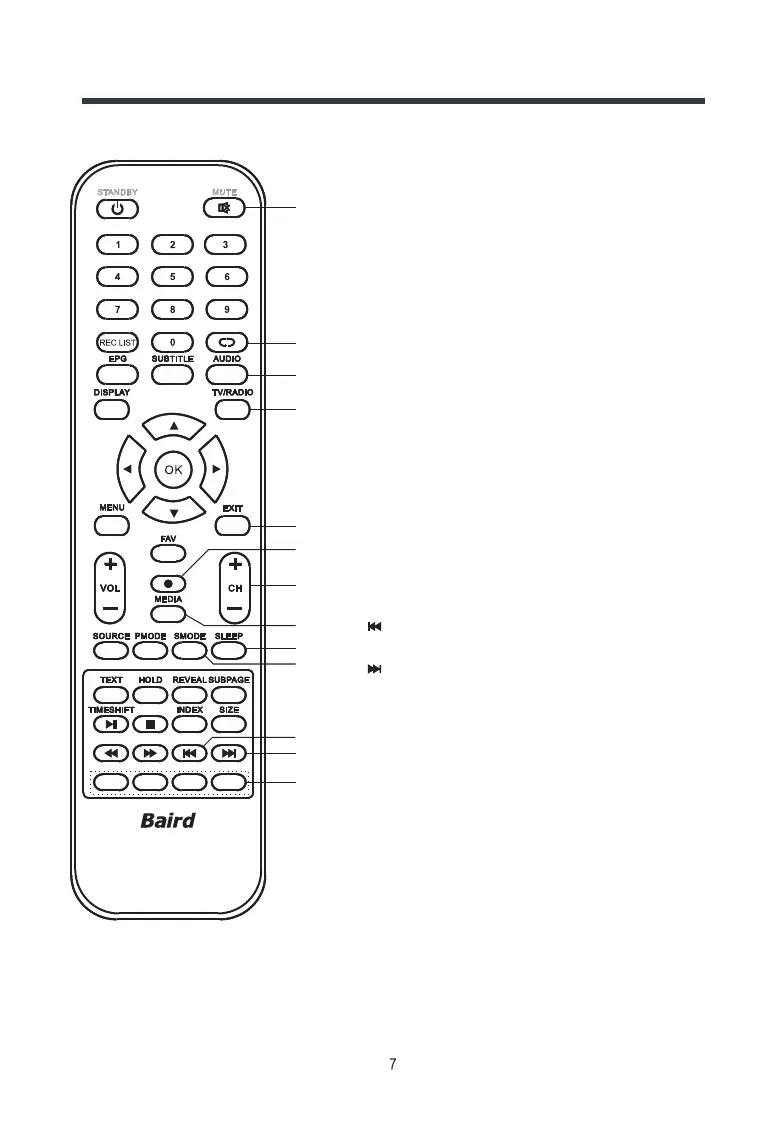
18.
To switch the sound on or off.
19.
28.
29.
RETURN
To return to previously selected programme number in TV mode.
20. AUDIO
In ATV mode, press to select nicam modes.
In DTV mode, press to select language.
21. TV/RADIO
In DTV mode, press to select TV or Radio mode.
22. EXIT
To exit the current menu.
23. REC
In DTV mode, press to record.
24. CH-/+ (PROGRAM UP/DOWN)
To select the desired programme in ascending or descending order.
25. MEDIA
Press to enter the USB mode.
26. SLEEP
To set the sleep timer.
27.SMODE
To select a sound mode.
In USB mode, press to select the previous chapter or song.
In USB mode, for select the next chapter.
30. COLOUR BUTTONS
Use for channel edit and teletext function.
MUTE
Controls
OK



 To Next Page