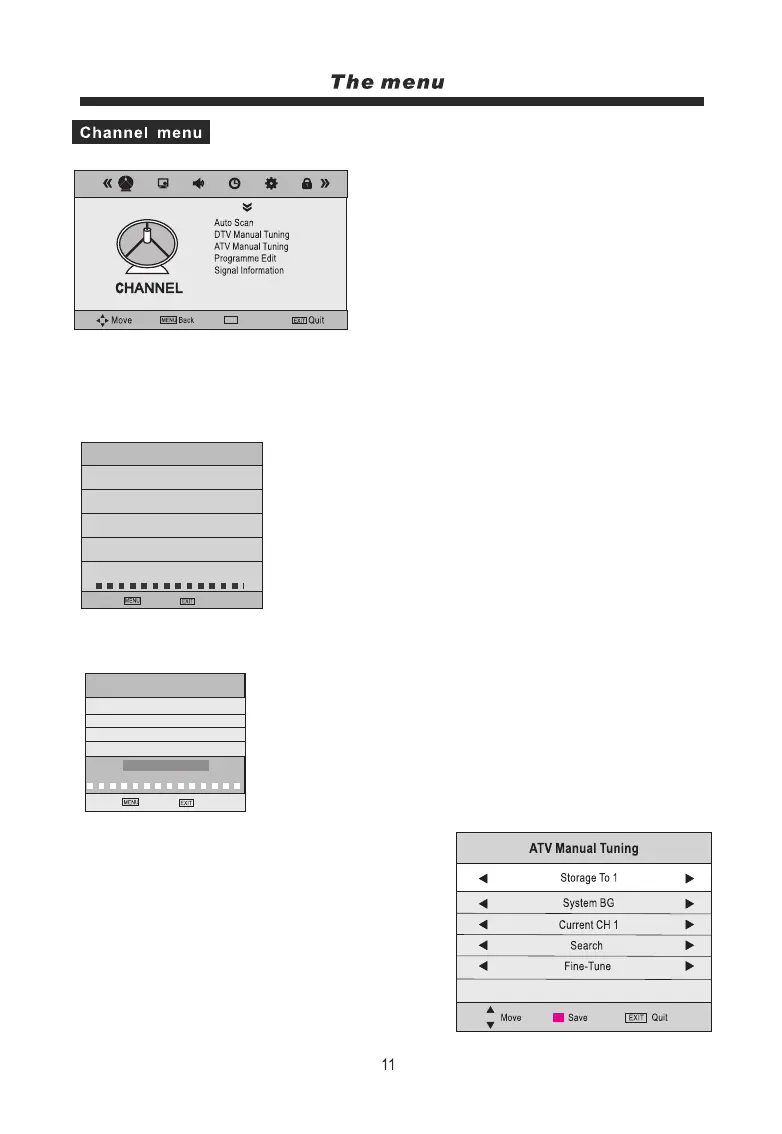
1. Press the MENU button on the remote
controller to display the OSD main menu.
2. Press t/u button to select the CHANNEL menu.
3. Press the OK button to enter the menu, then you can
use p/qbuttons to select the sub menu options.
4. Press t/ubutton to adjust.
5. Press the MENU or EXIT button to exit from
the menu.
Auto Scan:
that you use “Auto Search “during installation of this unit.
p/q/t/ubutton to select a corresponding
country(default UK) and tune type,
This option allows you to tune all stations that can be received automatically. It’s recommended
Press OK button to enter the Auto Scan menu, use
then press OK button to start searching.
ATV Manual Tuning
Press OK button to enter the ATV Manual Tuning menu.
System: Select a TV system for searching.
Fine Tune: Press◄/►button to fine-tune.
Frequency: Display the current frequency.
Note: Press RED button to save your settings
Channel Tuning
TV
DTV
Radio
35% 628.25MHz (TV)
DTV Manual Tuning
Press OK button to enter the DTV Manual Tuning menu,
select a DTV channel, and press OK button to
NO SIGNAL
DTV Manual Tuning
◄ ►
Bad Normal Good
No Signal
Data
Storage To: This item is disabled.
Current CH: Select the channel you want to manually tune.
CI Information
Back Quit
: 0 Programme(s)
: 0 Programme(s)
: 0 Programme(s)
: 0 Programme(s)
During searching, you can press the MENU or EXIT button to
stop the search at any time, and return to the previous menu.
Back Quit
Search: Press◄/►button to start search.
Select
start searching.
OK
Frequency 471.25MHz
UHF CH44
OK



 To Next Page