18
After Sales Support
44 800 496 9698
customercare@balcolifestyle.com
Model Number HE180433
Playback mode
ThisallowsyoutoselectthroughyourphotosandvideosstoredontheinternalmicroSDCardusingthe
UpandDownbuttonsandplaythembackontheActionCamera’sscreen
VideosorpicturescanbedeletedindividuallybyholdingdowntheOKbuttonforafewseconds.This
willgiveyoutheoptiontodeleteornot.Selectdeletewhenhighlightedtoconrmdeletion
Settings mode
Video/Photo settings
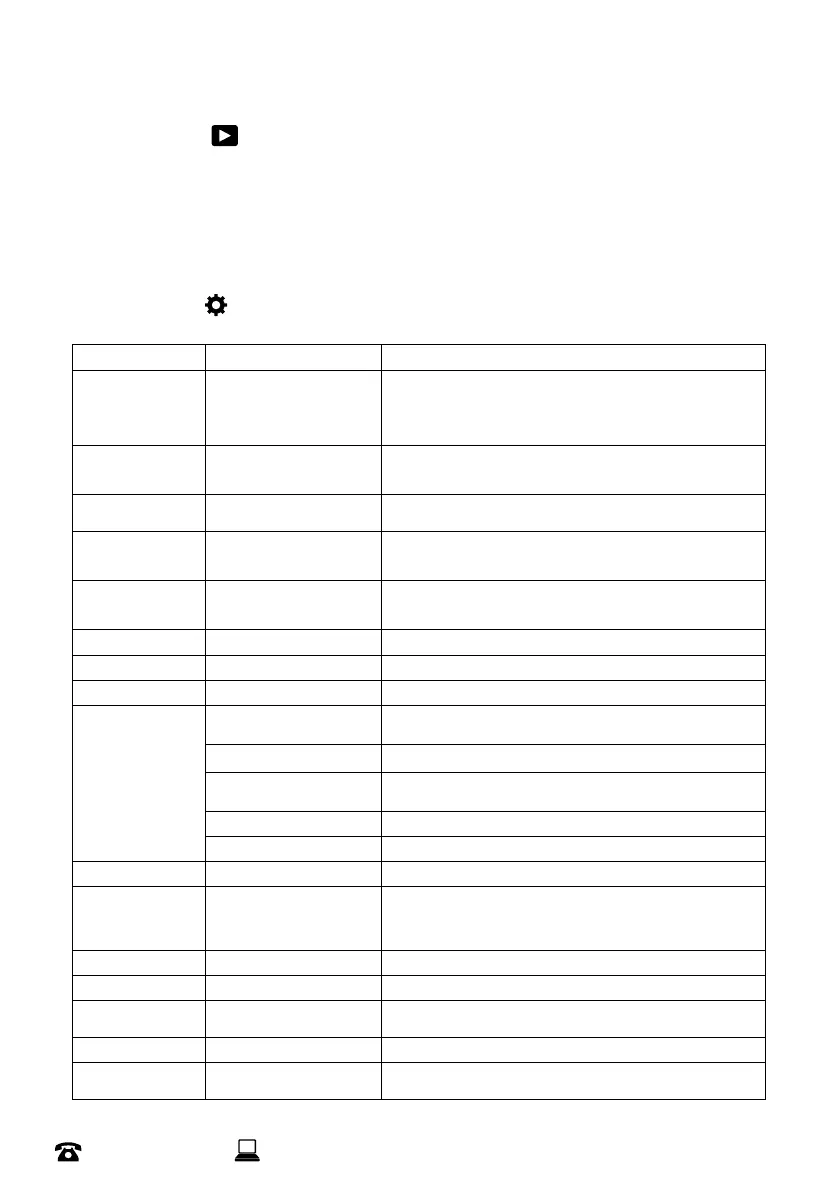
Option Setting Description
Recordresolution
Video only
4K 60FPS, 4K30FPS,
2.7K30FPS,1080P120FPS,
1080P60FPS,1080P30FPS,
720P240FPS,720P120FPS,
720P60FPS,720P30FPS
Choosefromdierentrecordingresolutionsandframerates
Videolength
For loop mode
Video only
2 min, 3min,5min Setthemaximumlengthofarecordedvideoforwhenloopmode
isactive
PixelInset
Photo only
16M,13M,8M Choosebetweendierentphotoresolutions
Slowlyrec
For Slowly mode
Video only
1080P~720P SetstheresolutionforSlowlymode
Recinterval
For Lapse mode
Video only
0.5~60s SetsthetimebetweenphotosforLapsemode
PhotoInterval 3s~30s Forautomode
PhotoFrequency 3p/s~10p/s Forburstmode
Countdown 3s~20s Fortimermode
WhiteBalance
Allows the removal
of unrealistic color
casts, so that
objects which
appear white in
person are rendered
white in your photo
Auto
Cameraanalysesthesceneandwillsetthewhitebalance
accordingly
Sunny Givesneutralcoloursundermiddaysun
Cloudy Makesitslightlywarmerandaddsredtotheimagetoneutraliseand
lookmorenatural
Incandescent Usuallyusedforindoorstocoolthecolourdown
Fluorescence Similartocloudy,makestheimagewarmer
Exposuresettings -3,-2,-1,0,+1,+2,+3 Adjusttheamountoflightwhichreachesyourcamera’ssensor
Meteringmode Average Metering,
CentreMetering,
SpotMetering,
MatrixMetering
Meteringsettingsworkbyassessingtheamountoflightavailablefor
aphotograph,andthenadjustingtheexposureaccordingly
Sharpness High,Middle,Low Adjusttheimage’soverallclarityintermsofbothfocusandcontrast
Videoquality High,Middle,Low Adjustthequalityoftherecordedvideo
ISO Auto,100,200,400,800,
1600,3200,6400
Measuresthesensitivityofthecamera’simagesensor
Timewatermark On/O
Recordaudio
Video only
On/O
Instructions


 To Next Page