Need help?
Do you have a question about the Balmac 205ce and is the answer not in the manual?
Powers the instrument on and off.
Selects vibration amplitude display (DISP, VEL, ACC).
Selects the measurement range (200, 20, 2, Very Low).
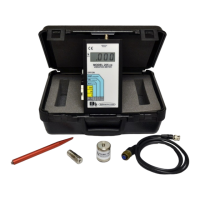
Connect the Model 601 Pickup to the 059-5' Pickup Cable.
Choose magnetic base clamp or probe tip.
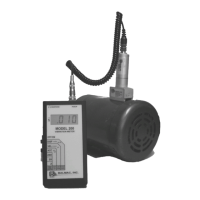
Connect the cable and pickup assembly to the Model 205ce.
Depress the OFF/ON switch to power the unit on.
Choose between Displacement, Velocity, or Acceleration.
Set the range button for accurate readings.
Recommended for machinery severity, proportional to destructive forces.
Measures peak-to-peak distance in mils, requires known operating speed.
Useful for detecting bearing/gear defects, levels <0.5 g's are acceptable.
Use 1/4-28 UNF stud or magnetic base on clean surface.
Mounting stud must not extend more than 0.2" into the pickup.
Do not slam or bang the accelerometer when mounting.
Guide for selecting and setting vibration limits for machinery.
Defines Class-1 to Class-4 machinery for severity assessment.
Check batteries, power switch, and connections.
Verify vibration pickup, cable, and signal.
Check installation, loose components, and signal-to-noise ratio.
Provides phone, email, and mailing address for support.
Details the two-year warranty and equipment return process.
Lists major assemblies and accessories for replacement.
Symbol indicating when batteries need replacement.
Steps to turn off, open, replace batteries, and close.
Product disposal according to WEEE Directive.
Details measurement ranges for displacement, velocity, acceleration.
Lists selectable measurement ranges for English and Metric models.
Meter accuracy and operational frequency range.
Specifies sensitivity (mV/g) and acceleration range (g peak).
Details frequency response characteristics.
Lists temp range, limits, mounting, and connector type.
 General
| Brand | Balmac |
|---|---|
| Model | 205ce |
| Category | Measuring Instruments |
| Language | English |

 To Next Page