Documentation Number 3PCIO1-0903 Manual Appendix A A-1
B&B Electronics Mfg Co – 707 Dayton Rd - PO Box 1040 - Ottawa IL 61350 - Ph 815-433-5100 - Fax 815-433-5104
B&B Electronics Ltd – Westlink Comm. Pk. – Oranmore, Galway, Ireland – Ph +353 91-792444 – Fax +353 91-792445
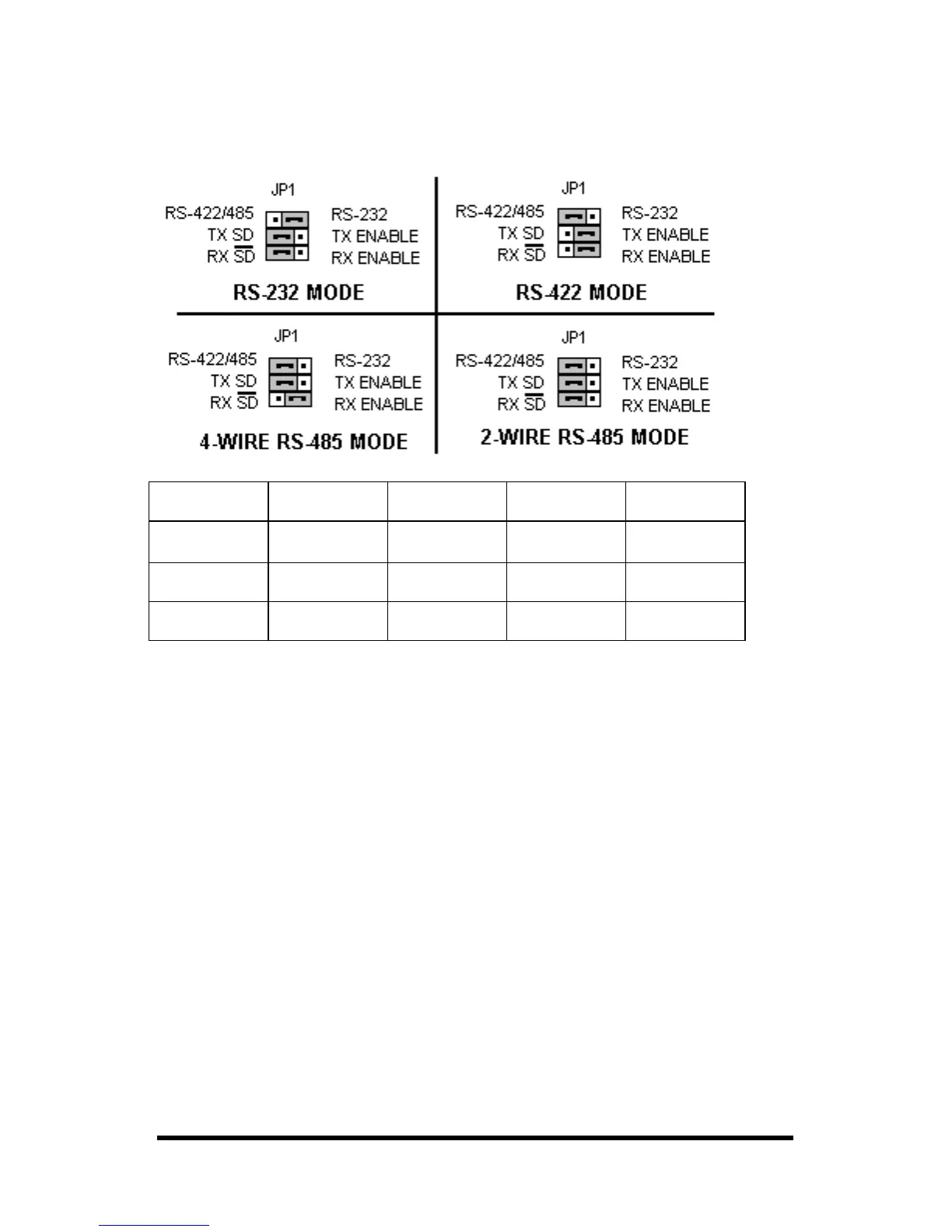
Appendix A – Jumper/Mode Settings
Set the 3 JP1 Jumpers to match your Operating Mode.
Jumpers RS-232 RS-422
4-Wire
RS-485
4-Wire
RS-485
2-Wire
JP1 Top 232
(Right)
422/485
(left)
422/485
(left)
422/485
(left)
JP1 Middle
-----
No effect
TX ENABLE
(right)
TX SD
(left)
TX SD
(left)
JP1 Bottom
-----
No effect
RX ENABLE
(right)
RX ENABLE
(right)
RX SD
(left)
Table A – Jumper/Mode
The top jumper sets either RS-232 or RS422/485 DB9 connections.
Only the Top Jumper position affects RS-232 mode
.
The middle jumper sets either RS-485 or RS-422 transmit enable.
The bottom jumper sets either RS-485 (half-duplex) or receive
enable.
Full-duplex 4-wire modes must select RX ENABLE.



 To Next Page