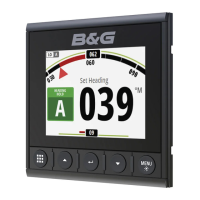
Overview of The Vessels Navigation System
! Give a general overview of what is installed on the vessel and explain that data is shared
between all navigation devices on the vessel.
! Point out that button functions in white text require a single key press while those in red
require a press and hold
MultiFunction Navigation System (B&G Zeus Touch, Zeus
2
)
! Demonstrate the main pages using the “Home” button – charting, radar, instruments. In
addition some units may be integrated with engine instruments, onboard cameras and the
vessels audio system.
! Point out the main features of the Sailsteer screen (TWA, Laylines, Heading, Tide Vector)
! Point out the laylines on the chart screen
! Explain that chart information is on an SD Card and point out it’s location
! Demonstrate how to zoom and pan the chart.
! Plot a waypoint at the cursor and demonstrate “GoTo” waypoint
! Explain that weather data can be overlayed on the chart by inserting Grib weather data on
an SD Card.
! Demonstrate how to open the pdf of user manual on screen (from Files>Manuals).
! Demonstrate how to enter the Settings Menu (press Menu>Settings)
PWR Key
! Repeat press PWR key to demonstrate backlight adjustment and switch to night mode.
Vessels with AIS
! Point out any AIS targets if visible and highlight vessel details using the cursor
! Point out MOB keys
!
Vessels with Radar
! Switch to the radar screen and show how to adjust Adjust Gain/Seastate/Rain Clutter
! Move cursor to show range and bearing to cursor
! Demonstrate how to set up a guard zone
! Switch to the chart screen and demonstrate radar Overlay (Chart>Menu>Overlay>Radar)
Vessels with GoFree WiFi
! Show how to access the WiFi password (System>network?WiFi>Access Points)
! Demonstrate control of Multifunction Display from iPad or Android tablet.
Handover Reference Guide


 To Next Page