page 25page 25
page 25page 25
page 25
595ML CRL
800-00050
INSTRUMENT PANELS CONTINUED...
11
11
1
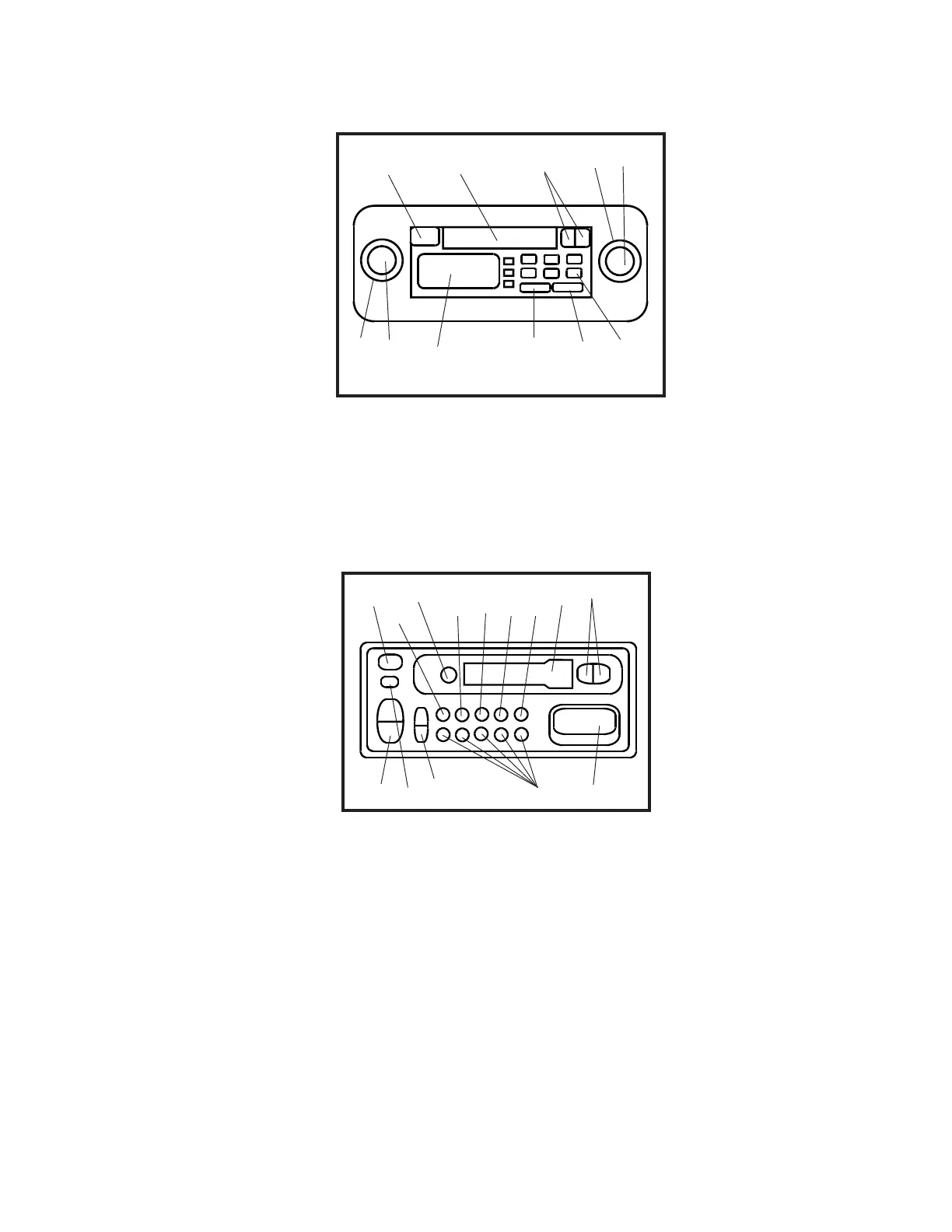
DisplayDisplay
DisplayDisplay
Display
22
22
2
Memory ButtonsMemory Buttons
Memory ButtonsMemory Buttons
Memory Buttons
To enter a radio station into a
memory button, push and hold
until radio plays again. (One
station per button).
33
33
3
Seek/Clock Set ButtonsSeek/Clock Set Buttons
Seek/Clock Set ButtonsSeek/Clock Set Buttons
Seek/Clock Set Buttons
To search for a radio station,
push either side of button.
To set clock, push left side for
hours, right side for minutes.
44
44
4
Volume/Adjust ButtonsVolume/Adjust Buttons
Volume/Adjust ButtonsVolume/Adjust Buttons
Volume/Adjust Buttons
Adjusts volume or adjusts levels
of selected mode (Ex: when in
Bass mode, adjusts bass level.
See also item 9 and 12).
55
55
5
Power On/Off ButtonPower On/Off Button
Power On/Off ButtonPower On/Off Button
Power On/Off Button
66
66
6
Release ButtonRelease Button
Release ButtonRelease Button
Release Button
Press to release face plate.
77
77
7
Source Select ButtonSource Select Button
Source Select ButtonSource Select Button
Source Select Button
Press to select AM, FM or
cassette (if already inserted).
88
88
8
Eject Cassette ButtonEject Cassette Button
Eject Cassette ButtonEject Cassette Button
Eject Cassette Button
RADIO/CASSETTE (BLAUPUNKT)RADIO/CASSETTE (BLAUPUNKT)
RADIO/CASSETTE (BLAUPUNKT)RADIO/CASSETTE (BLAUPUNKT)
RADIO/CASSETTE (BLAUPUNKT)
88
88
8
11
11
1
1414
1414
14
33
33
3
44
44
4
22
22
2
55
55
5
77
77
7
66
66
6
99
99
9
1313
1313
13
1212
1212
12
1111
1111
11
1010
1010
10
(mounted to ceiling above operator's seat)(mounted to ceiling above operator's seat)
(mounted to ceiling above operator's seat)(mounted to ceiling above operator's seat)
(mounted to ceiling above operator's seat)
11
11
1
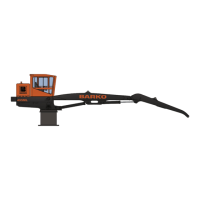
Cassette DoorCassette Door
Cassette DoorCassette Door
Cassette Door
Insert cassette here.
22
22
2
Eject Cassette ButtonEject Cassette Button
Eject Cassette ButtonEject Cassette Button
Eject Cassette Button
33
33
3
Fast Forward/Rewind ButtonsFast Forward/Rewind Buttons
Fast Forward/Rewind ButtonsFast Forward/Rewind Buttons
Fast Forward/Rewind Buttons
Push left button to fast forward
cassette. Push right button to
rewind cassette. Push both
buttons to reverse cassette.
44
44
4
Power On/Volume KnobPower On/Volume Knob
Power On/Volume KnobPower On/Volume Knob
Power On/Volume Knob
Turn knob to right to turn on
system. Volume increases as
knob is turned to right.
4a4a
4a4a
4a
Fade/Balance KnobFade/Balance Knob
Fade/Balance KnobFade/Balance Knob
Fade/Balance Knob
Turn to balance speaker sound.
RADIO/CASSETTE (SONY)RADIO/CASSETTE (SONY)
RADIO/CASSETTE (SONY)RADIO/CASSETTE (SONY)
RADIO/CASSETTE (SONY)
11
11
1
22
22
2
33
33
3
44
44
4
55
55
5
4a4a
4a4a
4a
5a5a
5a5a
5a
66
66
6
77
77
7
88
88
8
99
99
9
(mounted to ceiling above operator's seat)(mounted to ceiling above operator's seat)
(mounted to ceiling above operator's seat)(mounted to ceiling above operator's seat)
(mounted to ceiling above operator's seat)
55
55
5
Tuner KnobTuner Knob
Tuner KnobTuner Knob
Tuner Knob
Turn knob to locate stations.
5a Tone Knob5a Tone Knob
5a Tone Knob5a Tone Knob
5a Tone Knob
Turn knob to change tone
from bass to treble.
66
66
6
DisplayDisplay
DisplayDisplay
Display
77
77
7
Memory ButtonsMemory Buttons
Memory ButtonsMemory Buttons
Memory Buttons
To enter a radio station into a
memory button, push and
hold until radio plays again.
(One station per button).
88
88
8
Band ButtonBand Button
Band ButtonBand Button
Band Button
Changes bands from AM to
FM.
99
99
9
Seek ButtonSeek Button
Seek ButtonSeek Button
Seek Button
Push to seek next radio
station.
99
99
9
Mute/Audio Adjust/ClockMute/Audio Adjust/Clock
Mute/Audio Adjust/ClockMute/Audio Adjust/Clock
Mute/Audio Adjust/Clock
Adjust ButtonAdjust Button
Adjust ButtonAdjust Button
Adjust Button
Press once to mute sound.
Press for 1 second to access
Base, press again for Treble,
for Balance and again for Fade.
When in any of the above four
modes, use the Volume/Adjust
Buttons (item 4) to adjust level.
1010
1010
10
Scan ButtonScan Button
Scan ButtonScan Button
Scan Button
Press to scan stations. Press
again to stop scanning.
1111
1111
11
Loudness ButtonLoudness Button
Loudness ButtonLoudness Button
Loudness Button
Press to increase sound of low
and high frequencies. Press
again to cancel.
1212
1212
12
Clock ButtonClock Button
Clock ButtonClock Button
Clock Button
Press for four seconds until
clock starts blinking (note:
display will change after two
seconds but press for four).
Use Volume/Adjust Buttons,
item 4, to change hours and
minutes.
1313
1313
13
Cassette DoorCassette Door
Cassette DoorCassette Door
Cassette Door
Insert cassette here.
1414
1414
14
Fast Forward/Rewind/Fast Forward/Rewind/
Fast Forward/Rewind/Fast Forward/Rewind/
Fast Forward/Rewind/
Reverse ButtonsReverse Buttons
Reverse ButtonsReverse Buttons
Reverse Buttons
Push either side of button to
fast forward or fast rewind a
cassette. Push both buttons
at same time to reverse
cassette.



 To Next Page