Barracuda CloudGen Firewall
Barracuda NG Firewall F600 Revision C 5 / 8
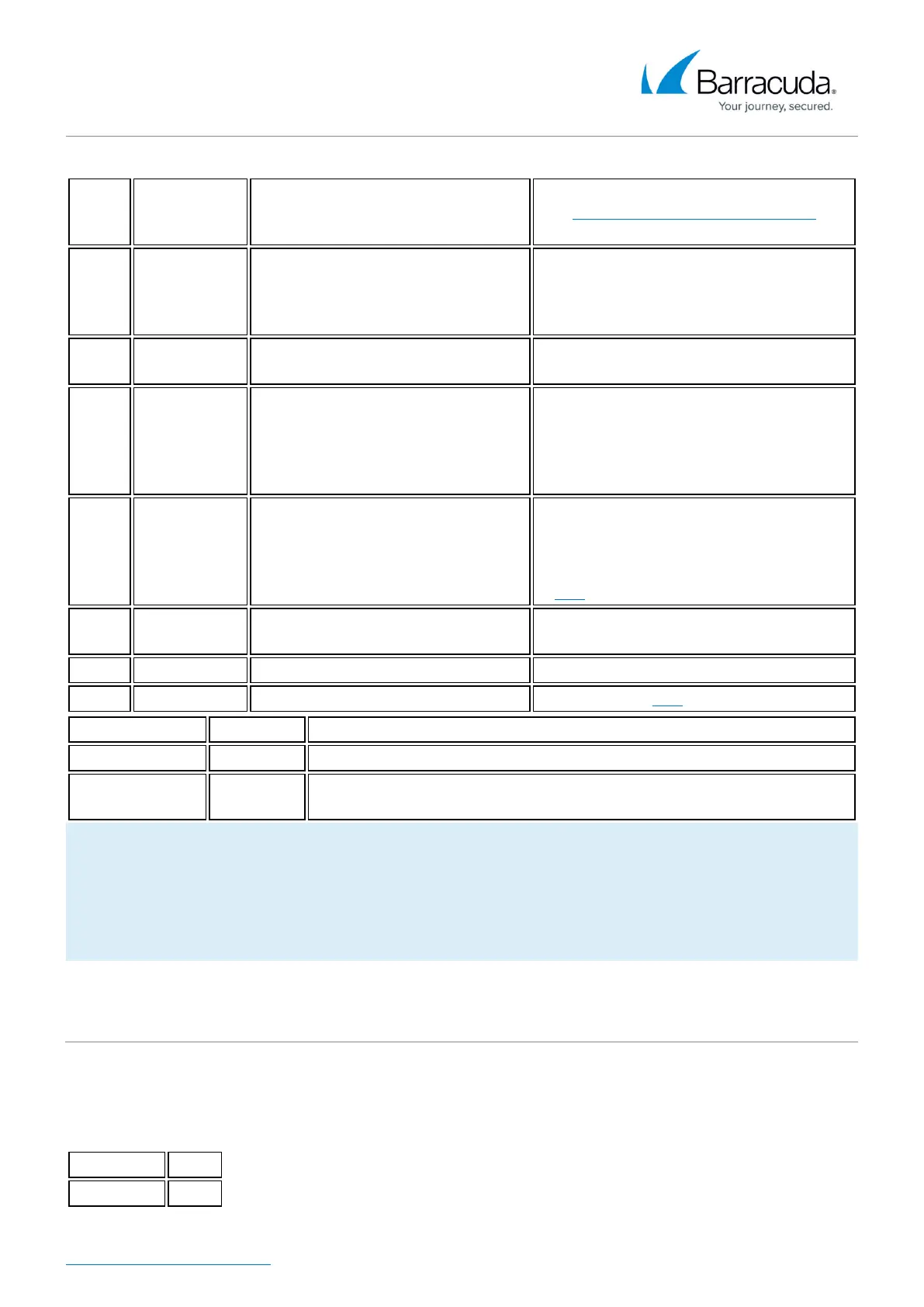
Color
Glowing
State
Meaning installation
Meaning Normal Operation or
Active Recovery Technology
Operation
Off Off
Appliance is powered off or
installation has not initialized far
enough for LED control when
installation is started.
Appliance is powered off.
Green Blinking Normal installation.
Appliance is either booting, shutting
down or performing a system update.
Green Steady
Installation was completed
successfully, appliance is halted for
reboot or installation was not yet
initialized far enough for LED
control.
Barracuda NG Firewall is up and running.
Red Blinking Error during installation.
An error has appeared preventing
Barracuda NG Firewall from entering the
up state.
If no orange light available: appliance is
in ART mode.
Red Steady -
Appliance is halted and may be
disconnected.
Orange Blinking - -
Orange Steady - Appliance is in ART mode.
Acoustic Signal Frequency Meaning Installation
Beep 1 time Unit starts booting
Beep 3 times
Installation is completed successfully and appliance is halted for
reboot. After reboot, one beep indicates booting.
Not all appliances support orange and/or red LED colors. Depending on the appliance type, the
status LED might be on by default and it might take some time during boot and installation to
start either blinking or changing the color. Furthermore, the status LED might blink at different
frequencies.
Serial Console Port
In order to establish a console connection to the appliance using a serial cable (Revision A: DB9, other
revisions: RJ45), you need to configure the serial port on the terminal using the following parameters:
Parameter Value
Baud 19200


 To Next Page
 Loading...