5
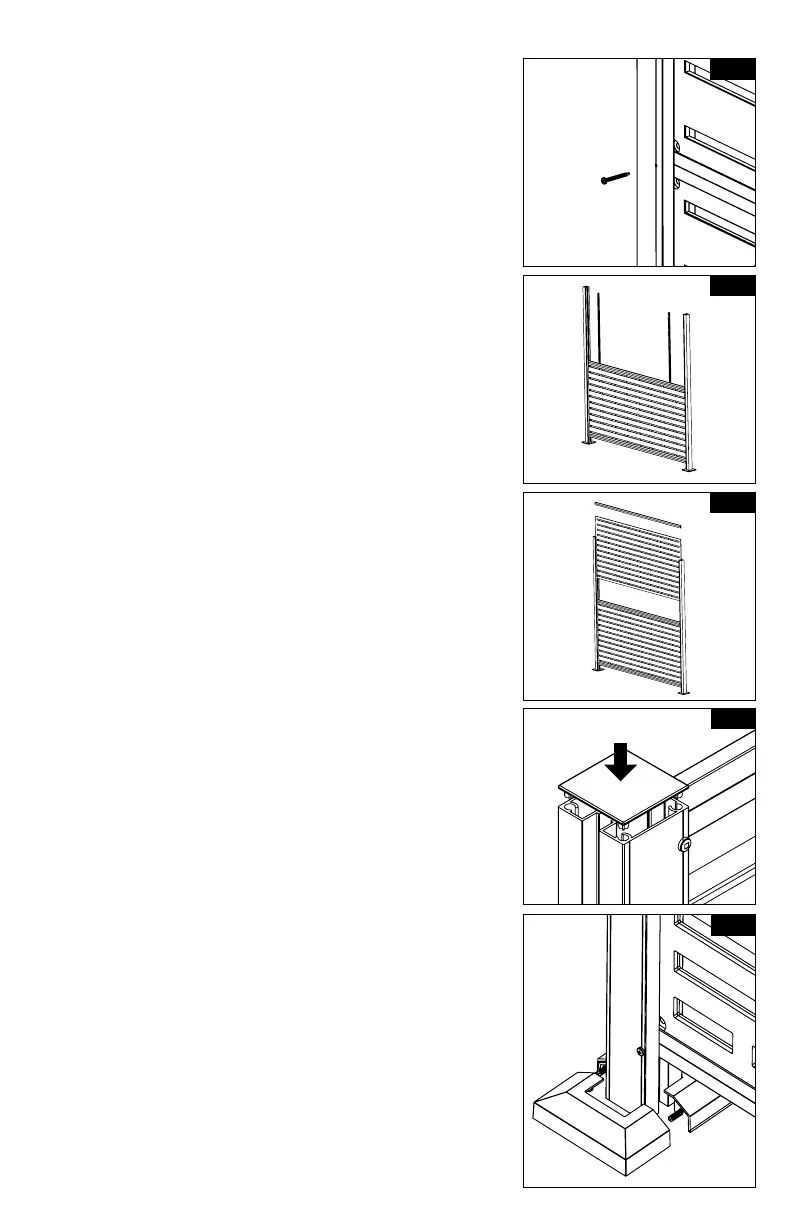
10.
11.
12.
13.
Repeat steps 7-9 for the top panel (Fig. 11 & 12).
NOTE:
Always use a tape measure to verify rails are
equal space from each other and that they
are level.
Place post caps on top of posts (lining up the
tabs underneath to the holes in the post). Using
a rubber mallet, fully seat the cap onto the post
(Fig. 13).
NOTE:
If installing additional frame kits (line or
corner), install these prior to placing post
caps on posts.
To connect additional frame kits, line and corner
extension kits are available.
Assemble trim ring over plate. Take one side
of trim ring and push plugs through holes
underneath. Take second half of the trim ring and
push together (Fig. 14).
AA
CV
A
UU
W
W
V
SECTION U-U
Y
SECTION W-W
DETAIL AA
INSTALL 33" PVC CHANNEL INTO POST. ENSURE
CHANNELS ARE INSTALLED CORRECTLY (SEE FIG1).
33" PVC CHANNEL
DETAIL CV
SCALE 1 : 4.5
REPEAT STEPS ON SECOND POST.
AR
CT
CT
CU
SECTION CT-CT
SCALE 1 : 5
DETAIL CU
SCALE 2 : 5
REPEAT PREVIOUS STEPS TO INSTALL 2ND SCREEN
AR
CT
CT
CU
SECTION CT-CT
SCALE 1 : 5
DETAIL CU
SCALE 2 : 5
REPEAT PREVIOUS STEPS TO INSTALL 2ND SCREEN
Fig. 10
Fig. 11
Fig. 13
Fig. 14
Fig. 12



 To Next Page