- 31 -
• After baking remove the pizza from the oven with use of appropriate kitchen utensils.
• When the device will not be used again, set the temperature controller to position “0”.
Turn the device off (ON/OFF switch to position “0”) and disconnect it from the socket
(remove the plug!).
Baking chamber internal illumination
• The baking chamber internal illumination may be turned on when required. Press
appropriate button on the control panel. The illumination operates only when the
device is turned on (ON/OFF switch in position “I”, green indicator is on).
6. Cleaning
WARNING!
Before cleaning set the temperature controller to position “0”,
turn the device off with use of ON/OFF switch (set to position
“0”), and disconnect the device from the power supply
(disconnect the plug). Leave the device for cooling down.
Never clean the device with use of water jet!
Protect the device from the water penetration.
o Clean the device regularly.
o The elements of the device having contact with food should be cleaned particularly
thoroughly.
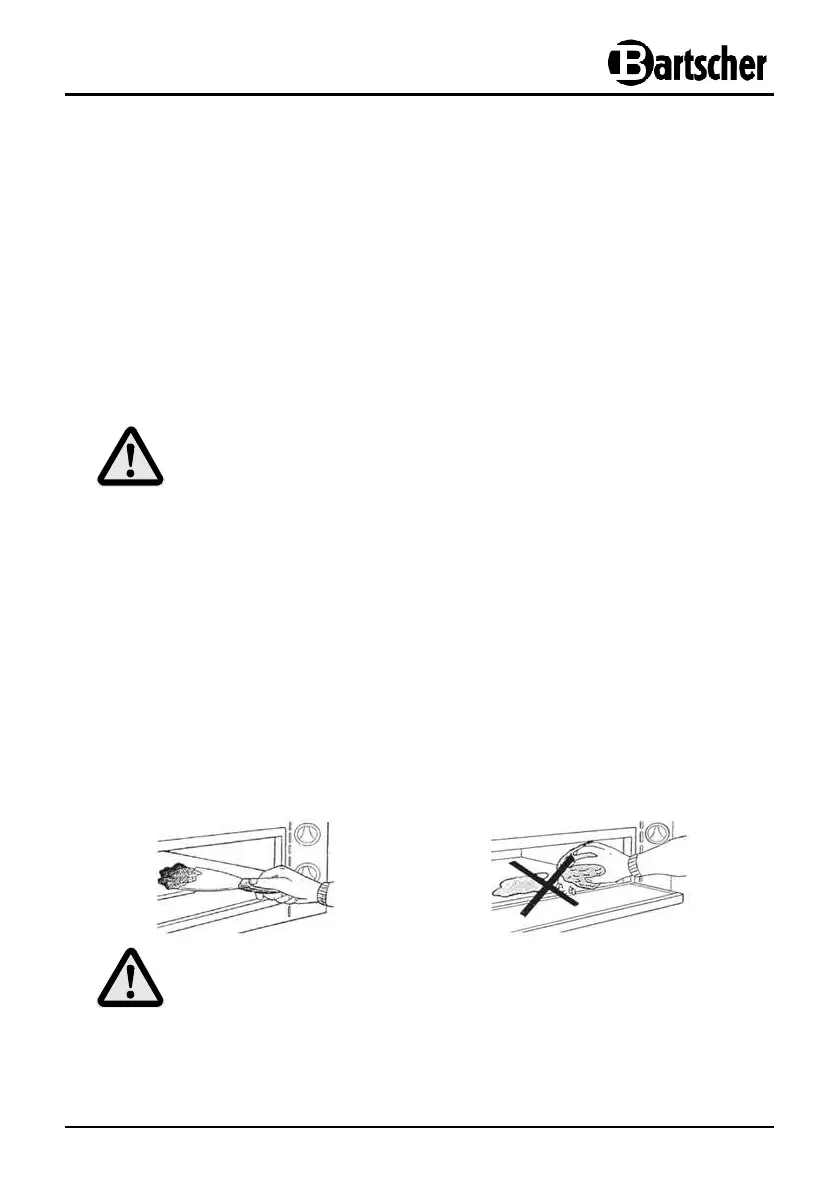
o The bottom of the baking chamber should be cleaned after each baking with use of
metal paddle or scraper.
CAUTION!
To avoid damages never clean the baking chamber bottom with water and
do not cool it down with water.


 To Next Page