PRELIMINARY ADJUSTMENT
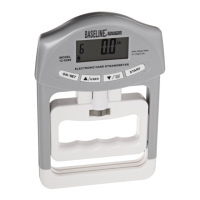
By turning the adjusting knob left or right,
you can adjust the handle up or down to get an
ideal grasp. eg: User with large hand can adjust
the handle upwards by turning the adjusting knob
the right. There are 5 pre-marked settings.
TO SET USER PARAMETERS
TO TEST UNDER USER MEMORY MODE
After testing, LCD will show user code, gender, max. grip value, and grip value status (weak,
normal, strong). Press “ON / SET” 3 seconds to switch off. Auto shut-off occurs if LCD shows
the same reading for 20 seconds.
4


 To Next Page