Baseline® Push / Pull Dynamometers User’s Guide
4 HOME SCREEN AND CONTROLS
4.1 Home Screen
The current displayed force reading. See Operating Modes section for
details.
The current unit of measurement. Abbreviations are as follows:
lbF – Pound-force
kgF – Kilogram-force
N – Newton
The current measurement mode. Abbreviations are as follows:
RT – Real Time
PC – Peak Compression (push)
PT – Peak Tension (pull)
See Operating Modes section for details about each of these modes
Battery / AC
adapter indicator
Either the AC adapter icon or battery power icon will be shown, depending on
power conditions. Refer to the Power section for details.
- indicates a push direction
- indicates a pull direction
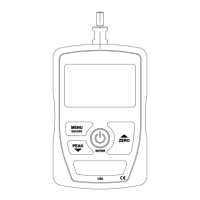
4.2 Controls
Powers the dynamometer on and
off. Press briefly to power on, press
and hold to power off. Active only
when the home screen is displayed.
Various uses, as described in the
following sections.
Zeroes the primary reading.
Navigates up through the menu and
sub-menus.
Reverts one step backwards through
the menu hierarchy.
Toggles between real-time and peak
measurement modes.
Navigates down through the menu
and sub-menus.
Note: Units are configured through the menu. Refer to the Changing The Units section for details.


 To Next Page