BASENGREEN, YOUR RELIABLE POWER
05
ItemPosition
Description
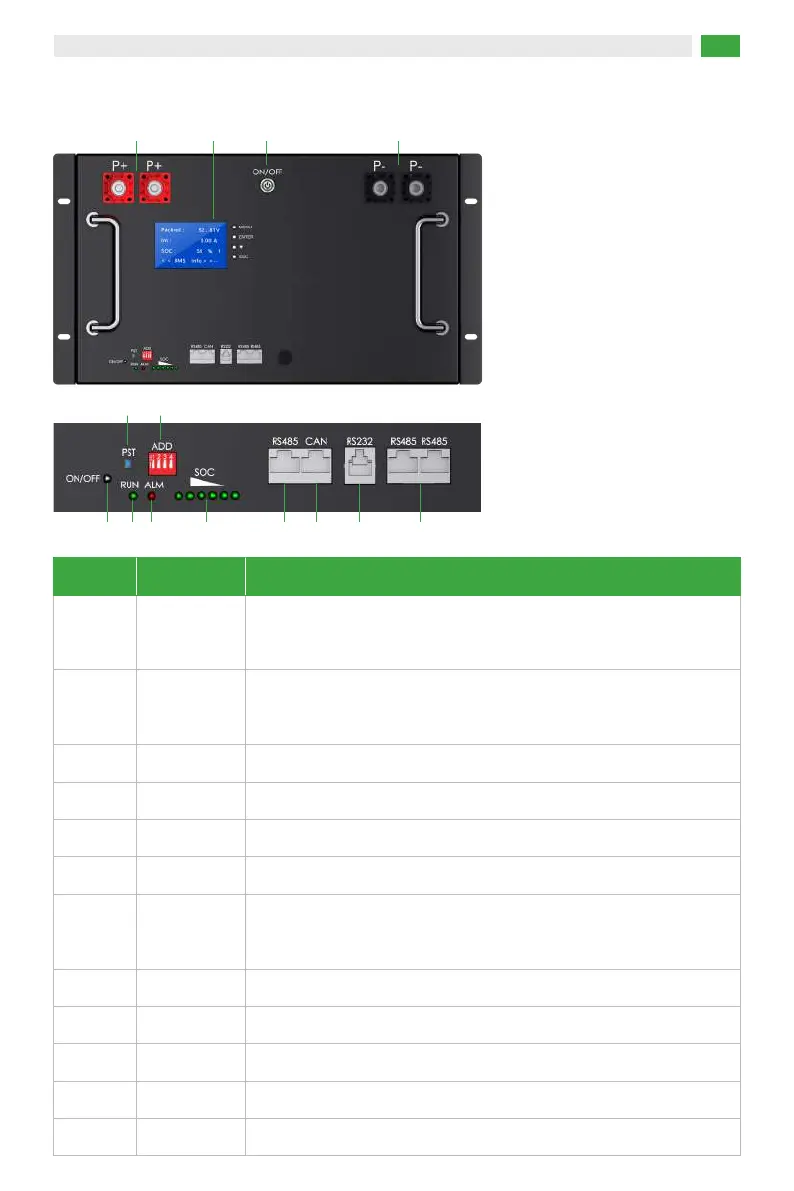
The positive terminal of the battery, can be connected to the positive
pole of the inverter through a cable for DC output.
P+1
Manual-return switch button
RST4
5.2 Interface Overview
The negative terminal of the battery, can be connected to the
negative pole of the inverter through a cable for DC output.
Turn on then light-on, turn off then light-off
P-
2
Power Indicator3
Setting up battery parallel communication and inverter communication
ADD5
Indicating the normal operation status of the battery
RUN6
Indicating the abnormal state of the battery, if there is an low voltage
or over voltage, the alarm will sound.
Alarm
7
6 indicators, indicating the remaining power status.
SOC8
RS485 port for the inverter or the upper system communication
RS485 A9
CAN port for the inverter communication
CAN10
Communication port for the upper system.
RS23211
RS485 port for parallel communication
RS485 B/C 12
3 6 7
54
13
14
2
1
8 9 10 11 12


 To Next Page