Manual for BAUER RAINSTAR A1, A2
26
Entering machine data:
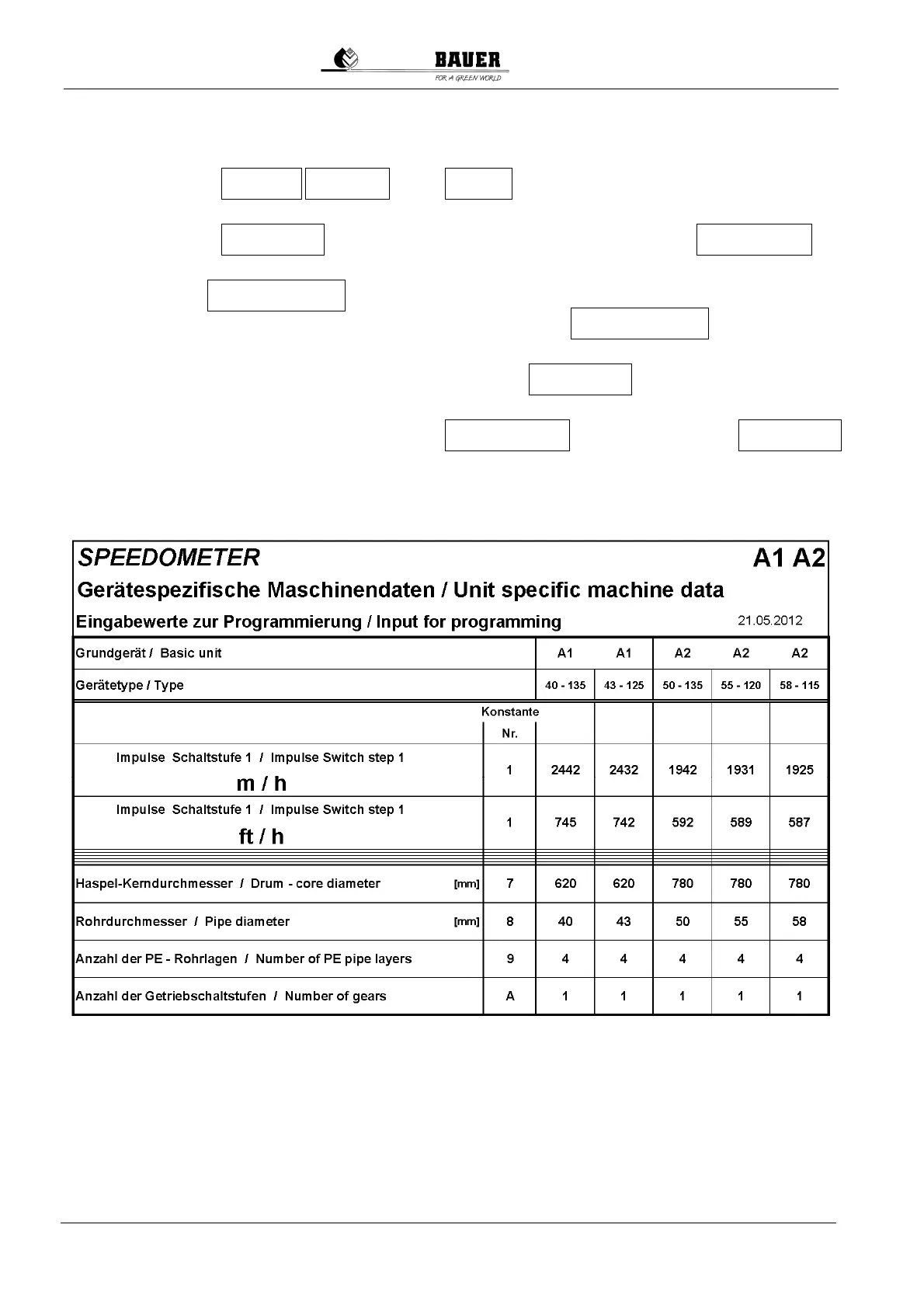
1. Press the 3 keys: , and for at least 3 seconds. Figure -1- (constant
no. 1) is blinking on the display. – Enter the pulses per meter according to sheet 1 or 2.
2. By pressing the the entered number increases. By pressing the ,
the entered number decreases.
3. By pressing the , the speedometer changes to the next constant. Enter the values as
described before. Enter the data up to constant "A" and/or press the until "b" is on
display.
4. When "b" is on display, save the machine data by pressing the . Hence the machine data
are saved permanently in the electronics, and they remain saved even when replacing the battery.
5. Check the electronics' version number: Press the - . Before pressing the
the version number is displayed.
LAYER GEAR ON
ON key GEAR key
LAYER key
ON-Taste
LAYER key ON-Taste
LAYER key


 To Next Page