EasyManua.ls Logo

Bauhn AESPP-0517 - User Manual

Bauhn AESPP-0517
20 pages
Print Icon
To Next Page IconTo Next Page
Loading...
INSTRUCTION MANUAL
Model Number: AESPP-0517
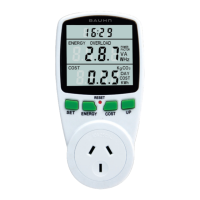
Power Meter
1300 886 649
AUS
MODEL: AESPP-0517 PRODUCT CODE: 57907 05/2017
www.tempo.org

Questions and Answers

  • J
    Jessica BrownAug 3, 2025
    What to do if everything connected to my Bauhn Accessories powerboard is not receiving power?
    • J
      Joseph FarmerAug 3, 2025
      If everything connected to your Bauhn Accessories powerboard isn't receiving power, it's possible the overload protection has been tripped. Disconnect all devices and unplug the powerboard. Then, press the black reset button until it clicks. Reconnect the powerboard, making sure not to exceed 2400W.
  • M
    Margaret JonesAug 10, 2025
    Why do my Bauhn Accessories connected devices won’t switch on?
    • L
      Linda HawkinsAug 10, 2025
      If your connected devices won’t switch on, first ensure that you have turned on the MASTER device. The AUTO ON/OFF devices will not receive power unless the MASTER device is on. Also, verify that the MASTER device draws more than 10W and has been switched on before operating devices connected to the AUTO ON/OFF outlets.
  • J
    Jessica CarrilloAug 18, 2025
    What to do if my Bauhn Accessories device won’t automatically switch off?
    • M
      Mrs. Diane BakerAug 18, 2025
      If your device won’t automatically switch off, ensure it's plugged into an outlet marked AUTO ON/OFF. After switching off your MASTER device, wait approximately 30 seconds to see if the power is automatically cut.
  • K
    Kelsey ObrienAug 25, 2025
    Why does my Bauhn Accessories wireless router or PVR recorder or telephone keeps turning off?
    • D
      Danielle JohnsonAug 26, 2025
      If your wireless router, PVR recorder, or telephone keeps turning off, it may be because devices requiring constant power should be plugged into the ALWAYS ON socket. If they are plugged into AUTO/OFF, they will automatically turn off when the MASTER device is turned off.

Summary

Warranty Details

General Safety Instructions

Function Overview

Reset Function

Resets the device to its default settings in case of abnormal operation.

Product Operation

Connecting Appliances

Steps to connect an appliance for monitoring.

Setting the Electricity Price

How to set the electricity price per kWh.

Setting the Overload Limit

Steps to set the overload limit.

Resetting the Power Meter

Instructions to reset the device using the RESET button.

Frequently Asked Questions

Technical Specifications

Bauhn AESPP-0517 Specifications

General IconGeneral
BrandBauhn
ModelAESPP-0517
CategoryMeasuring Instruments
LanguageEnglish

Related product manuals