12
Caution
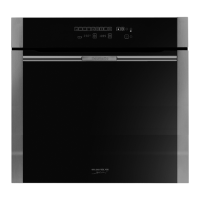
The electronic clock features Touch-Control
technology. To operate, simply touch the glass
control symbols with your fingertip.
The touch control sensitivity continuously adapts
to ambient conditions. Make sure the glass sur-
face of the control panel is clean and free of obs-
tacles when plugging in the oven.
If the clock does not respond correctly when you
touch the glass, unplug the oven for a few
seconds and then plug it in again. Doing this
causes the sensors to adjust automatically so
that they will react once more to fingertip con-
trol.
Setting the time on the Electronic Clock
When the oven is connected to the power supply,
the indication 00:00 flash on the display. Press
or to set the time on the clock. The clock beeps
twice to confirm the selected time.
If you wish to modify the time, press or
until the current time flash on the screen. Press
OK. Then press or to modify the time. The
clock beeps twice to confirm the modification.
Manual Operation
The oven is ready to be used when the clock has
been set. Select a cooking function and a tem-
perature.
When you begin cooking, symbol lights up to
indicate that the oven is heating the contents;
the symbol goes out when the selected temper-
ature is reached.
Set the controls to to turn the oven off.
Use of the Oven
Defrosting
This cooking mode is suitable for gentle
defrosting of delicate food to be consumed
unheated, e.g.: cream, custard, pastry, tarts,
cakes, fruit,...
Note
The pilot light remains on in any cooking
function.
Functions of the Electronic Clock
Alarm: Creates an alarm signal when the period
of time finishes; the oven does not need to be in
use in order to use this function.
Cooking Time: To cook for a selected length of
time; the oven turns itself off automatically
when the time finishes.
End Cooking Time: To cook until a set time; the
oven turns itself off automatically when the time
finishes.
Cooking time and End Cooking Time: To cook
for a selected length of time and end at a set
time. When this function is set, the oven comes
on automatically at the time required in order to
cook for the set length of time (Cooking time)
and end automatically at the indicated time
(End Cooking Time)
Programming the Alarm
1 Press until symbol lights up. Press OK.
2 Set the period of time after which you wish
the alarm to sound by pressing or .
3 The clock beeps twice, the current time is dis-
played and symbol lights up permanently
to indicate that the alarm has been set.
4 When the set period of time comes to an end,
the alarm sounds and symbol starts to
flash.
5 Press any button to stop the alarm; symbol
goes out.



 To Next Page