17
You cook with your Microwave Oven by first choosing
a Power Level and then setting the time you need to
cook for.
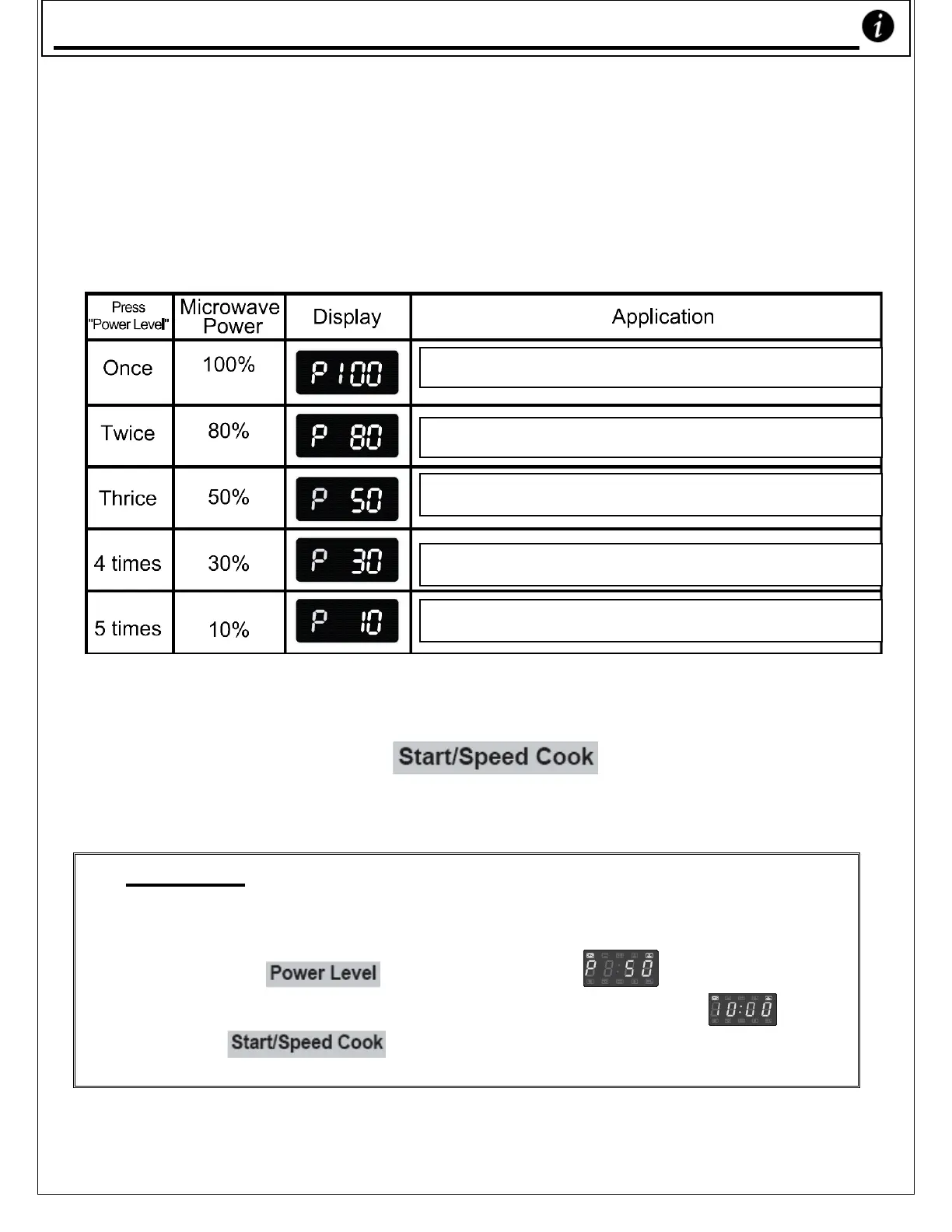
o To set the Cooking Power you’d like to use, you need to
press the ‘Power Level’ key one or more times.
o You have five different powers available to you.
o Please see the table below to select the power you want:
o Now select the time you want to cook for with
number keys (see Example below).
o Then press the ‘ ’ button to cook.
The microwave light will show on the display.
_ _ _ _ _ _ _ _ _ _ _ _ _ _ _ _ _ _ _ _ _ _ _ _ _ _ _ _
Example
To get your Microwave to cook for 10 minutes at
50% power:
1) Press the ‘ ’ key three times.
2) Press the number pads in this order: ‘1’, ‘0’, ‘0’, ‘0’
3) Press ‘ ’ to start cooking. The timer will count
down to zero minutes and seconds.
(*Note: The maximum time you can set your Microwave
to cook for is 99 minutes, 99 seconds.)
Reheat, Boil Water, Cook Vegetables & Chicken
Cook Rice, Fish & Seafood, Cookies, Meats
Cook Milk cake, Stew Food
Defrost
Soften Ice Cream, Keep Warm
Usin
our Microwave Oven










 To Next Page