o If ice cubes do not dispense, then pull out the ice cube storage
case and separate any ice cubes that may have got stuck
together. Then try to dispense ice again.
Locking the ice maker
21
o Before cleaning the ice cube storage case or if you do not want
the ice maker to produce ice, press the LOCK ICE MAKER
button.
o You should then remove all ice from the ice cube storage case.
o To reactivate the ice maker you should press the LOCK ICE
MAKER button again.
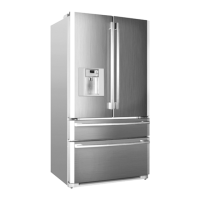
Removing and replacing the ice cube storage case
o Pull the storage case forwards to
remove it from the freezer.
o To put the storage case back into
position, locate it into the side grooves
of the cabinet and push it back into
place.
o If the storage case does not fully slide back into position, remove
it from the freezer again. Rotate the coil inside of the case a
quarter of a turn and then slide the storage case back into place.
Water filter change icon
o Six months after you connect your appliance to the mains supply
for the first time, the WATER FILTER CHANGE icon will come
on.
o After changing the water filter (see manual section for details),
press and hold the LIGHT BUTTON until the FILTER CHANGE
icon switches off.


 To Next Page