12
Preset weekly intervals
(Program line 500 for the heating and 560 for the DHW)
• Mon-Sun (groups of days)
• Mon-Fri (groups of days)
• Sat-Sun (groups of days)
• Monday-Tuesday-Wednesday-Thursday-Friday-Saturday-
Sunday (individual days)
Preset daily hourly ranges
(Program line 514 for the heating and 574 for the DHW)
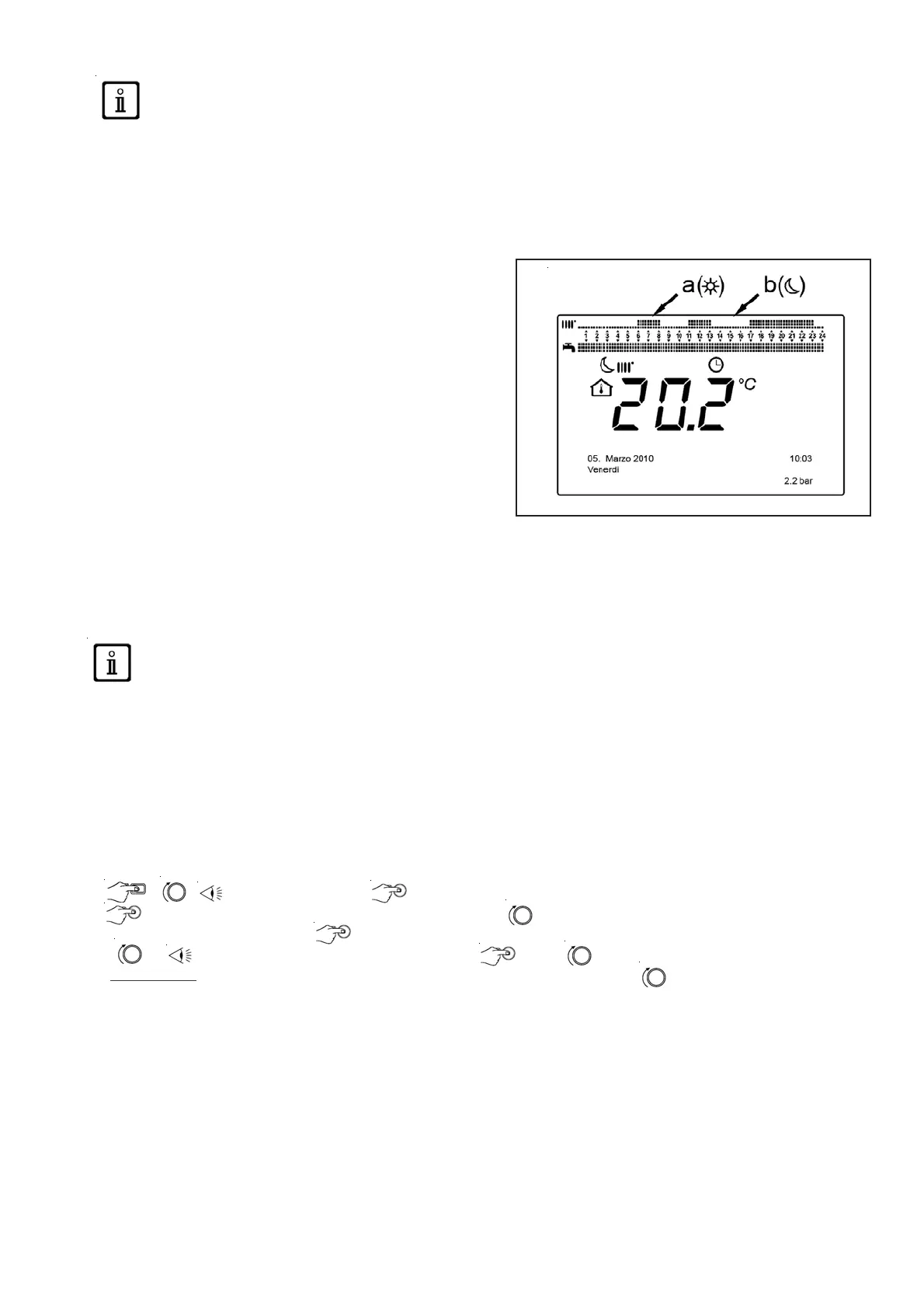
• 06:00-08:00 .. 11:00-13:00 .. 5pm - 11pm (example in the
figure opposite)
• 06:00-08:00 .. 5pm-11pm0
• 06:00-23:00
8.1 Groups of days
This function is used to program one of the 3 weekly intervals availabe, each with three preset daily hourly ranges to switch
the boiler on and off, which may be modified by the user - program program 501...506. The intervals are the following:
Mon-Sun (default value) / Mon-Fri / Sat-Sun.
If the installation is divided into zones, with each one controlled by its control unit/room thermostat,
each zone must be programmed separately on each device.
8.2 Individual days
All of the daily boiler switch on/off phases may be modified by the user. For each day selected, 3 preset hourly ranges are
available, as stated in the summary table at the end of this chapter.
8.3 Hourly programming modification procedure (heating/DHW)
After performing the hourly programming using the preset programs, you can modify the periods of the three hourly ranges
- program lines501...506 for the heating and 561...566 for the DHW, as described below.
Heating circuit programming modification procedure
• C B CC1 hourly program B program line 500 (Day selection).
• B : the groups of days field (chapter 4.1) starts to flash B to scroll through the days («Groups
of days» or «Individual days») B to confirm.
• B program line 514 (Default value selection?) B and B to select one of the
3 programs preset for the daily «Groups of days» (chapter 7.1) programming or B a position
anto-clockwise to switch to manual programming: program lines 501....506.
DHW circuit programming modification procedure
The procedure to activate the hourly programming for the domestic hot water is the same as for the hourly programming for
the heating. The only difference is with the name of the menuHourly program 4 / DHW and the program lines to be
programmed 560 (Day selection). To deactivate this function, you must run the procedure described below in the «Restoring
the original default programming» section.
8 HOURLY PROGRAMMING
Before accessing the programming, you must activate the Automatic operating mode (chapter 4).
The hourly heating (CC1 hourly programming) and DHW (Hourly program 4 / DHW) programming is used to program the
boiler’s automatic operation during determined daily hourly ranges and during the days of the week. The example in the
figure below refers to the daily hourly range 1 (below) where « a » is the operating period at comfort temperature and « b »
is the operating period in Reduced mode (chapter 4). The boiler operating programming may be performed by groups of
days or by individual days (every day from Monday to Sunday).







 To Next Page